Speech to text turns the words you say into typed text. A computer gives you 8 ways to do it, and the right one depends on where you write.
In short:
- Windows 11 and macOS have speech to text built in. On a PC, press Windows key + H. On a Mac, turn on Dictation in System Settings.
- Google Docs, Word and ChatGPT each have their own dictation, and each types only inside itself. Word's needs a Microsoft 365 subscription.
- Typing as you talk and typing out a recording are two jobs. A dictation tool does the first. An audio to text tool does the second.
People also say voice to text or speak to text. All three mean the same thing.
I build Typally, a voice typing app, and it comes up near the end. By September 30, 2026, I had dictated 476,777 words with it, by its own count. The facts about other makers' tools come from their own pages, read on October 6, 2026. I did not try those tools by speaking into them.
Which speech to text fits where you write?
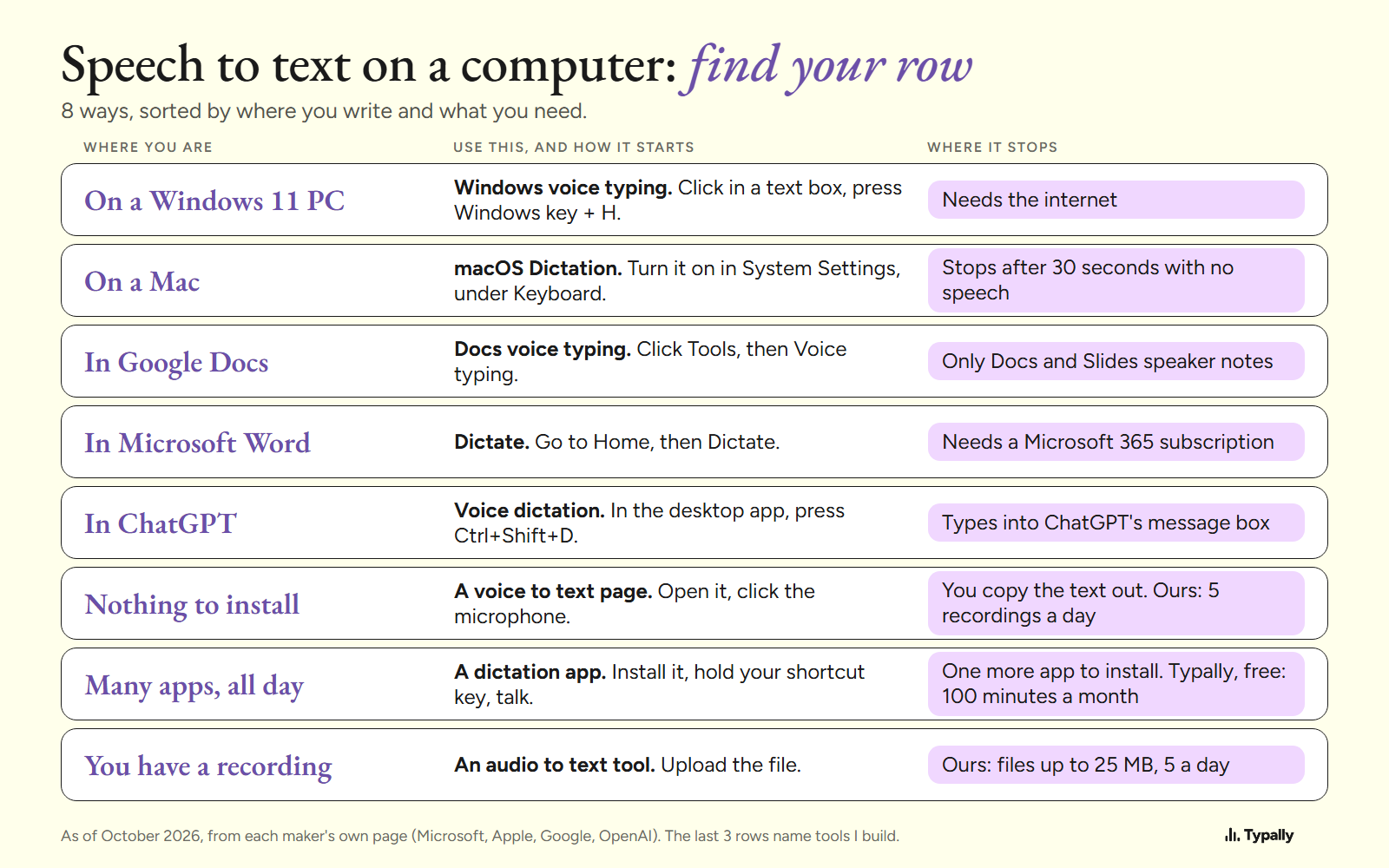
Find your row in the table. Each row has a short section below, with how it starts and a link to the full guide.
| Where you are | Use this | Where it stops |
|---|---|---|
| On a Windows 11 PC | Windows voice typing | Needs the internet |
| On a Mac | macOS Dictation | Stops after 30 seconds with no speech |
| In Google Docs | Docs voice typing | Only Docs and Slides speaker notes |
| In Microsoft Word | Dictate | Needs a Microsoft 365 subscription |
| In ChatGPT | Voice dictation | Types into ChatGPT's message box |
| Nothing to install | A voice to text page | You copy the text out. Ours: 5 recordings a day |
| Many apps, all day | A dictation app | One more app to install. Typally's free plan: 100 minutes a month |
| You have a recording | An audio to text tool | Ours: files up to 25 MB, 5 a day |
How do you use speech to text on a Windows PC?
Click in a text box and press Windows key + H. Microsoft's voice typing page names 3 conditions. "To use voice typing, you'll need to be connected to the internet, have a working microphone, and have your cursor in a text box."
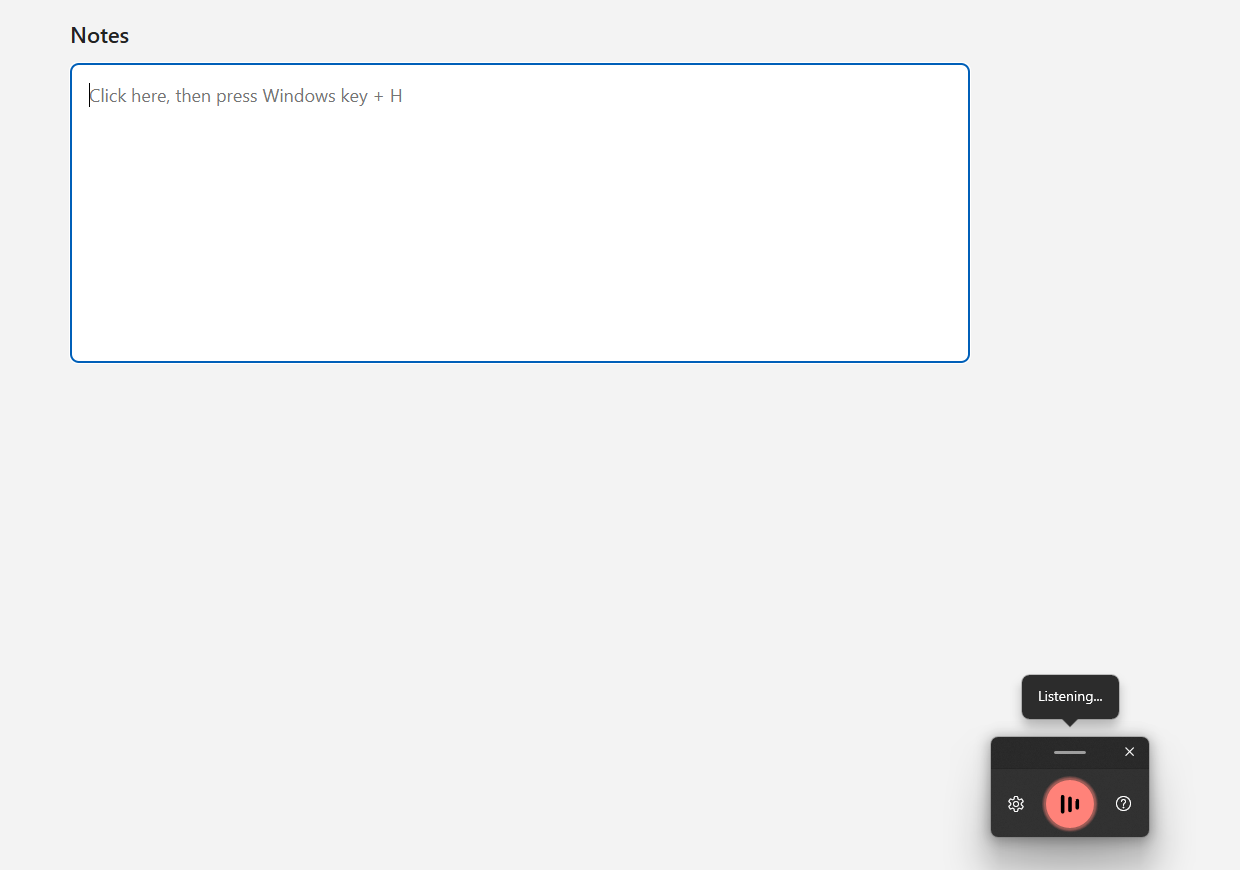
It stops at filler words on most PCs. Microsoft describes Fluid dictation, which "automatically corrects grammar, punctuation, and filler words as you speak". As of October 2026 it is "a new feature in Voice typing on Copilot+ PCs", for English.
Windows 11 has a second tool, Voice access, which also controls the PC by voice. Both sit on one Settings screen.
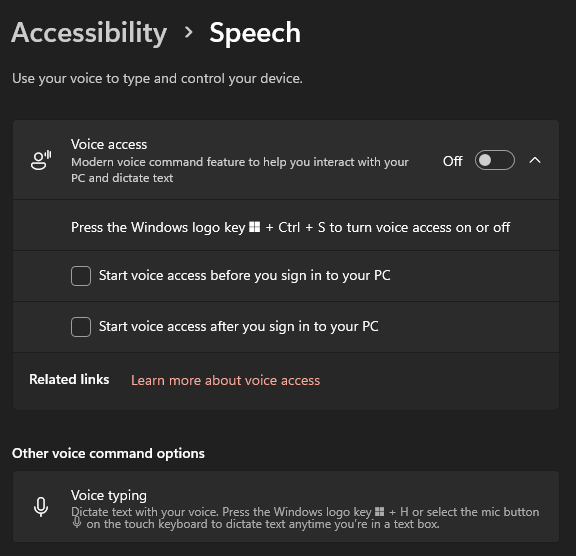
Every step and voice command is in speech to text on Windows. To compare tools, see dictation software for Windows.
How do you use speech to text on a Mac?
Turn Dictation on once, then start it with a key. These steps are Apple's, from its Dictation page.
- Choose Apple menu > System Settings, then click Keyboard.
- Go to Dictation and turn it on.
- Press the Microphone key, use the Dictation shortcut, or choose Edit > Start Dictation.
Apple says you can "speak to enter text anywhere you can type it" and "dictate text of any length without a timeout". It stops by itself "when no speech is detected for 30 seconds". The page says nothing about filler words.
The punctuation commands and fixes are in how to dictate on a Mac. The apps are in dictation software for Mac.
How do you use voice to text in Google Docs, Word and ChatGPT?
Each has its own button or shortcut, and the text goes only into that app. The details below are as of October 2026.
- Google Docs. Click Tools, then Voice typing, and a microphone box appears. Google's help page says it works with "the latest versions of" Chrome, Edge and Safari, in a document or in Slides speaker notes. Full guide: voice typing in Google Docs.
- Word. Go to Home, then Dictate. Microsoft's page says: "The dictation feature is only available to Microsoft 365 subscribers". It also needs an internet connection. Full guide: voice typing in Microsoft Word.
- ChatGPT. OpenAI's prompting guide gives the steps for the desktop app: press Ctrl+Shift+D, then talk. ChatGPT "transcribes your speech into the composer so you can review and edit it before sending the prompt". ChatGPT Voice is a different thing: "a live conversation", in OpenAI's words. See voice typing in ChatGPT and Talk to ChatGPT.
If all your writing is in one of these, its own tool may be all you need.
Which speech to text needs nothing installed?
A voice to text page in your browser. You open it, click the microphone and talk. Ours is the free voice to text tool, which allows "5 recordings per day, no signup".
The text lands in a box on that page, and you copy it to where you need it. That suits a single note on a borrowed computer. For daily work, the copy and paste adds a step to every text. Free speech to text software lists 7 free options and the limit of each.
How do you turn a recording into text?
Upload the file to an audio to text tool. Dictation listens to your microphone as you talk; a recorded interview or voice memo needs a tool that takes a file.
Our free audio to text converter takes MP3, M4A, WAV and other files "up to 25 MB". It allows 5 transcriptions a day, with no signup.
What does a dictation app add to speech to text?
Two things: it types into any app, and it may clean up the text. You hold a key and talk, and the words land where your cursor is. One tool then covers email, chat, documents and AI prompts.
Here is one cleanup, by Typally. I wrote a 62-word prompt with fillers in it and ran the cleanup on October 5, 2026. It began "okay so um I need you to write a follow up email to a client". That came back as "Okay, I need you to write a follow-up email to a client."
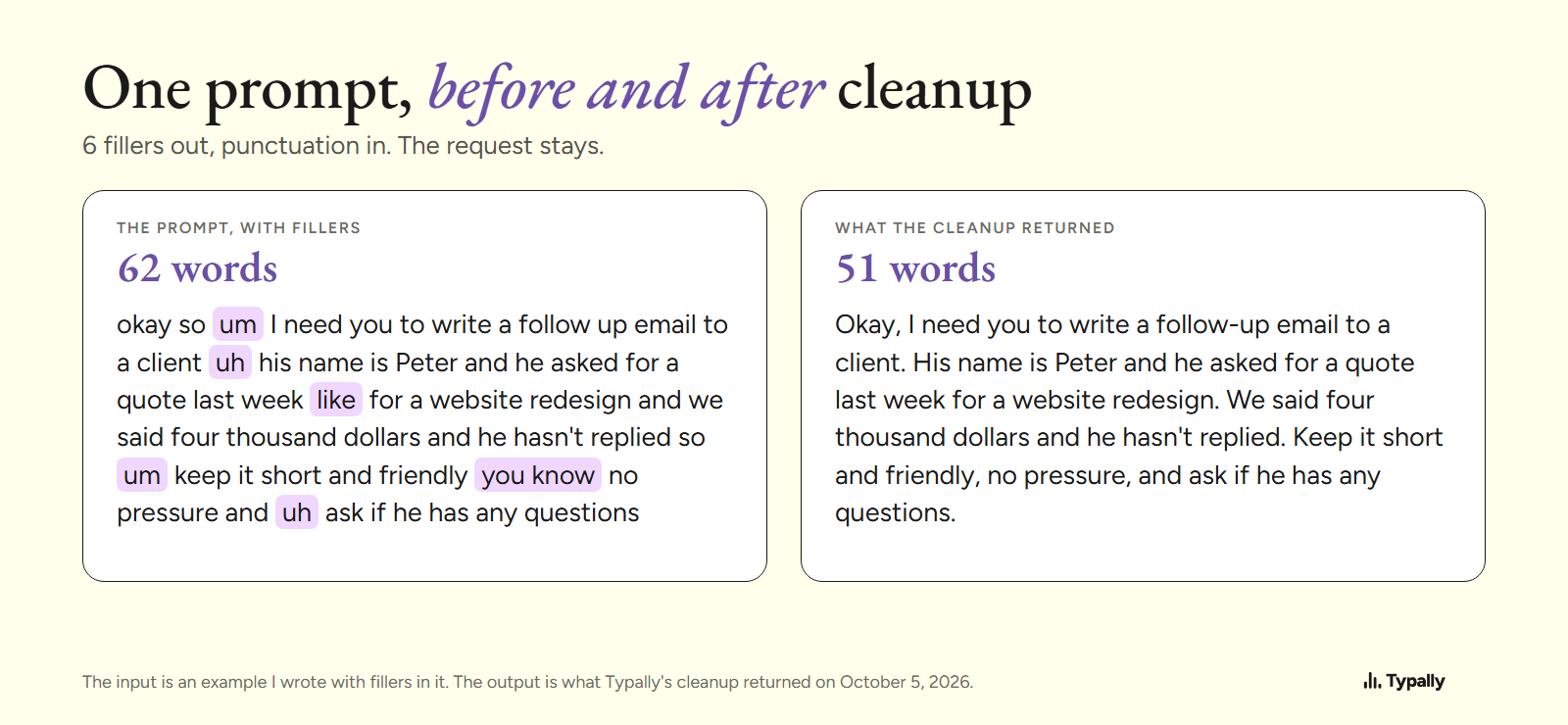
That is one app on one written example, not a comparison. How to voice type covers how to speak so the text comes out right. Speech recognition software explains how a computer turns sound into words, and filler words covers the ums.
Where does Typally fit?
Typally, voice typing for Mac and Windows, is the "many apps, all day" row. Hold your shortcut key, talk, let go, and the text appears where the cursor is. That can be Gmail, Slack, Claude or any other app. The cleanup is on by default: it removes the ums and fixes the punctuation and capitals.
For a few lines a day, start with the tool your computer already has. I use Typally to prompt Claude and ChatGPT. It needs an internet connection. It listens only while you hold the key. The audio is discarded after transcription, and your history stays on your computer.
Download Typally free at typally.com for Windows or Mac. The free plan gives you 100 minutes a month and doesn't ask for a card.
What else do people ask about speech to text?
Is speech to text free?
Windows voice typing and Mac Dictation come with the computer, and Google Docs voice typing is part of Docs. Word's Dictate needs a Microsoft 365 subscription. Typally has a free plan: 100 minutes of dictation a month, forever, no card needed.
Does speech to text need the internet?
Often. Microsoft says Windows voice typing needs you "to be connected to the internet", and Typally needs a connection too. On a Mac, Apple says Keyboard settings show whether Dictation is processed on your device.
Is speaking faster than typing?
That depends on how fast you type. My speaking side: 476,777 words in 91 hours 31 minutes, about 87 words a minute, pauses included (mine, September 30, 2026; not typical). Average typing speed has the typing side, and words per minute speaking has the speaking side.