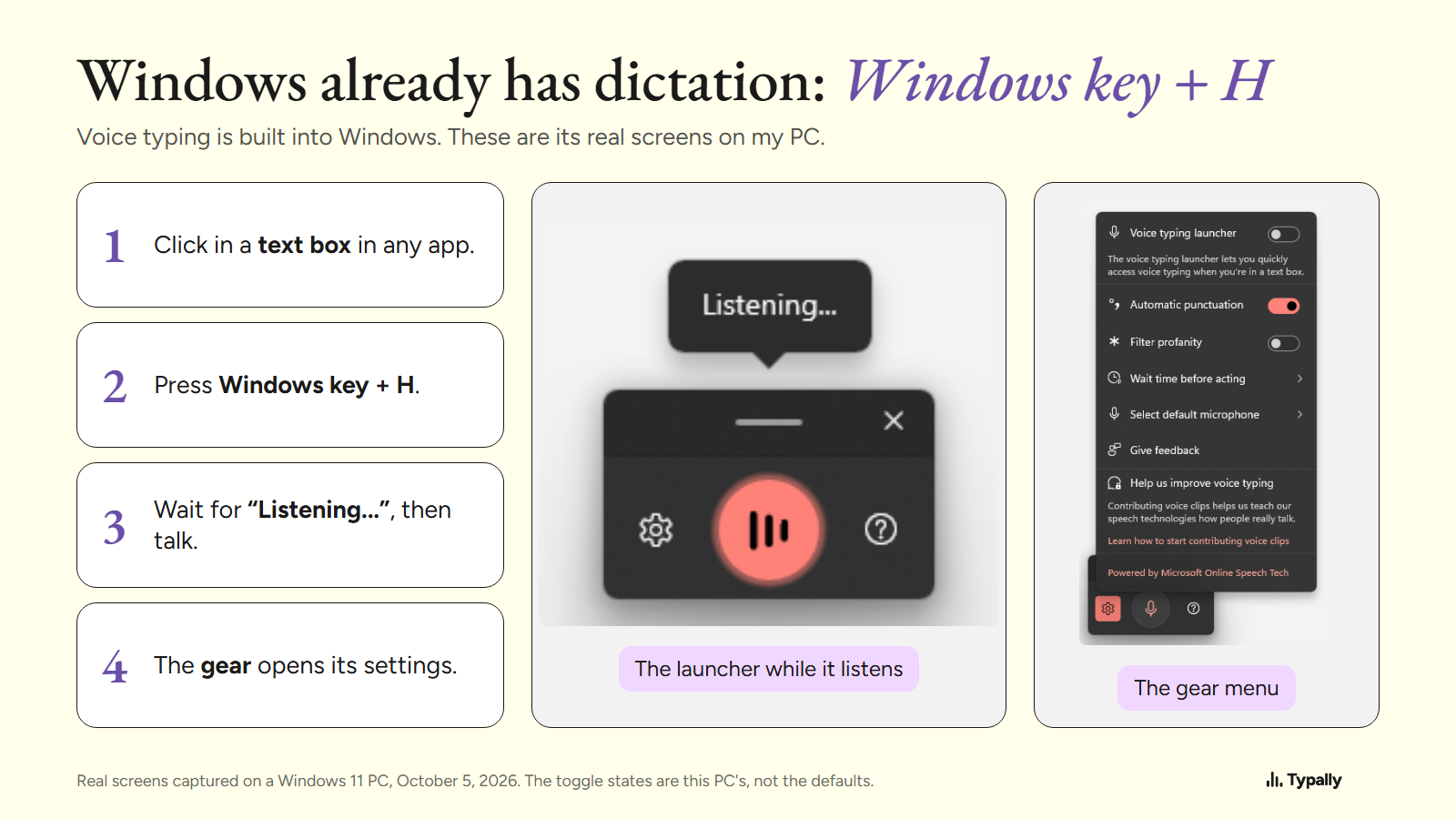
Windows already has dictation software built in: click in a text box and press the Windows key + H. Add another tool only when you need something it lacks, such as your own word list.
In short:
- Windows voice typing (Windows key + H) is free on Windows 10 and 11 and types into any text box. It needs an internet connection.
- Windows 11 has a second free tool, Voice access. Microsoft says it lets people control the PC and write text "without an internet connection".
- Other tools fit narrower needs: the ums removed on any PC, your own vocabulary, one app such as Word, or custom voice commands at work.
I build Typally, one of the tools below, and it comes up near the end. Every price and feature here comes from the maker's own page, read on October 5, 2026. I did not run a speaking test across these tools, so this guide does not rank accuracy.
Which dictation software is already on your Windows PC?
Windows 11 has 2 tools: voice typing and Voice access. Windows 10 has one, an older voice typing that Microsoft calls dictation.
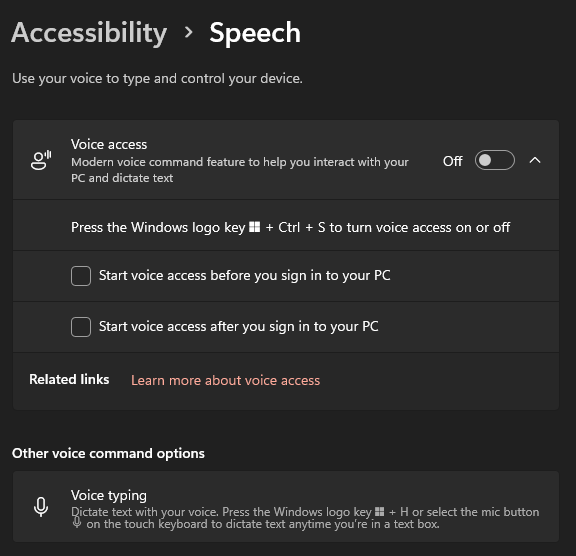
Voice typing is the one for writing. Microsoft's voice typing page says it "uses online speech recognition, which is powered by Azure Speech services". You need an internet connection, a working microphone and your cursor in a text box. For Windows 11, the page lists 46 languages and regional variants.
The gear menu on my PC has 5 settings: the launcher, automatic punctuation, a profanity filter, the wait time before a command, and the microphone. It has no word list for your own names or terms.
Voice access runs the whole PC by voice. Microsoft's Voice access page says it lets people "control their PC and author text using only their voice and without an internet connection". It needs Windows 11, version 22H2 or later. The setup page lists 15 languages and dialects, and setup needs a connection once, to download the language files.
For the setup, see the steps for speech to text on Windows.
When is the free built-in tool enough?
It is enough when you dictate short text, online, in a language it supports, and you don't mind fixing a few words by hand. Use it for a week before you install anything.
On some PCs it also does the cleanup that other tools charge for. Microsoft says Fluid dictation, a voice typing feature on Copilot+ PCs, "automatically corrects grammar, punctuation, and filler words as you speak". It runs on the PC itself, is on by default, and "is available in all English locales". With a Copilot+ PC and English text, start there.
It stops being enough in 3 cases. You want the ums removed and your PC is not a Copilot+ PC. You need a word list for names and terms. Or you also work on a Mac. Typally vs Windows voice typing has the head-to-head.
What changes if you are on Windows 10?
The same shortcut works, with less behind it. Microsoft's Windows 10 instructions, on the same page, say Windows key + H opens "the dictation toolbar". They list 7 languages: Chinese, English, French, German, Italian, Portuguese and Spanish. Dictation commands "are available in US English only".
The automatic punctuation setting appears only in the Windows 11 instructions. Voice access needs Windows 11. And Microsoft ended Windows 10 support on October 14, 2025, feature updates included, so its dictation stays as it is.
Which tool fits which Windows user?
Match the tool to where you write. The table has 8 tools, and the first 4 cost nothing.
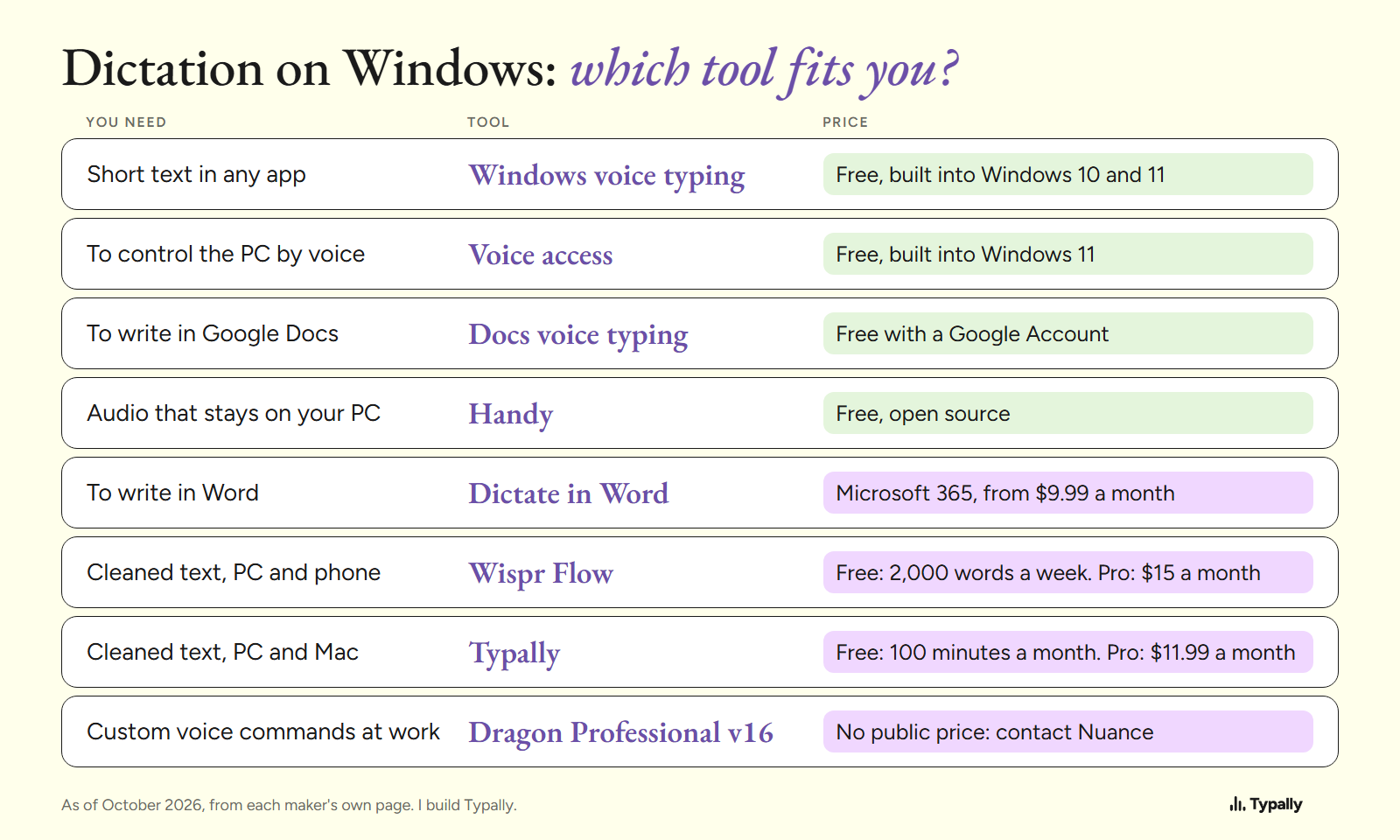
- You write in Google Docs. Docs voice typing sits under Tools > Voice typing, and Google's help page names no paid plan for it. Google says it works in "the latest versions of" Chrome, Edge and Safari. Its voice commands are English only.
- You write in Word. Dictate sits under Home > Dictate. Microsoft says it "is only available to Microsoft 365 subscribers". Microsoft 365 Personal is $9.99 a month or $99.99 a year as of October 2026. If you already subscribe, use it.
- Audio must stay on your PC. Handy is free and open source, with Windows installers for x64 and ARM. Its site says: "Your voice stays on your computer." Voice access is the built-in choice for the same need.
- You want cleaned text on your PC and your phone. Wispr Flow runs on Windows, Mac and phones. It "automatically removes filler words, adds punctuation, and formats your writing". As of October 2026 its pricing page shows a free plan with 2,000 words a week on desktop. Pro is $15 per user a month, or $12 billed yearly. Typally vs Wispr Flow compares the two.
- Your office needs custom voice commands. Nuance, now part of Microsoft, sells Dragon Professional v16 for Windows. Its page describes "custom voice commands" and macros. As of October 2026 it shows no price, only a "Contact us" button. Our guide to Dragon NaturallySpeaking alternatives covers that choice.
Our general roundup of voice typing software goes beyond Windows.
What does cleanup change in the text?
Cleanup removes the filler words and adds the punctuation. Here is one run of Typally's cleanup from October 5, 2026. The input is an example I wrote with fillers in it, not a recording.
Before (51 words)
um so hi Dana uh thanks for sending the draft over like I read it this morning and I think the intro is uh a bit long you know so can we cut the first two paragraphs and um move the pricing table up and I'll send my notes by Thursday
After (39 words)
Hi Dana, thanks for sending the draft. I read it this morning and think the intro is a bit long. Can we cut the first two paragraphs and move the pricing table up? I'll send my notes by Thursday.
I have no matching run from Fluid dictation or Wispr Flow, so this shows what cleanup is, not whose is better. Our article on AI dictation explains how it works.
Where does Typally fit?
Typally, voice typing for Mac and Windows, fits people who write in many apps and want cleanup on any PC. Hold your shortcut key, talk, let go, and the text appears where the cursor is. That can be Outlook, Word, Slack or ChatGPT. The cleanup is on by default: it removes the ums and fixes the punctuation and capitals. There is custom vocabulary, 100 dictation languages and a hands-free mode for long thoughts.
Its limits: it needs an internet connection, and it has no phone app. It listens only while you hold the key. The audio is discarded after transcription, and your history stays on your computer.
The free plan has 100 minutes of dictation a month, forever. Pro is $11.99 a month with a 14-day free trial; the trial needs a card. Or $96 a year. It has been in the Microsoft Store since September 28, 2026.
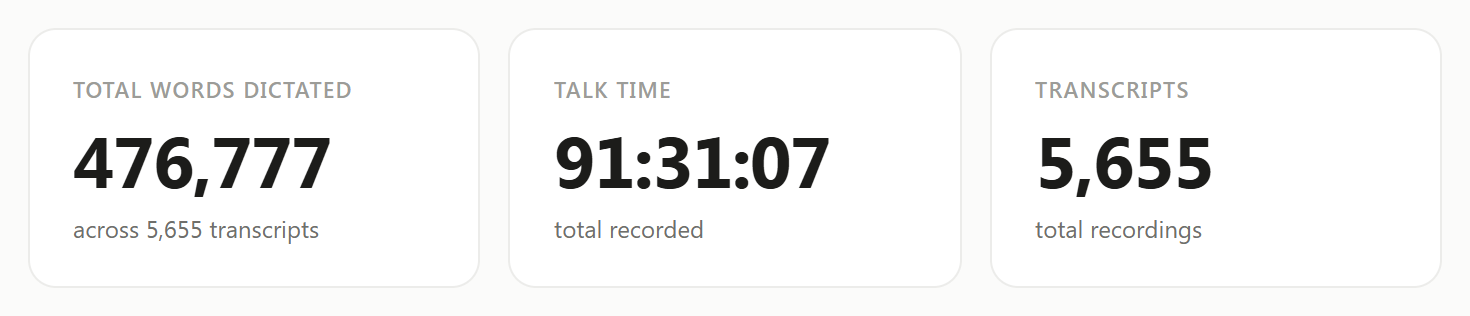
I use it to talk to Claude and ChatGPT. My Insights screen showed 476,777 words across 5,655 dictations on September 30, 2026.
Download Typally free at typally.com for Windows or Mac. The free plan gives you 100 minutes a month and doesn't ask for a card.
What else do people ask about dictation software for Windows?
Is there free dictation software for Windows?
Yes: 4 of the 8 tools here are free. They are Windows voice typing, Voice access, Google Docs voice typing and Handy. Wispr Flow and Typally have free plans with limits. Our list of free speech to text software goes deeper.
Does Windows dictation need an internet connection?
Voice typing does: Microsoft says "you'll need to be connected to the internet". Voice access does not, once its language files are downloaded. Handy also keeps the audio on your PC.
Is Dragon still sold for Windows?
Yes. Nuance lists Dragon Professional v16, "optimized for Windows 11" and "backwards-compatible to Windows 10". Its page shows no public price as of October 2026.