The dictation software to try first on a Mac is already on it: macOS Dictation types anywhere you can type. Look at another tool when you need something Apple's page doesn't list, like filler removal or typing out recordings.
In short:
- macOS has 2 speech to text tools built in. Dictation types anywhere you can type, and Voice Control adds spoken commands for the whole Mac.
- Apple's Dictation has no time limit, and in supported languages it adds commas, periods and question marks, by Apple's own page. For short everyday text, that is enough.
- Dragon has no Mac version on its maker's site in October 2026. Its Dragon Professional 16 is for Windows.
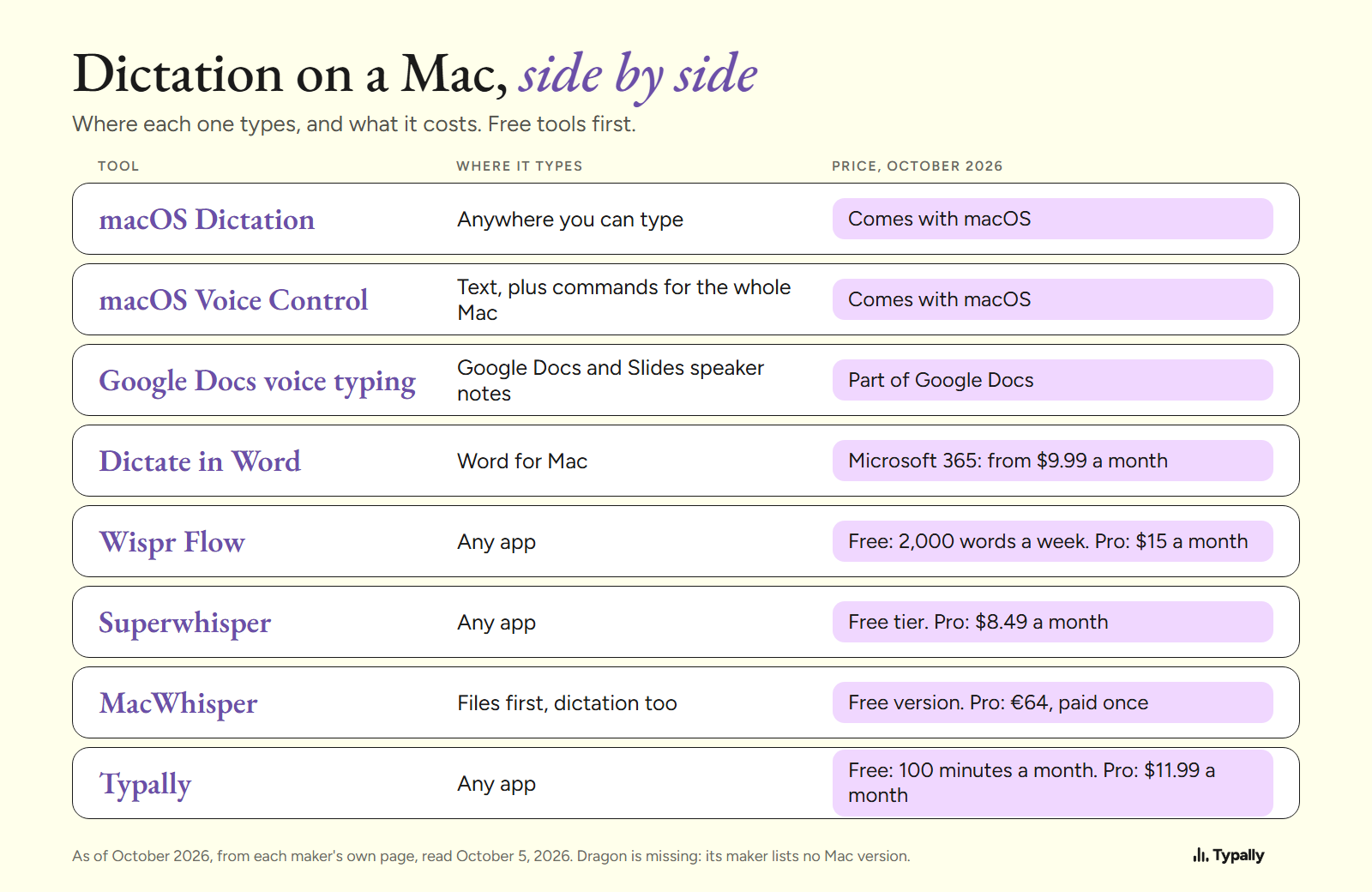
I build Typally, one of the 8, and it comes up near the end. My search for this phrase returned 7 guides, and 6 came from a company selling one of the apps listed. So every price and limit below links to the maker's own page, read on October 5, 2026. I did not run a speaking test of the other makers' apps; I report what their pages say.
Is Apple's free Dictation enough on a Mac?
Yes, for short text you are happy to tidy by hand. These facts are Apple's, from its Dictation page in the Mac User Guide for macOS 27:
- Where it works. "With Dictation, you can speak to enter text anywhere you can type it."
- How long. "You can dictate text of any length without a timeout." It stops on its own after 30 seconds with no speech.
- Punctuation. In supported languages it adds commas, periods and question marks as you talk.
- Typing while talking. On a Mac with Apple silicon, you can keep using the keyboard while you speak.
On privacy, Apple says Keyboard settings show whether your dictation is processed on your device. If it isn't, Apple's privacy page says the things you dictate "are sent to and processed on the server". They are not stored unless you opt in.
Where it stops: Apple's page names 3 marks it adds for you and says nothing about removing filler words. It doesn't mention a word list of your own either; Apple's Voice Control page links to one. The steps to switch it on are in How to Dictate on a Mac.
What else can you use before you buy an app?
3 tools: Voice Control, Google Docs voice typing and Dictate in Word. Free Speech to Text Software has more.
macOS Voice Control comes with macOS. Apple's Voice Control page says you can "speak commands to navigate the desktop and apps, interact with what's on the screen, dictate and edit text". While it is on, standard Dictation isn't available. It suits someone who wants to run the Mac by voice.
Google Docs voice typing is part of Google Docs. Google's help page says it works in the latest Chrome, Edge and Safari, in a document or in Slides speaker notes. Your browser "controls the speech-to-text service". It suits drafts written in Docs, and it stops at the edge of the document.
Dictate in Word works in Word for Mac, with a catch. Microsoft's page says it "is only available to Microsoft 365 subscribers" and needs a "reliable internet connection". As of October 2026, Microsoft 365 Personal is $9.99 a month or $99.99 a year. It suits people who already pay for it.
What do the paid Mac dictation apps add?
They add what Apple's page leaves out: cleaned-up text, models that run on your own Mac, and file transcription.
Wispr Flow describes itself in these words: "The voice-to-text AI that turns speech into clear, polished writing in every app." Its pricing page lists a free plan with 2,000 words a week on desktop. Pro is $15 a user a month, or $12 billed yearly, as of October 2026. It runs on Mac, Windows and phones, and suits a daily writer who wants polished text.
Superwhisper promises "Voice to text that works in any app", with or without a connection: "No Wi-Fi, no problem." Its page lists a free tier and Pro at $8.49 a month, with yearly and lifetime options, as of October 2026. Its FAQ adds: "Offline models only run really well on Apple Silicon macs." It suits people who dictate with no connection.
MacWhisper opens its page with "The all-in-one Mac app to transcribe it all." You drag in a recording, and local models type it out on your Mac. Its page also lists system-wide dictation. There is a free version, and Pro is €64, paid once (shown to me in euros, October 2026). It suits interviews, lectures and voice memos.
Dragon is the name many people still search for. Nuance's product page is headed "Dragon Professional (Windows)". It says version 16 is "optimized for Windows 11 and backwards-compatible to Windows 10". Its product menu lists no Mac version, and the page shows "Contact us" instead of a price. Dragon NaturallySpeaking Alternatives covers what to use instead.
What does cleaned-up dictation look like?
It looks like the same request with the fillers gone and the punctuation added. I wrote the prompt below with fillers in it, the way people talk. Then I ran Typally's cleanup on it on October 5, 2026.
Before (62 words)
okay so um I need you to write a follow up email to a client uh his name is Peter and he asked for a quote last week like for a website redesign and we said four thousand dollars and he hasn't replied so um keep it short and friendly you know no pressure and uh ask if he has any questions
After (51 words)
Okay, I need you to write a follow-up email to a client. His name is Peter and he asked for a quote last week for a website redesign. We said four thousand dollars and he hasn't replied. Keep it short and friendly, no pressure, and ask if he has any questions.
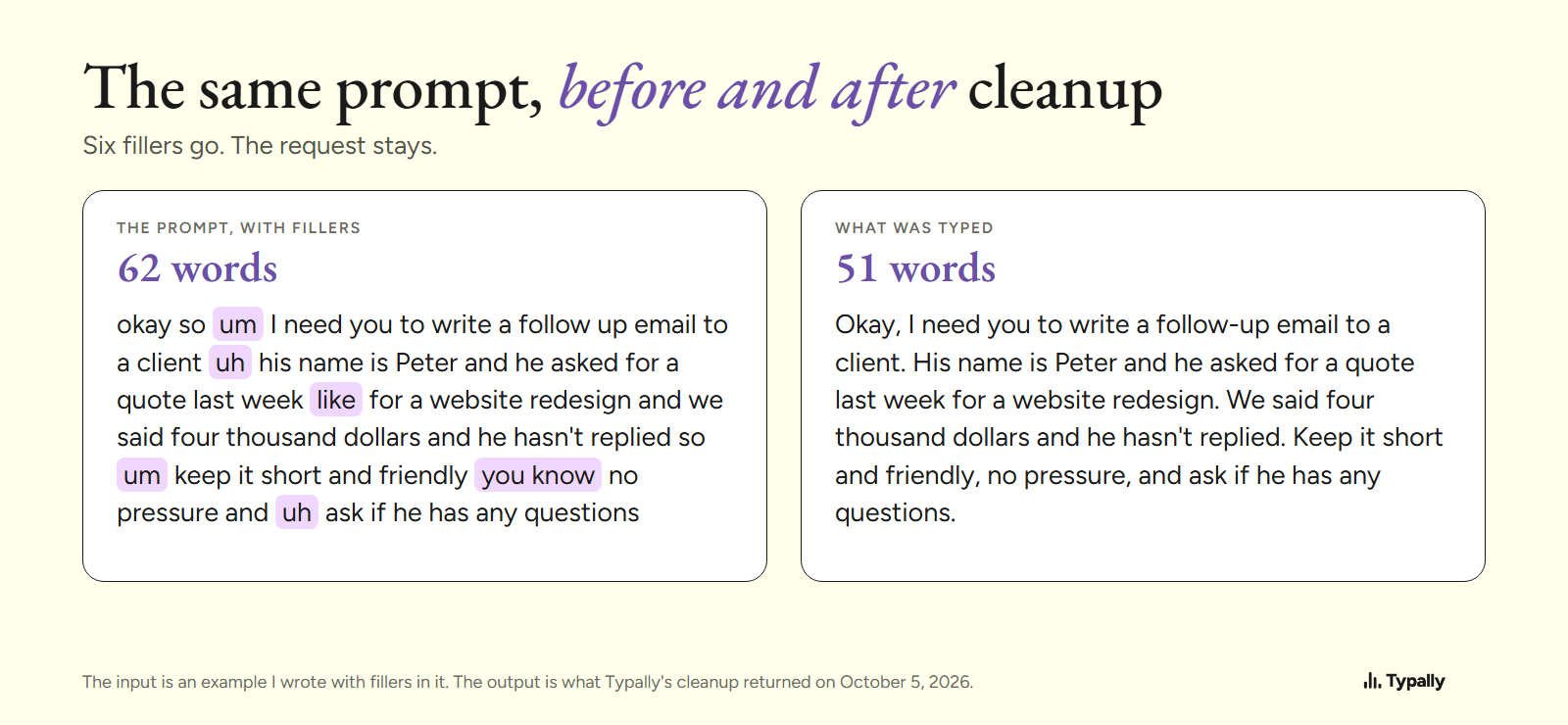
This is one app on one written example, not a comparison.
Which Mac dictation software fits you?
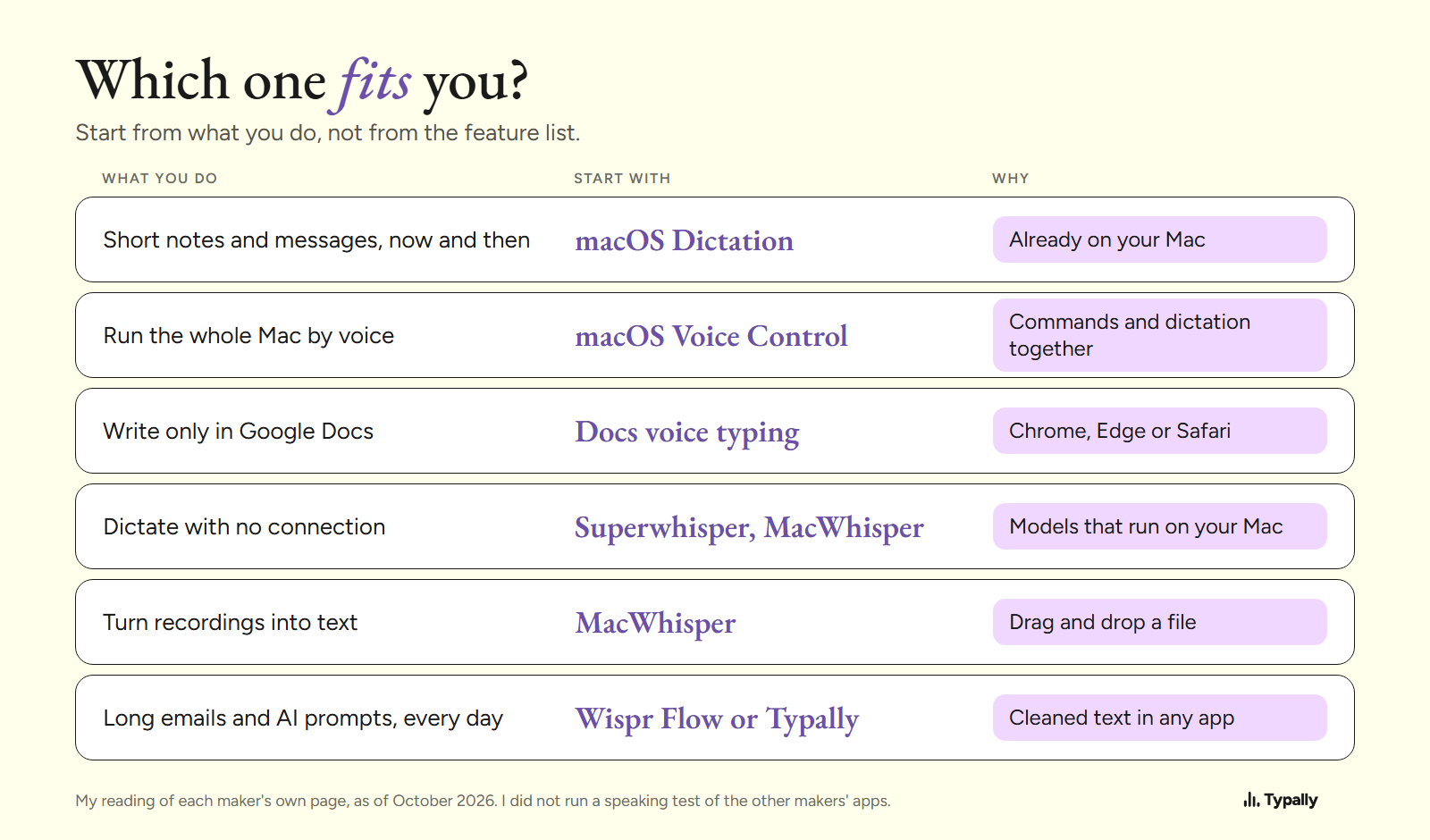
Start from the job you do most. For a few lines a day, stay with macOS Dictation. With no connection, or for recordings, look at Superwhisper and MacWhisper. For long emails and AI prompts every day, look at Wispr Flow or Typally (compared here).
On a PC too? See Dictation Software for Windows, or our general roundup.
Where does Typally fit?
Typally, voice typing for Mac and Windows, fits people who talk to AI tools and write long messages all day. Hold your shortcut key, talk, let go, and the text appears where the cursor is. That can be ChatGPT, Claude, Apple Notes, Apple Mail or any other app.
The cleanup is on by default: it removes the ums and fixes the punctuation and capitals. There is a hands-free mode for long thoughts, a custom vocabulary, 100 dictation languages and audio file transcription.
It listens only while you hold the key. The audio is discarded after transcription, and your transcripts and history stay on your computer.
It is the wrong pick in 2 cases. Typally needs an internet connection. And for a few lines a day, Apple's Dictation is already there.
Download Typally free at typally.com for Mac or Windows. The free plan gives you 100 minutes a month and doesn't ask for a card. Pro is $11.99 a month with a 14-day free trial; the trial needs a card. Or $96 a year.
What else do people ask about speech to text on a Mac?
Is Dragon available for Mac?
Not on its maker's site, as of October 2026. Nuance's product page is headed "Dragon Professional (Windows)", and its product menu lists no Mac version.
Does dictation on a Mac need the internet?
It depends on the tool. Apple says Keyboard settings show whether your dictation is processed on your Mac. Superwhisper and MacWhisper describe models that run on the Mac itself, while Word's Dictate and Typally need a connection.
Is there a time limit on Mac dictation?
Apple's page says: "You can dictate text of any length without a timeout." Dictation stops by itself after 30 seconds with no speech.