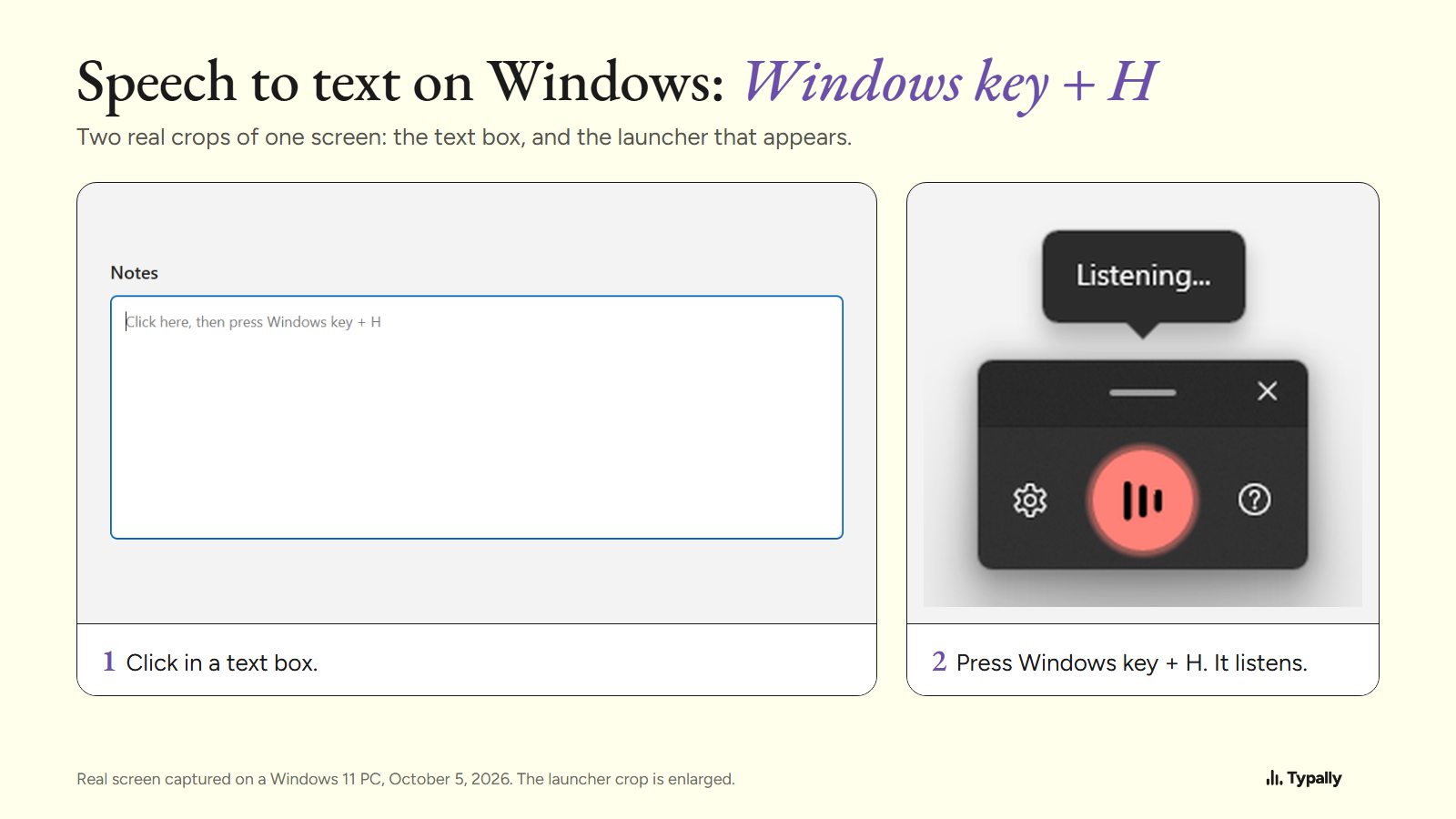
To use speech to text on Windows 11, click in a text box and press Windows key + H. Wait for "Listening...", then talk, and Windows types what you say.
In short:
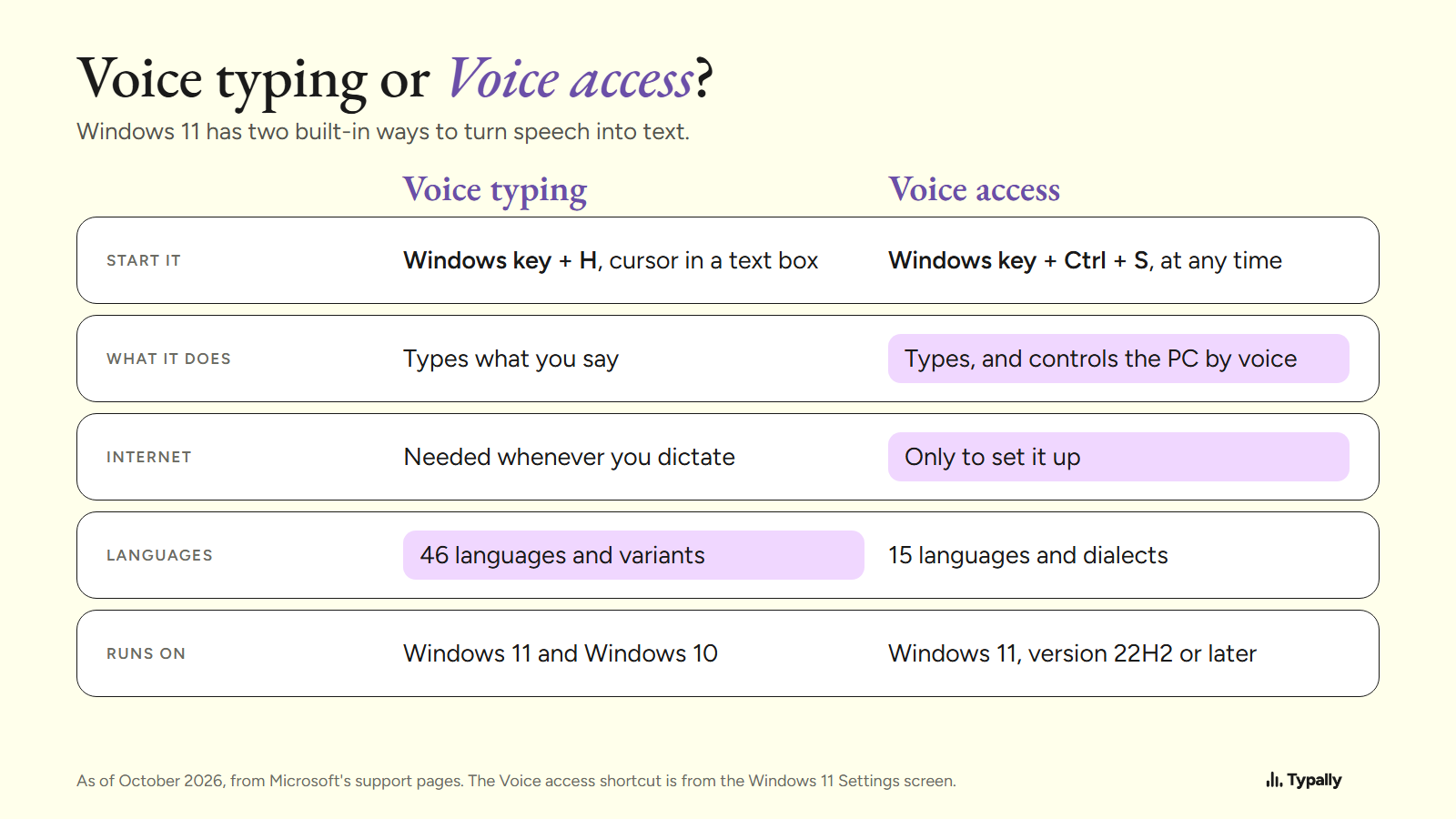
- Windows 11 has two built-in tools. Voice typing (Windows key + H) types into a text box and needs the internet. Voice access also controls the PC and needs a connection only for setup.
- Punctuation comes two ways: switch on Automatic punctuation in the gear menu, or say "comma", "period", "question mark" and "new line".
- When Windows key + H does nothing, check three things: the internet connection, the microphone, and that the cursor is in a text box.
People call it speech to text, voice to text or talk to text. Microsoft's name is voice typing; on Windows 10 it was dictation. The Windows screens here were captured on October 5, 2026. The rest is from Microsoft's support pages, read that day and linked. I build Typally, and it comes up near the end.
How do you turn on speech to text on Windows 11?
Press Windows key + H with the cursor in a text box. Microsoft's voice typing page sets three conditions: "you'll need to be connected to the internet, have a working microphone, and have your cursor in a text box."
- Click where the words should go, such as an email or a chat box.
- Press Windows key + H. On a touch screen, press the microphone button on the touch keyboard.
- Wait for the "Listening..." alert. Microsoft says to wait for it "before you start speaking".
- Talk. Your words go in at the cursor.
- To stop, say "stop listening" or press the microphone button on the launcher.
The connection is required because voice typing "uses online speech recognition, which is powered by Azure Speech services".
How do you get punctuation in Windows voice typing?
There are two ways: let Windows add it, or say it yourself. For the first, select the gear on the launcher and switch on Automatic punctuation. Microsoft says it lets voice typing "automatically insert punctuation based on what you’re saying".
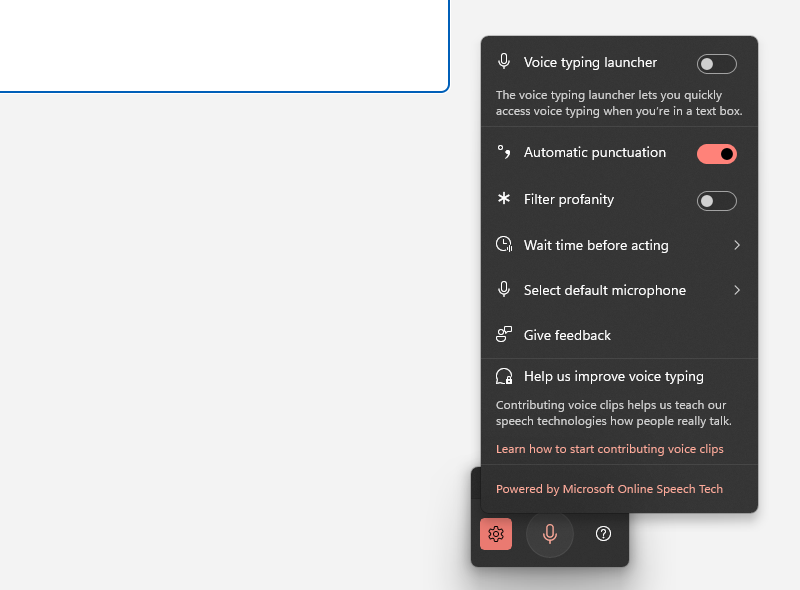
Microsoft's page doesn't say whether that switch starts on or off. On the PC in this capture it was on, so open the menu and check yours.
What can you say to punctuate and edit?
Say the name of the mark, or a short command. These are from the English lists on Microsoft's voice typing page, as of October 2026.
- Marks: "period" or "full stop", "comma", "question mark", "exclamation mark", "colon", "semicolon", "open quotes", "close quotes".
- Breaks: "new line" and "new paragraph".
- Delete what you last said: "delete that", "erase that" or "scratch that".
- Select it, or undo a change: "select that", "undo that" or "revert".
- Keys: "press Enter", "press Backspace", "press Tab", "press Space".
- Pause or stop: "pause voice typing", "stop listening" or "stop dictation".
The commands change with the language, and Microsoft's page has a list for each one.
Which languages does voice typing on Windows 11 support?
Microsoft lists 46 languages and regional variants, by my count of its list in October 2026. Six of them are kinds of English.
To dictate in another language, add it under Settings > Time & language > Language & region, then switch with Windows key + Spacebar. Voice typing follows your input language.
What does Voice access add to voice to text on a PC?
Voice access is the second built-in tool. It controls the whole PC by voice, and after setup it needs no connection. Microsoft's Voice access page says it "uses modern, on-device speech recognition" and "works even without the internet".
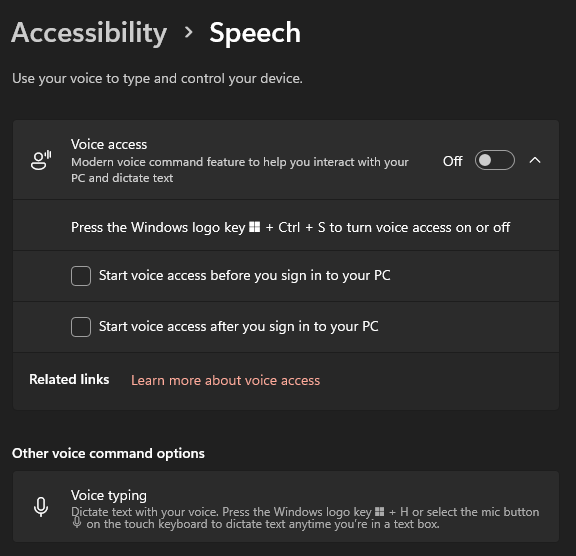
Turn it on under Settings > Accessibility > Speech. That screen gives its shortcut: Windows logo key + Ctrl + S.
The first run needs the internet once, to download the language files, says Microsoft's setup page. Then you can "open and switch between apps, browse the web, and read and author emails using your voice". For writing, it has an Add to vocabulary list for names and hard words.
The setup page lists 15 languages and dialects for Voice access, against 46 for voice typing. It needs Windows 11, version 22H2 or later.
What do you check when Windows key + H does nothing?
Check Microsoft's three conditions first, then two more things.
- The cursor. Voice typing "can only be started if the cursor is in a text box", says Microsoft's Voice access FAQ. Click into the box and press the keys again.
- The connection. Check that you're online. Then make sure Online speech recognition is on under Settings > Privacy & security > Speech, because voice typing runs on it.
- The microphone. In Settings > Privacy & security > Microphone, make sure Microphone access is on. In Settings > System > Sound, pick your input device and select Start test. Both steps are on Microsoft's microphone page.
- The language. If your input language isn't one of the 46, switch to one that is with Windows key + Spacebar.
- Voice access. If it's running, Windows key + H only shows a message: "You can use voice access for typing too. Select a text box and start dictating."
Where does built-in speech to text for PC stop?
It stops at filler words and at your own vocabulary, and Microsoft's pages show both.
Filler words. Microsoft's answer is Fluid dictation, which "automatically corrects grammar, punctuation, and filler words as you speak". As of October 2026 it is for Copilot+ PCs and English only. On other PCs, the voice typing settings Microsoft lists include nothing for filler words.
Names and jargon. The voice typing menu has no word list. Voice access has one, in its 15 languages.
For a few lines a day, the built-in tools may be all you need, and they come with Windows. When people hit these limits, they add a dictation app. My guide to dictation software for Windows goes through the choices, free and paid. See also free speech to text software and how to voice type on other computers.
Where does Typally fit?
Typally, voice typing for Mac and Windows, is the app I build and use. Hold your shortcut key, talk, let go, and the text appears where the cursor is, in any app: Outlook, Microsoft Word, Slack, ChatGPT.
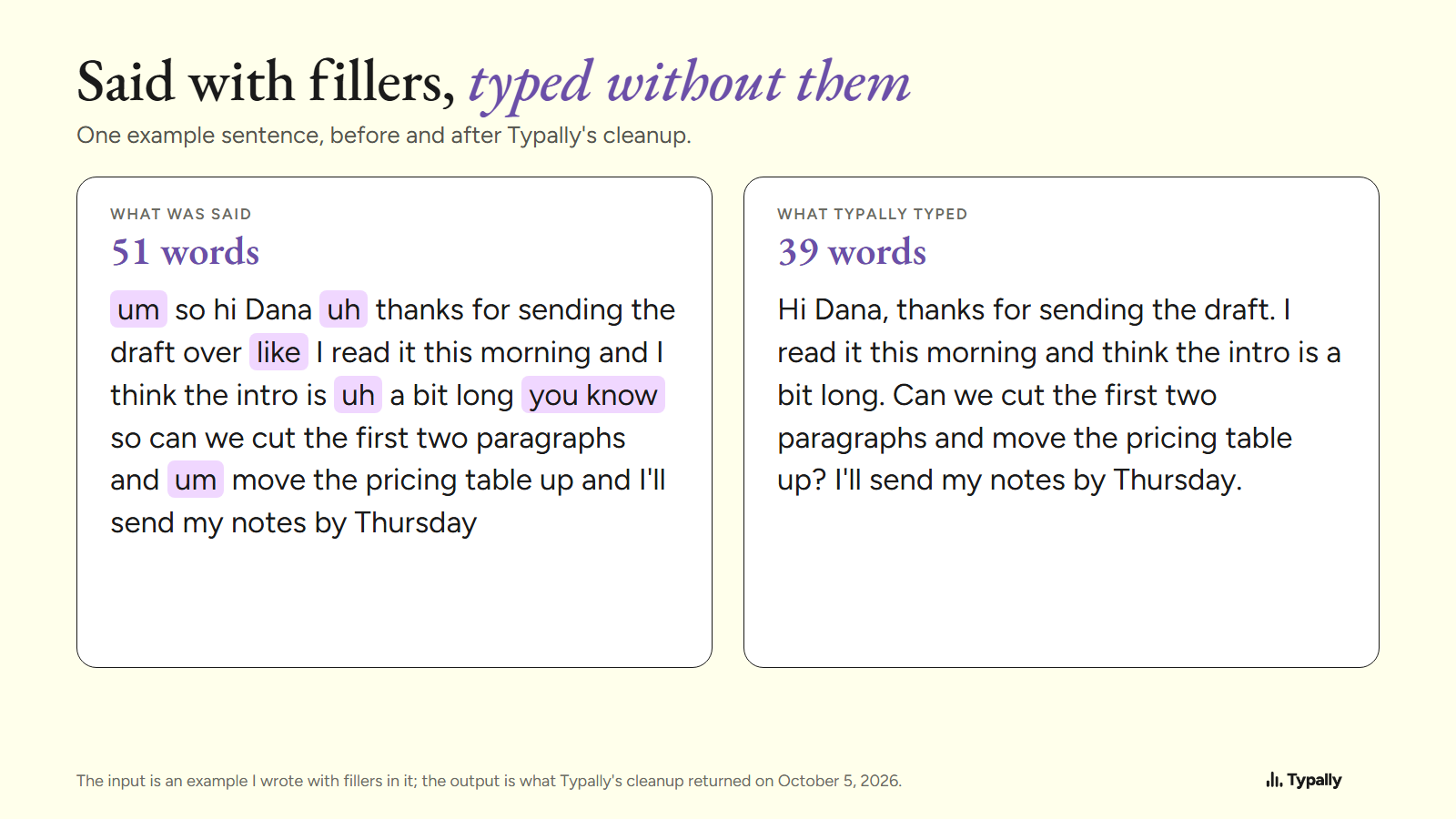
Its cleanup is on by default. It removes the ums and fixes the punctuation and capitals. I wrote a 51-word example with fillers in it and ran the cleanup on October 5, 2026. "um so hi Dana uh thanks for sending the draft over" came back as "Hi Dana, thanks for sending the draft."
It has custom vocabulary and 100 dictation languages. Like voice typing, it needs an internet connection. It listens only while you hold the key, the audio is discarded after transcription, and your history stays on your computer.
Start with Windows key + H, because it's already there. My Typally and Windows voice typing comparison says when it is enough and when it isn't. Download Typally free at typally.com. The free plan gives you 100 minutes a month and doesn't ask for a card.
What else do people ask about speech to text on Windows?
Does speech to text work on Windows 10?
Yes: click a text field and press Windows key + H, and the dictation toolbar opens; it needs the internet. Its commands are "available in US English only", say Microsoft's Windows 10 instructions, and Microsoft ended Windows 10 support on October 14, 2025.
Does Windows speech to text work with no internet?
Voice typing doesn't: Microsoft says you "need to be connected to the internet". Voice access does, once its language files have downloaded.
Does Microsoft keep recordings of what you dictate?
Microsoft's privacy page says voice data is sent "only to provide the service and create text transcriptions". It adds: "Microsoft does not store, sample, or listen to voice recordings without your permission."