Speech recognition software, also called voice recognition software, turns the sound of your voice into written words. The newer kind is one large model trained on hundreds of thousands of hours of recorded speech.
In short:
- Speech recognition measures your voice in 25-millisecond slices, then predicts the likeliest words. OpenAI's Whisper model learned that from 680,000 hours of audio.
- Four things change accuracy: the microphone, the noise, your vocabulary and your language. In OpenAI's tests, one distant microphone gave 36.4% word errors where headsets gave 16.9%.
- Recognition and cleanup are two steps. Recognition writes down the words, and the ums can come along. Cleanup removes them and adds the punctuation.
I build Typally, and it comes up near the end. By September 30, 2026, I had dictated 476,777 words, by the app's own count. My number, not a typical one. I ran no speaking test, so every accuracy figure below is the maker's own.
How does speech recognition software turn sound into text?
It measures the sound in tiny slices, then predicts the words most likely to match. OpenAI's Whisper paper (December 2022) gives the exact numbers for its model.
- Measure. The audio is sampled 16,000 times a second.
- Slice. Every 10 milliseconds, a 25-millisecond window of sound becomes 80 numbers.
- Predict. One part of the model reads up to 30 seconds of those numbers. A second part writes the text, piece by piece.
Step 3 is a guess. OpenAI's model card says the models "combine trying to predict the next word in audio with trying to transcribe the audio itself". It adds that the output "may include texts that are not actually spoken". Apple's Dictation page has the everyday case: you may get "flour" when you intended "flower".
What changed with large speech models?
Two things changed: several separate parts became one model, and the training audio grew to hundreds of thousands of hours. A 2019 post from Google's speech team lists the old parts. An acoustic model and a language model had, between them, "a pronunciation model that connects phonemes together to form words".
Around 2014, the same post says, researchers began training "a single neural network to directly map an input audio waveform to an output sentence". Whisper is one such network, trained on "680,000 hours of audio and the corresponding transcripts collected from the internet", by its model card.
On 25 English recordings, the paper found fully human transcription services "only a fraction of a percentage point better" than Whisper. A computer-assisted service was 1.15 points better.
What affects speech recognition accuracy?
Four things: the microphone, the noise, your vocabulary and your language. The usual score is word error rate: roughly, the wrong words per 100.
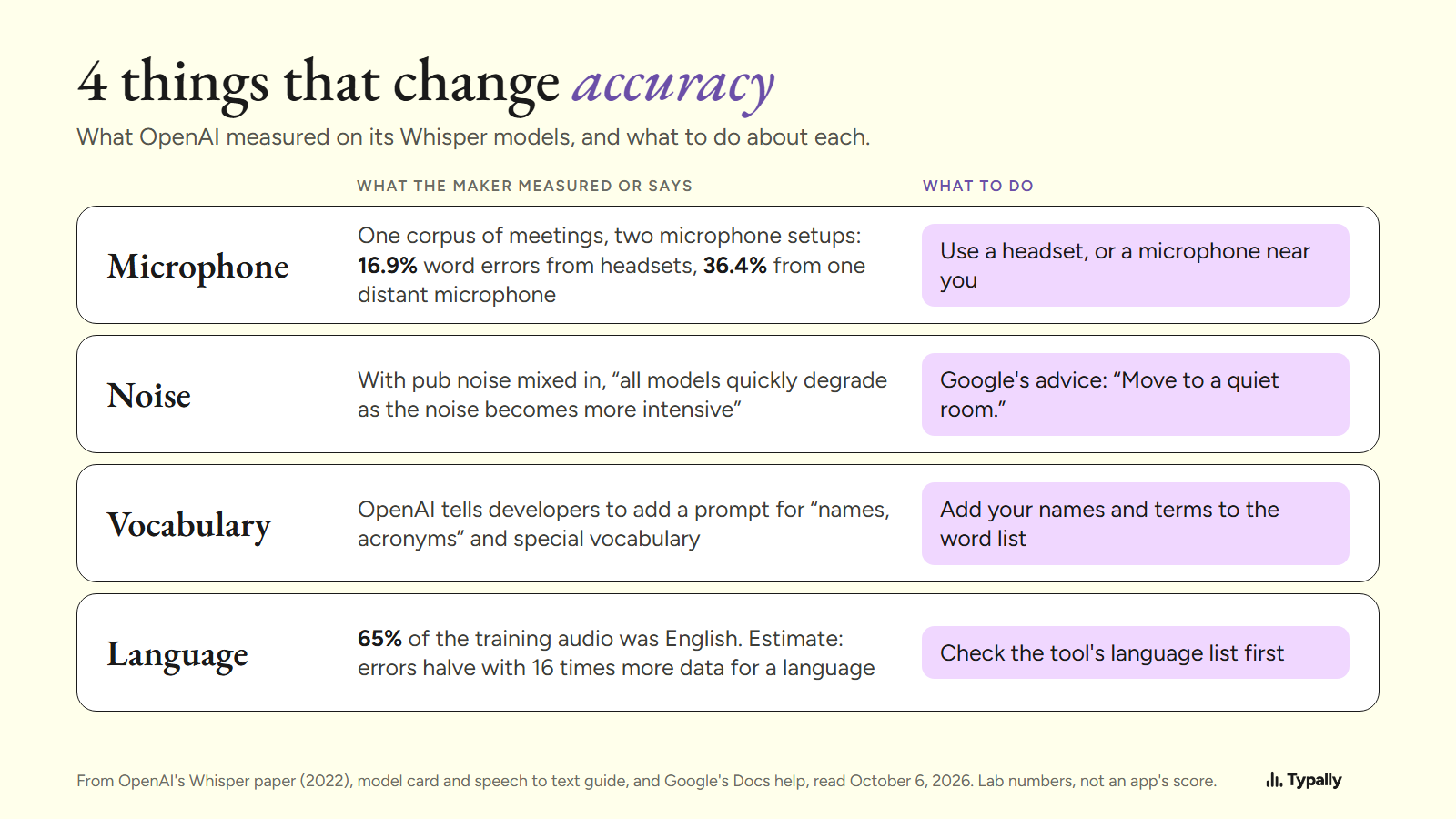
- Microphone. The paper's Table 2 scores one corpus of meetings twice. From headset microphones, Whisper's error rate was 16.9%. From a single distant microphone it was 36.4%. The recipe the paper followed names both setups.
- Noise. With pub noise mixed in, the paper found that "all models quickly degrade as the noise becomes more intensive". Google's voice typing help has the fix: "Move to a quiet room. Plug in an external microphone."
- Vocabulary. OpenAI's speech to text guide tells developers to add a prompt "to improve recognition of names, acronyms, formatting, or recording-specific vocabulary". In a dictation app, that job falls to the custom word list.
- Language. English was 65% of Whisper's training audio, by its model card. The paper estimates that a language's error rate halves with 16 times more training data.
These are OpenAI's lab numbers for its 2022 models, not a score for any app here, mine included.
Why does recognized speech still need cleanup?
Because recognition writes down what it hears, and people say "um". Accuracy scores skip the question. Before scoring English, the Whisper paper removes six filler sounds from the text: "hmm, mm, mhm, mmm, uh, um".
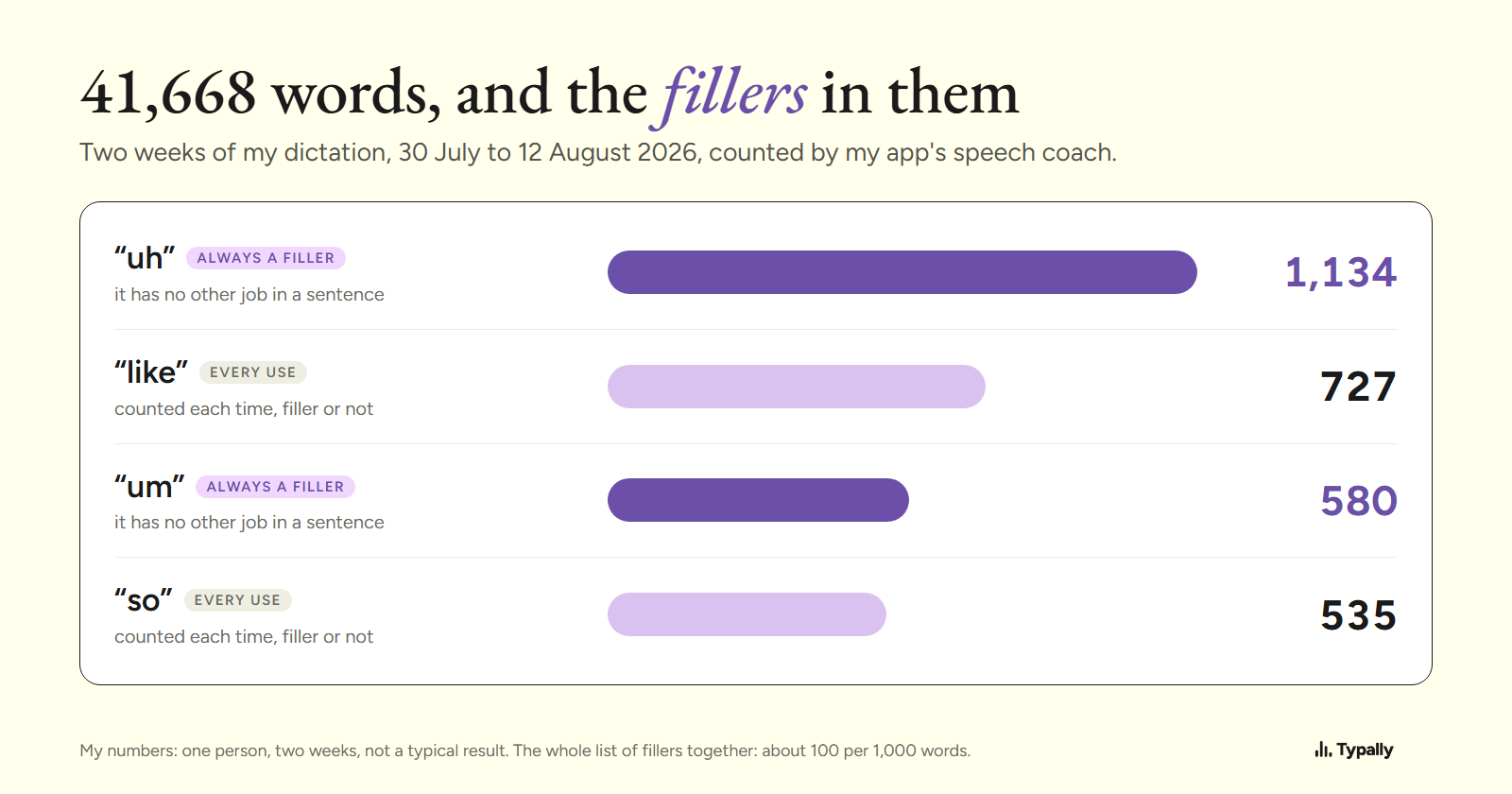
My own text shows it. On my computer the cleanup is switched off (the story is on Medium). Across 41,668 words of dictation, from July 30 to August 12, 2026, my app's coach counted "uh" 1,134 times and "um" 580 times. Every one was typed.
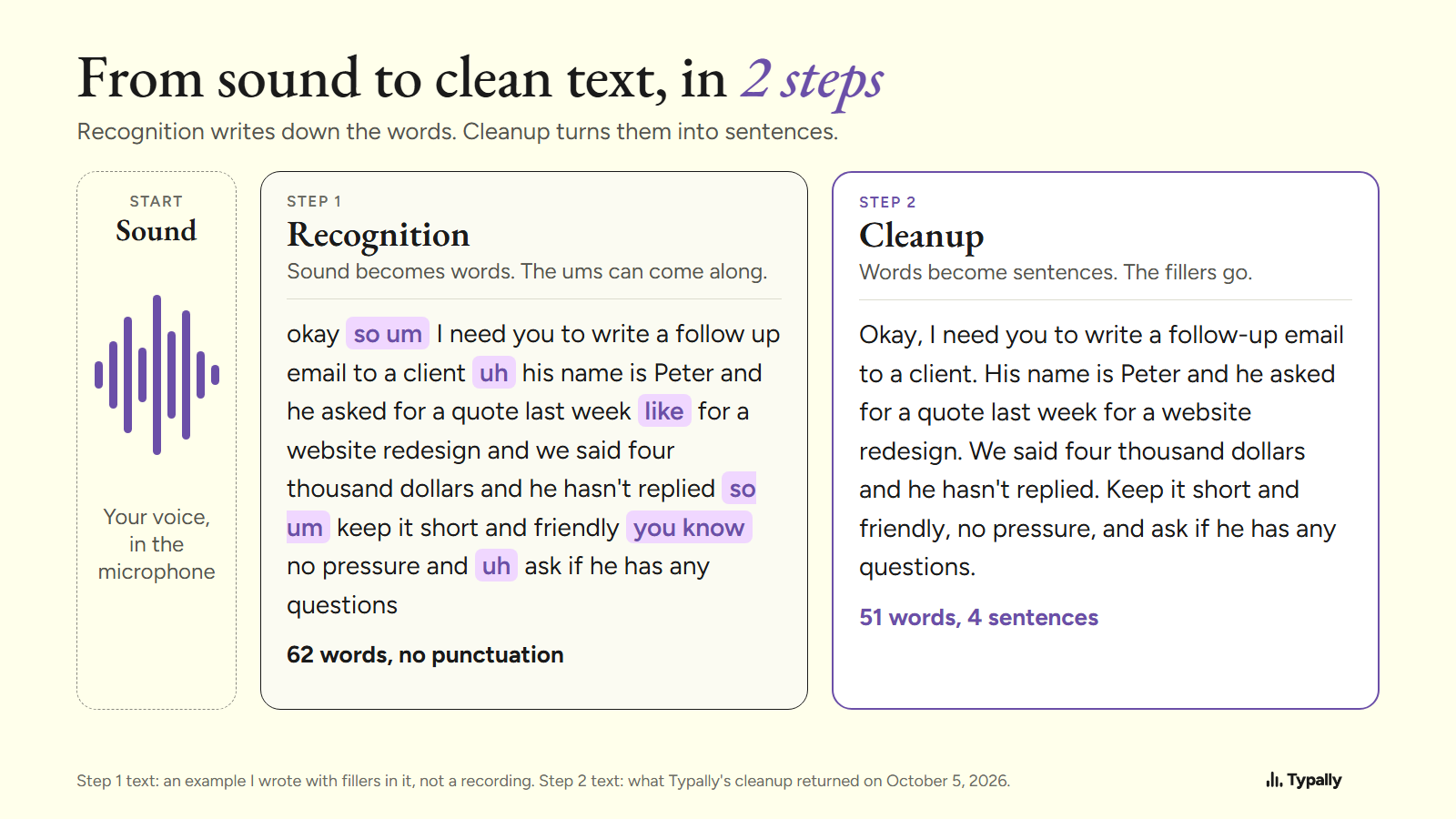
Cleanup is the second step: a language model takes out the fillers and adds the punctuation. Below is one run of Typally's cleanup from October 5, 2026. The input is an example I wrote with fillers in it, not a recording.
Before (62 words)
okay so um I need you to write a follow up email to a client uh his name is Peter and he asked for a quote last week like for a website redesign and we said four thousand dollars and he hasn't replied so um keep it short and friendly you know no pressure and uh ask if he has any questions
After (51 words)
Okay, I need you to write a follow-up email to a client. His name is Peter and he asked for a quote last week for a website redesign. We said four thousand dollars and he hasn't replied. Keep it short and friendly, no pressure, and ask if he has any questions.
10 words went: "um", "uh" and "so" twice each, "like", "you know" and one "and". In came 4 periods and 3 commas. AI dictation covers this step in depth.
Which speech recognition software should you use?
Start with the free tool on your computer, then match the tool to the job. This is the short list; our speech to text guide covers every route. The facts are from each maker's own page, as of October 2026.
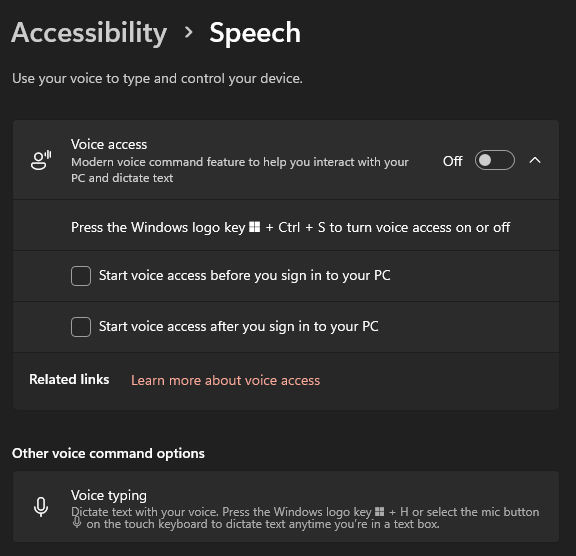
- Writing on Windows. Voice typing: click in a text box and press Windows key + H. Microsoft says it "uses online speech recognition" and needs a connection. On Copilot+ PCs, in English, its Fluid dictation "automatically corrects grammar, punctuation, and filler words as you speak".
- Running a PC by voice. Voice access, in Windows 11. Microsoft says it lets people "control their PC and author text using only their voice and without an internet connection".
- Writing on a Mac. Dictation. Apple says you can "speak to enter text anywhere you can type it", at "any length without a timeout". Its page does not mention filler words.
- Custom voice commands at work. Dragon Professional v16, for Windows. Nuance's page shows "Contact us" where a price would be. See Dragon NaturallySpeaking alternatives.
Windows 11 lists its two tools on one screen: Settings > Accessibility > Speech.
For clean text in every app, see dictation software for Windows or for Mac.
Where does Typally fit?
Typally, voice typing for Mac and Windows, runs both steps: OpenAI's Whisper large-v3 for recognition, then the cleanup. Hold your shortcut key, talk, let go, and the text appears where your cursor is. That can be ChatGPT, Claude, Gmail or any other text box.
The cleanup is on by default: it removes the ums and fixes the punctuation and capitals. A custom vocabulary covers your names and terms, and there are 100 dictation languages.
It needs an internet connection. It listens only while you hold the key, the audio is discarded after transcription, and your history stays on your computer. For a few lines a day, the built-in tool is the better pick.
Download Typally free at typally.com for Windows or Mac. The free plan gives you 100 minutes a month and doesn't ask for a card.
What else do people ask about speech recognition software?
Is voice recognition software the same as speech recognition software?
In everyday use, yes. Microsoft uses both names in one line: "To find out more about speech recognition, read Use voice recognition in Windows." Strictly, IBM says voice recognition "just seeks to identify an individual user's voice".
How accurate is speech recognition software?
It depends on the audio. In OpenAI's 2022 tests, one Whisper model scored 2.7% word error rate on clean read speech. The same model scored 36.4% on meetings picked up by one distant microphone.
Is there free speech recognition software?
Yes. Voice typing and Voice access come with Windows 11, Dictation comes with macOS, and voice typing is part of Google Docs. Free speech to text software lists more.