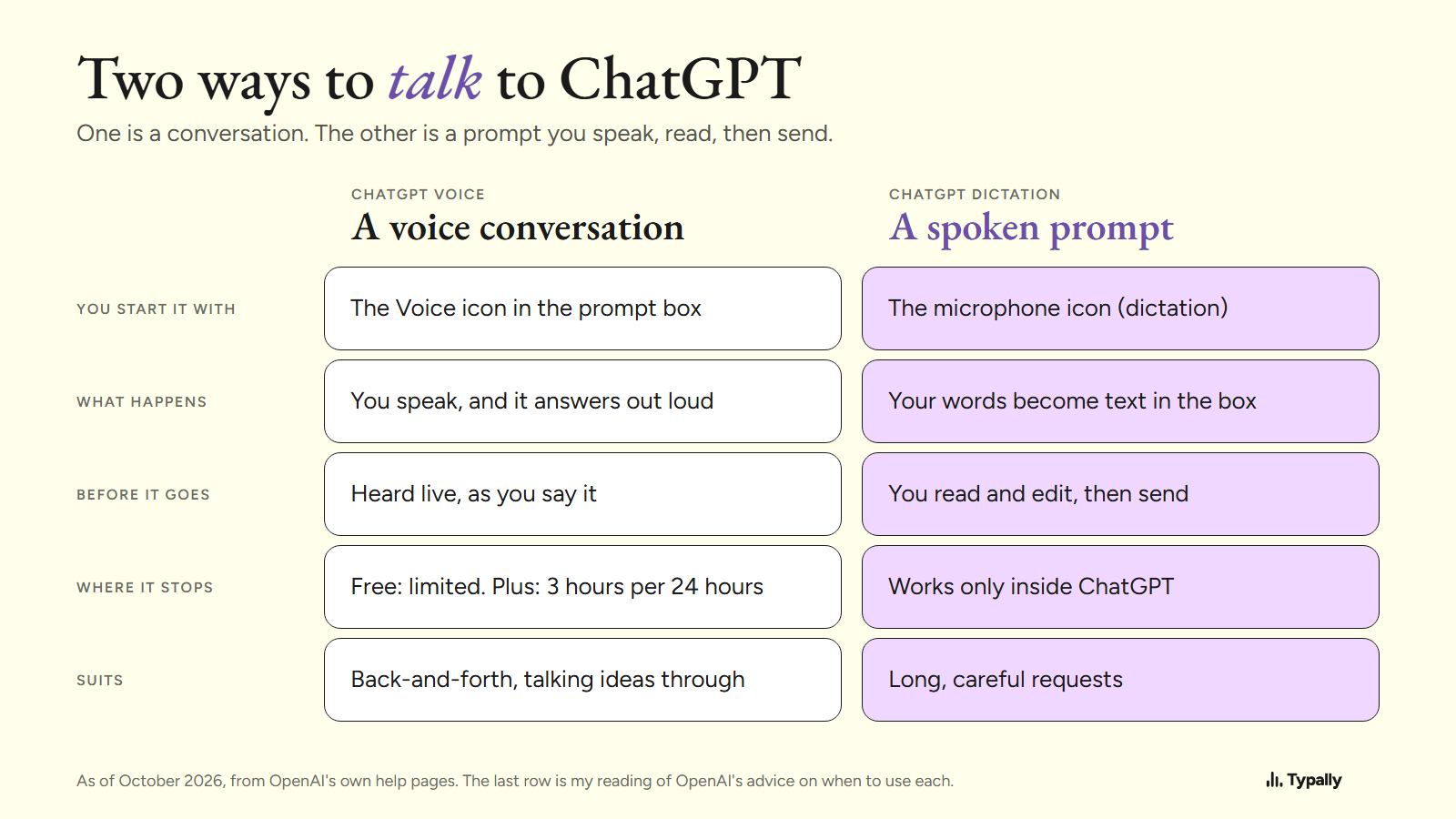
To talk to ChatGPT on a computer, open chatgpt.com, select the Voice icon in the prompt box and allow the microphone. That starts a spoken conversation. The second way is to speak your prompt as text, read it, then send it.
In short:
- ChatGPT Voice is a live conversation: you speak, it answers out loud, and a transcript lands in the chat. In a browser, the Free plan gets limited access.
- ChatGPT Dictation turns one recording into text you can edit before sending. Windows voice typing, Mac Dictation and hold-to-talk apps do that in other apps too.
- Pick by the job. A conversation suits back-and-forth. A spoken prompt you can read first suits long, careful requests.
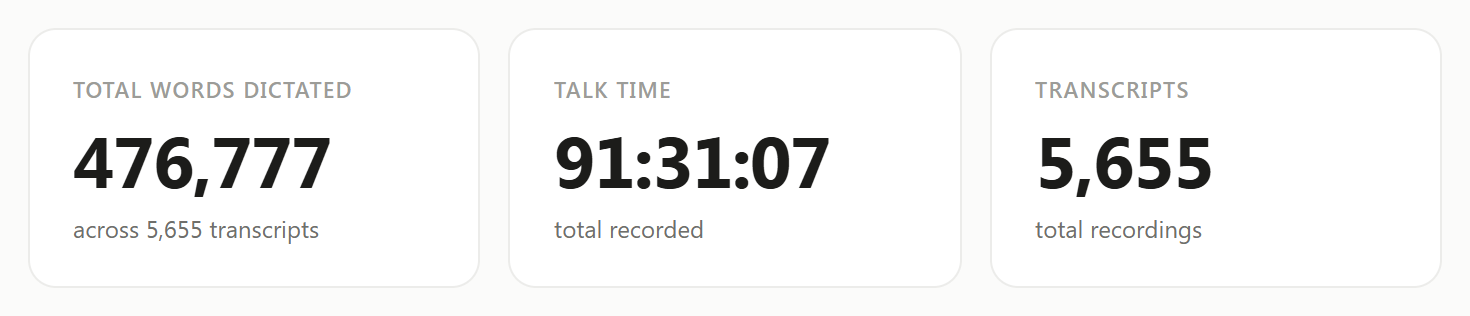
I talk to ChatGPT and Claude instead of typing to them, and I do it as text. On September 30, 2026, my Typally Insights screen showed 476,777 words across 5,655 dictations. I build Typally, and it comes up near the end.
How do you start a voice conversation with ChatGPT on a computer?
In a browser, it takes 4 steps. They come from OpenAI's ChatGPT Voice help page, as of October 2026:
- Go to chatgpt.com.
- Select the Voice icon in the prompt window.
- If prompted, allow your browser to access your microphone.
- After Voice opens, begin speaking.
With the Live option, ChatGPT's answers also appear as text while they are spoken, and a transcript is added to the chat afterward. Which options you see can depend on your plan and region.
The desktop app for Mac and Windows has its own button. OpenAI's desktop guide says to select "Start new voice chat", then allow microphone access and choose a voice the first time. The default shortcut is Ctrl+Shift+V, by its shortcuts page.
What does ChatGPT voice need, and where does it stop?
It needs a microphone, your permission to use it, and voice time left on your plan. In a browser, OpenAI measures Live voice "over a rolling 24-hour period". As of October 2026, the same help page lists these allowances:
- Free: "Limited access to GPT-Live-1 mini. Limits may change."
- Go: 3 hours with GPT-Live-1 mini.
- Plus: 3 hours with GPT-Live-1.
- Pro: 15 hours or unlimited, depending on the tier.
As of October 2026, OpenAI lists voice in the desktop app for Plus, Pro, Business, Edu and Enterprise plans, not for Free. Its pricing page says it "uses your existing Codex usage budget at $0.05 per minute".
Three limits matter when your request is long. A conversation can end "when you reach a usage limit, the maximum session length, or when a long conversation reaches its context limit". Long pauses may make ChatGPT answer before you finish. And OpenAI says voice transcripts "are not verbatim records and may not exactly match what was said".
How do you speak a prompt you can read before sending?
Use dictation instead of voice mode: your words become text in the message box, and nothing goes until you send it. There are 4 ways, as of October 2026.
- ChatGPT Dictation. Press the microphone icon. OpenAI's dictation page says the transcription "is returned as text, which you can edit before sending as a user message". In the desktop app, the shortcut is Ctrl+Shift+D. It works only inside ChatGPT.
- Windows voice typing. Press the Windows key + H in a text box. Microsoft's page says you need an internet connection, a working microphone and your cursor in a text box. On Copilot+ PCs, in English, its Fluid dictation also corrects "grammar, punctuation, and filler words".
- Mac Dictation. These steps are Apple's: turn Dictation on in System Settings under Keyboard, then press the Microphone key or your Dictation shortcut. Apple's page says it "stops automatically when no speech is detected for 30 seconds".
- A hold-to-talk app. Hold a key, talk, let go, and the text appears at your cursor in any app.
Windows voice typing and Mac Dictation come with the computer, so start there. For the steps inside ChatGPT, see our guide to voice typing in ChatGPT. Separate guides cover speech to text on Windows and how to dictate on a Mac.
What does a spoken prompt look like before you send it?
It reads as plain sentences you can check. The input below is an example I wrote with fillers in it. The output is what Typally's cleanup returned on October 5, 2026.
With the fillers (62 words)
okay so um I need you to write a follow up email to a client uh his name is Peter and he asked for a quote last week like for a website redesign and we said four thousand dollars and he hasn't replied so um keep it short and friendly you know no pressure and uh ask if he has any questions
After cleanup (51 words)
Okay, I need you to write a follow-up email to a client. His name is Peter and he asked for a quote last week for a website redesign. We said four thousand dollars and he hasn't replied. Keep it short and friendly, no pressure, and ask if he has any questions.
The um, uh, like and you know are gone, and the punctuation and capitals are in. Peter and the four thousand dollars are still there. You can fix a name or add a deadline before it goes.
Which way of talking to ChatGPT fits which job?
Voice mode fits a back-and-forth, and a spoken prompt fits a long request you want to get right. OpenAI draws the same line: "Use Voice for a live, back-and-forth conversation or to talk through ideas. Use ChatGPT Dictation when you want to record a prompt, review and edit its transcription, and then send it as text."
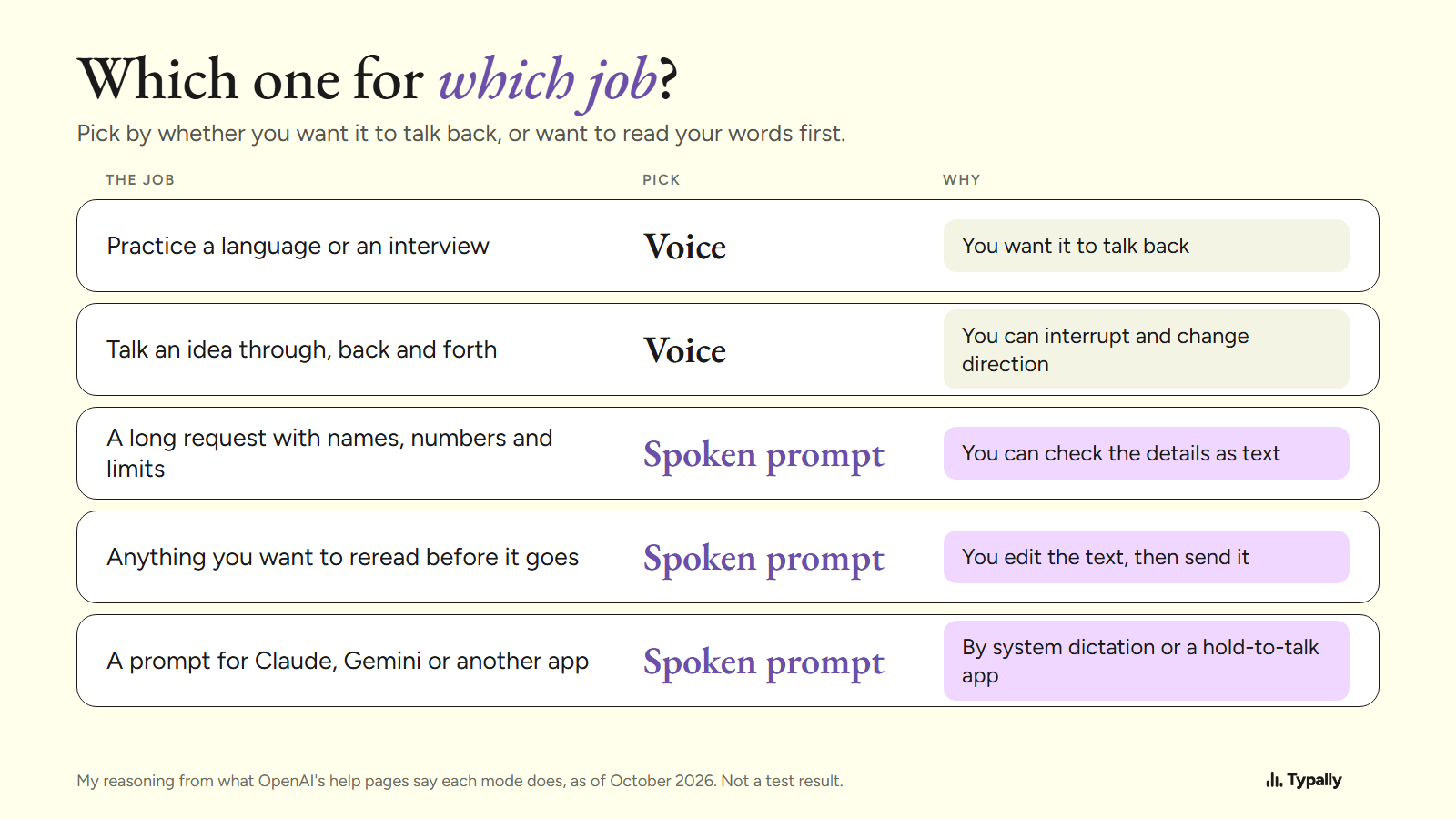
OpenAI's own examples for voice include practicing a language and preparing for an interview. My prompts are the other kind: long requests with names, numbers and limits. My dictations average about 84 words: 476,777 words over 5,655 dictations, and I use them for prompting ChatGPT and Claude. At about 87 words a minute, pauses counted, that is about a minute each.
Voice Prompting has the order I say a prompt in.
Where does Typally fit?
Typally, voice typing for Mac and Windows, is the hold-to-talk app I build and use. Hold your shortcut key, talk, let go, and the text appears where your cursor is. That can be ChatGPT, Claude, Gemini or any other text box. The cleanup is on by default: it removes the ums and fixes the punctuation and capitals.
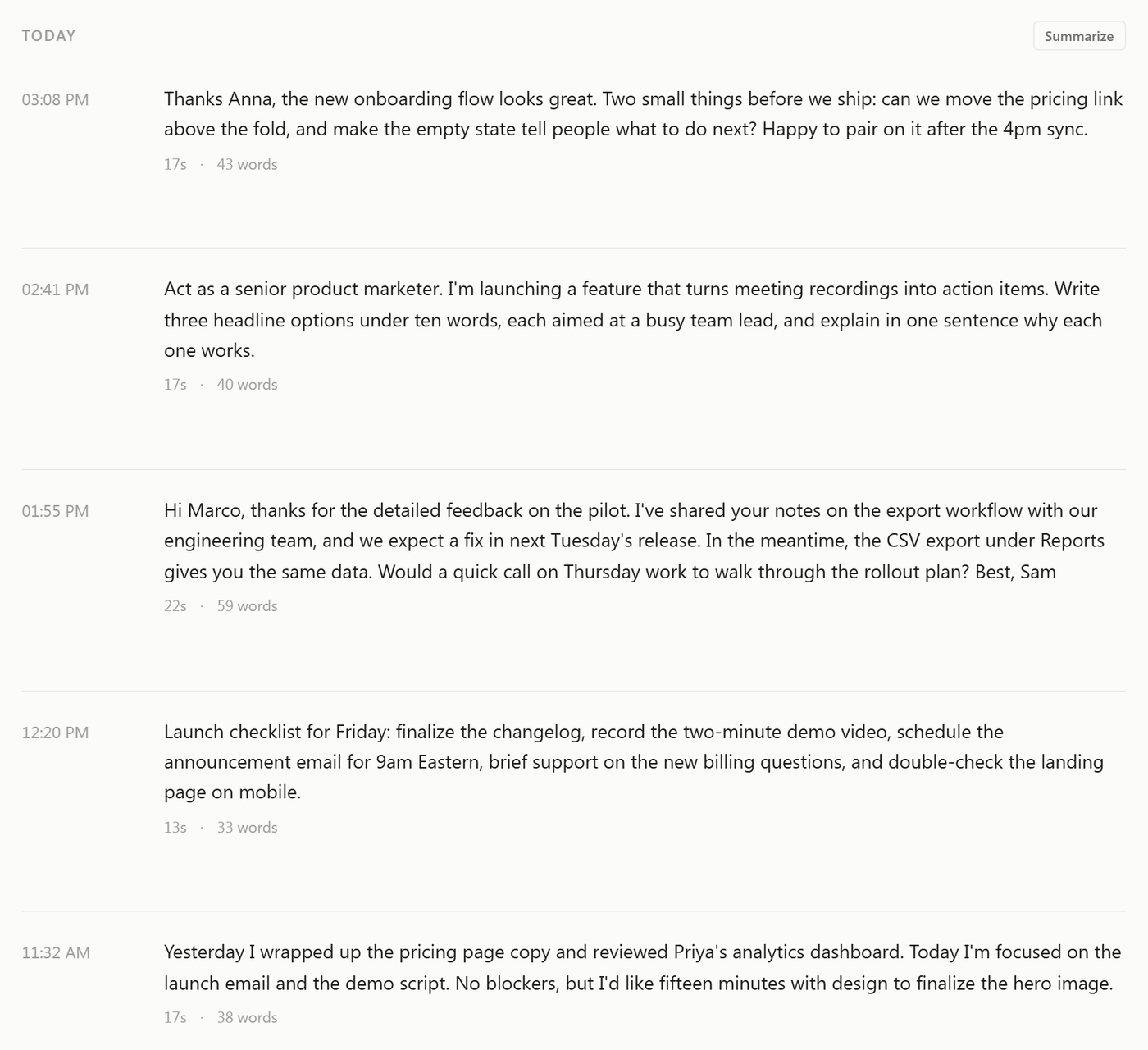
A hands-free mode covers long thoughts, and each dictation lands in a list in the app.
It listens only while you hold the key. The audio is discarded after transcription, and your transcripts and history stay on your computer. It needs an internet connection.
Typally does not talk back. If you want a spoken answer, ChatGPT's voice mode is the better pick. If you only dictate inside ChatGPT, its own button may be all you need.
Download Typally free at typally.com for Windows or Mac. The free plan gives you 100 minutes a month and doesn't ask for a card.
What else do people ask about talking to ChatGPT?
Can you talk to ChatGPT for free?
Yes, in a browser. As of October 2026, OpenAI's Free plan has "Limited access to GPT-Live-1 mini", and limits may change. Desktop app voice is not listed for the Free plan.
Can ChatGPT wait while you think out loud?
You can ask it to. OpenAI suggests saying "Wait until I ask you to respond" at the start of a Live conversation. It adds that long pauses or other sounds may still cause a response.
Does ChatGPT keep a recording of your voice?
For a time, by OpenAI's pages. Audio clips from Live voice conversations "are retained for 30 days". Audio from dictation is kept "for as long as the chat is part of your chat history".
Is Typally free?
There's a free plan with 100 minutes of dictation a month, forever, and it doesn't ask for a card. Pro is $11.99 a month with a 14-day free trial, and the trial needs a card. Or $96 a year.