Dictation types your words while you talk, in the place you are writing. Transcription turns a finished recording into text afterward, for meetings, interviews and voice memos.
In short:
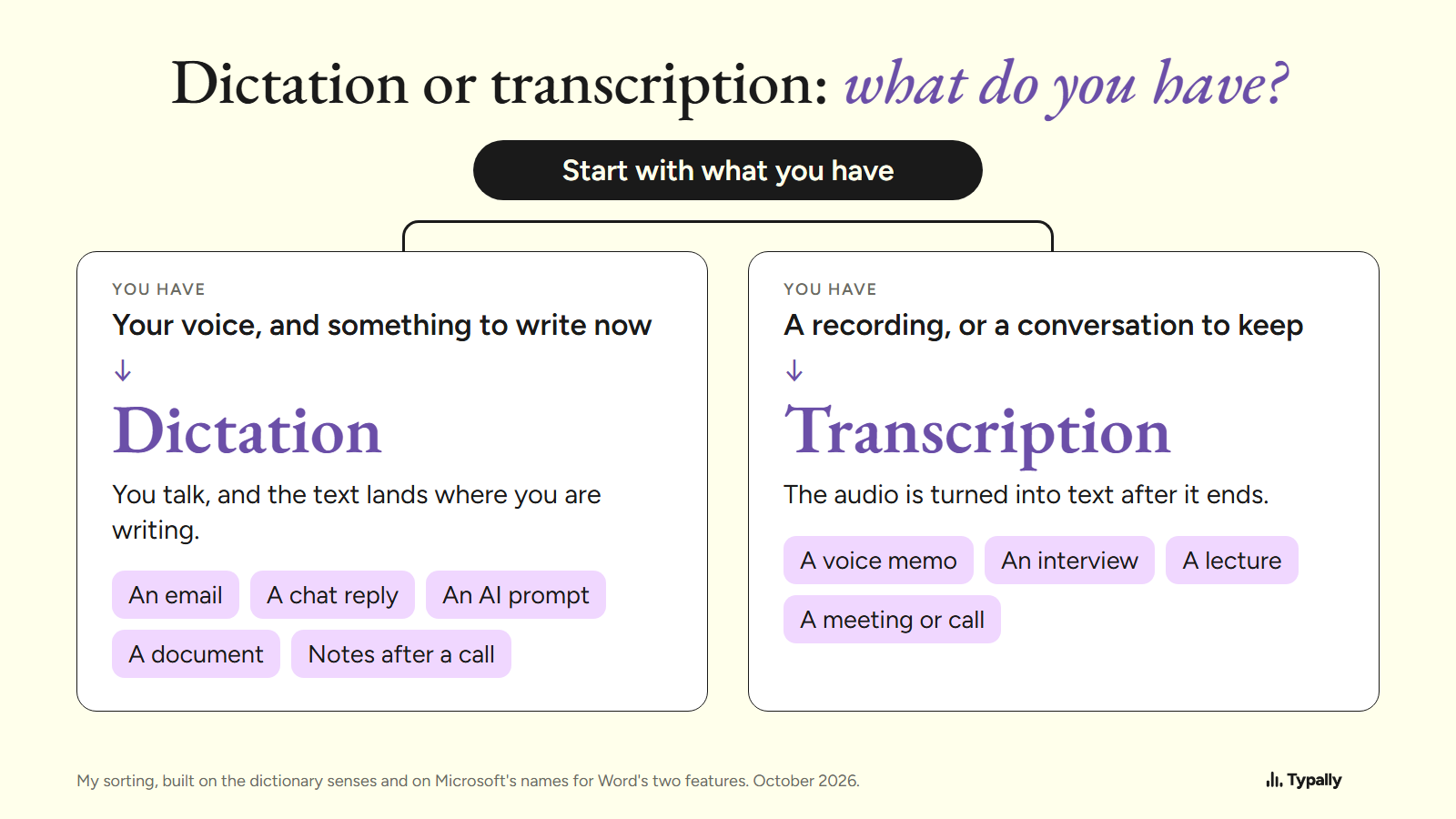
- Pick by what you have. Your voice and something to write now means dictation. A recording, or a conversation to keep, means transcription.
- Dictionaries describe one old office job in two halves: one person dictated and another transcribed. On a computer, software now does the writing in both.
- Microsoft Word has a button for each. Microsoft says Transcribe works "in the background", and "you won't see text on the page as you would when dictating".
I build Typally, and it comes up near the end. By September 30, 2026, I had dictated 476,777 words with it, by the app's own count. Facts about other makers' tools come from their own pages, read on October 7, 2026. I did not try those tools by speaking into them.
What do dictation and transcription mean?
Dictation is the speaking, and a transcription is the written copy. Oxford Learner's Dictionaries defines dictation as "the act of speaking or reading so that somebody can write down the words or they can be recorded". One sense of transcription there is "a written or printed copy of words that have been spoken".
So the two words named two halves of one job. The American Heritage Dictionary has dictation as "The act or process of dictating material to another for transcription."
In Cambridge's Business English entry, dictation is speaking "for a person or machine to record, so it can be written down later". On a computer today, software does the writing in both jobs. What still differs is when the text appears and where it goes.
Both words also have music senses. Dictionary.com lists dictation as "the playing or singing of music to be notated by a listener". I leave those out.
Word Dictate vs Transcribe: what does each one do?
In Word, Dictate types into the document as you speak, and Transcribe hands you a transcript after the recording ends. Dictate is at Home > Dictate. Transcribe is at Home > Dictate > Transcribe.
Microsoft's Dictate page says: "Dictation lets you use speech-to-text to author content in Microsoft 365 with a microphone and reliable internet connection." The step reads "Start speaking to see text appear on the screen." The page adds: "The dictation feature is only available to Microsoft 365 subscribers".
Its Transcribe page describes another job: "The transcribe feature converts speech to a text transcript with each speaker individually separated." You record in Word or upload a file (.wav, .mp4, .m4a or .mp3). One line separates the two: "Word transcribes in the background as you record; you won't see text on the page as you would when dictating."
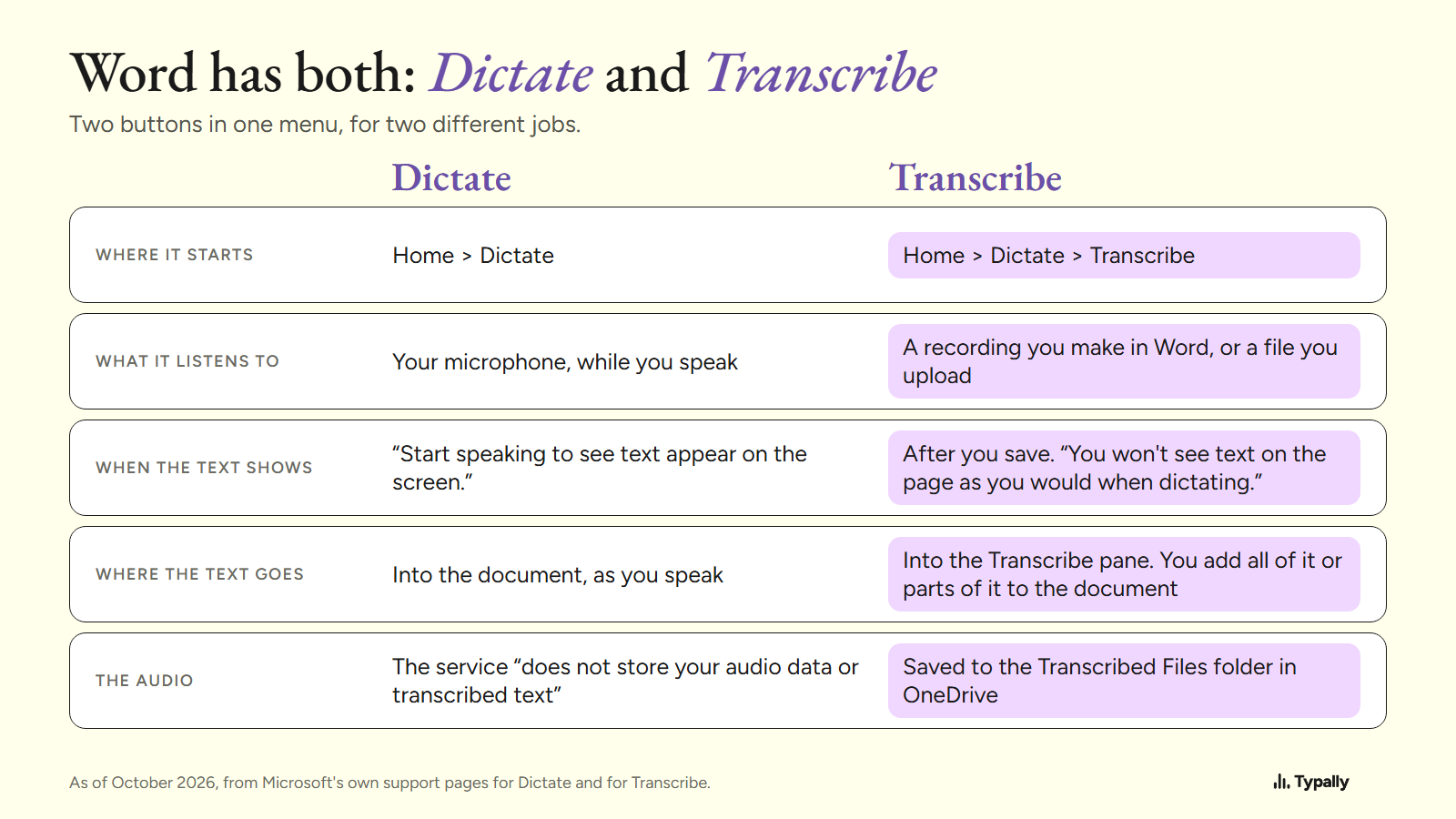
The transcript lands in the Transcribe pane, and you add all of it or parts of it to the document. The audio is kept: it "is saved to the Transcribed Files folder in OneDrive". Of Dictate, Microsoft says the service "does not store your audio data or transcribed text".
Three limits, as of October 2026. Subscribers "can transcribe a maximum of 300 minutes of uploaded audio per month". In Word for the web, Transcribe "only works on the new Microsoft Edge and Chrome". The Windows app carries a note: "This feature is currently only available in Word for Microsoft 365 on Windows in Commercial Tenants."
Dictate's steps are in voice typing in Microsoft Word. The words you say are in dictation commands, and the keys are in voice typing shortcuts.
Which one do you need, dictation or transcription?
You need dictation when the words are still in your head, and transcription when they are already audio.
| The job | You need | Why |
|---|---|---|
| An email, a chat reply, a document | Dictation | The text should land at your cursor |
| A prompt for ChatGPT or Claude | Dictation | You can read it before you send it |
| Notes right after a call | Dictation | One voice, yours, now |
| A voice memo from earlier | Transcription | The words are already in a file |
| An interview or a lecture | Transcription | It is recorded, often with 2 or more speakers |
| A meeting or a call | Transcription | Several people talk, and you want a record |
A meeting is transcription even while it is happening. You are keeping what several people said, and Word's Transcribe "identifies and separates different speakers". Tools that turn a call into notes are in our AI meeting notes tools list.
Captions are a third thing. Windows 11 live captions put the words on screen, but Microsoft says: "Generated captions are not stored anywhere on the device or the cloud." So you get no transcript.
What does each one give back?
A transcript is a record, and dictated text is a draft. A record stays close to what was said. In Word you can check it by "playing back the timestamped audio".
A draft is meant to be sent, so a dictation tool may tidy it. Here is one cleanup, by Typally. I wrote a 51-word message with fillers in it and ran the cleanup on October 5, 2026. Back came 39 words in 4 sentences.
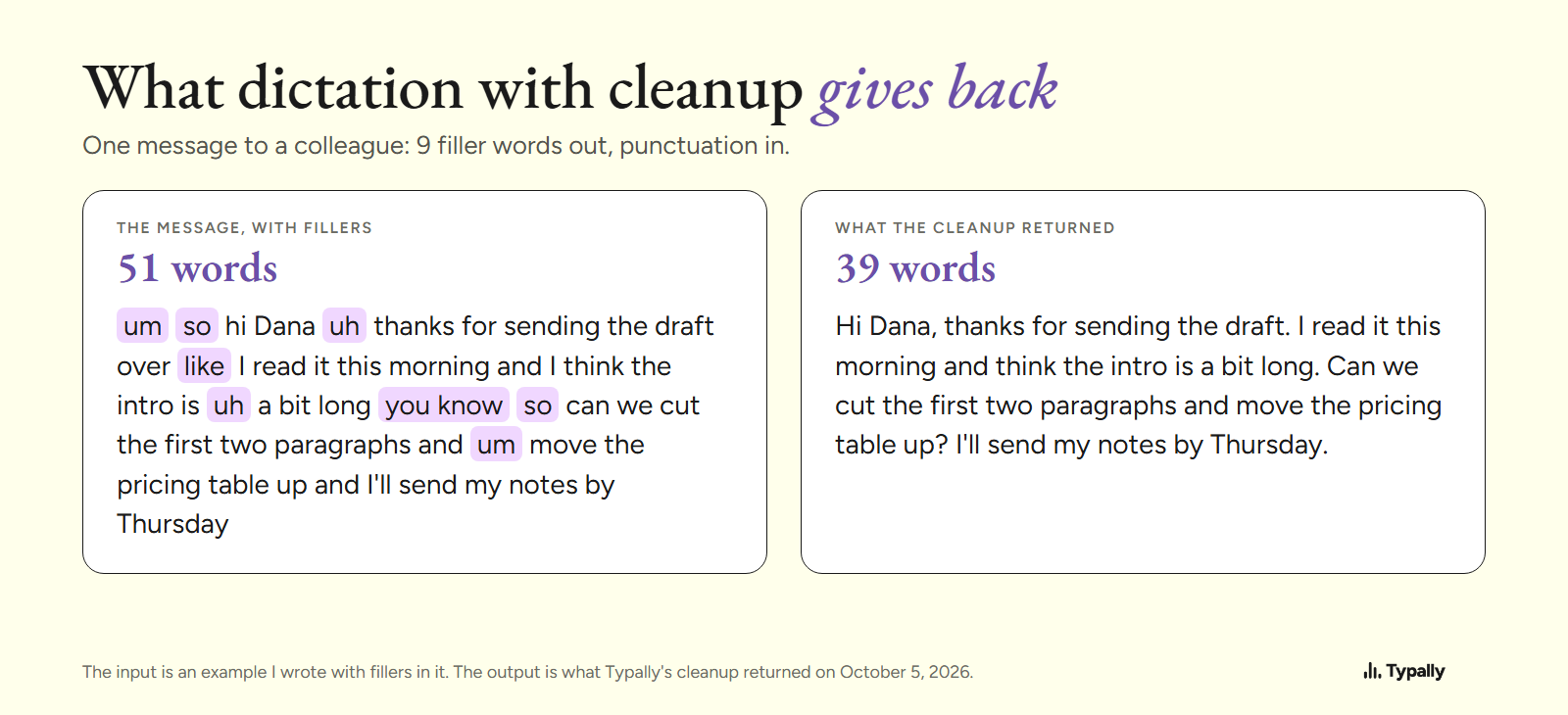
That is one app on one written example, not a test. AI dictation explains the cleanup step. If you need every word kept, such as a quote for an article, use a transcript.
Which free tools do dictation and transcription?
Dictation comes with Windows and macOS. Transcription depends more on your computer.
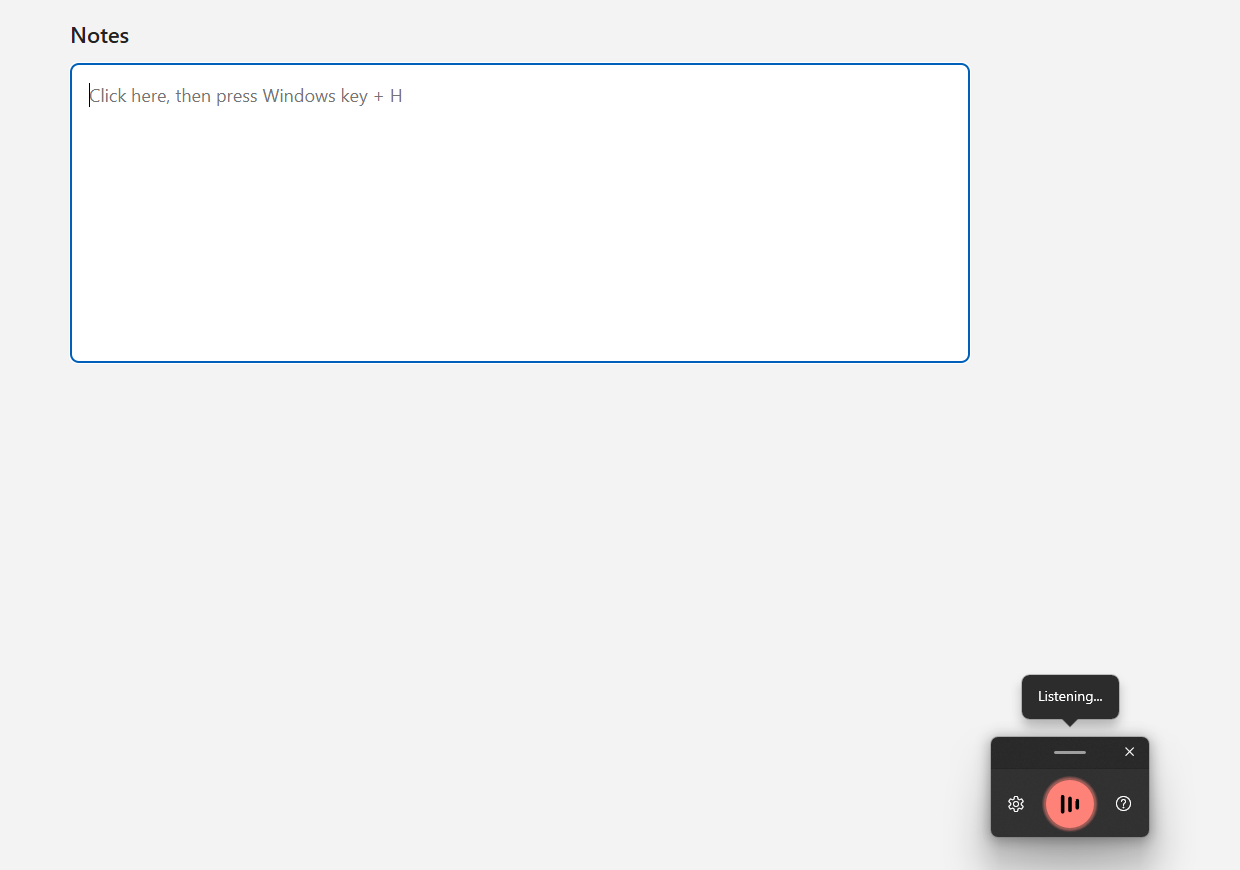
On Windows 11, dictation is voice typing: Windows key + H. Microsoft's voice typing page gives the conditions: "To use voice typing, you'll need to be connected to the internet, have a working microphone, and have your cursor in a text box."
On a Mac, Apple's Dictation page says you can "speak to enter text anywhere you can type it". In a browser, our voice to text tool allows "5 recordings per day, no signup".
For transcription, a Mac has a built-in route. Apple's Notes page says: "You can record audio and have the spoken words transcribed in a note." It needs a Mac "with M1 or later" and one of the device languages Apple lists, as of October 2026.
For a file, our free audio to text converter allows "5 transcriptions per day, up to 25 MB per file". If you already pay for Microsoft 365 and transcribe an interview or two a month, Word's Transcribe covers it. Every other route is in speech to text on a computer.
Where does Typally fit?
Typally, voice typing for Mac and Windows, does both jobs in one app. To dictate, hold your shortcut key, talk and let go. The text appears where the cursor is: Gmail, Slack, ChatGPT or any other app. The cleanup is on by default: it removes the ums and fixes the punctuation and capitals.
To transcribe, choose an audio file and Typally types the recording out. Pro adds meeting notes. It needs an internet connection. When you dictate, it listens only while you hold the key, and the audio is discarded after transcription.
Download Typally free at typally.com for Windows or Mac. The free plan gives you 100 minutes a month and doesn't ask for a card.
What else do people ask about dictation vs transcription?
Transcribe vs dictate: which verb is right?
You dictate, and the software transcribes. Oxford defines dictate as "to say words for somebody else to write down or to be recorded". Its entry for transcribe begins "to record thoughts, speech or data in a written form".
Can dictation transcribe a recording?
Dictation listens to your microphone, so a recording needs a feature that takes a file. Word's Transcribe has "Upload audio". Our audio to text converter takes one in the browser.
Is Typally free?
There's a free plan with 100 minutes of dictation a month, forever, and it doesn't ask for a card. Pro is $11.99 a month with a 14-day free trial, and the trial needs a card. Or $96 a year.