AI dictation is voice typing in two steps: a large speech model writes down what you said, then a language model cleans it up. The cleanup takes out the ums and adds the punctuation and capitals.
In short:
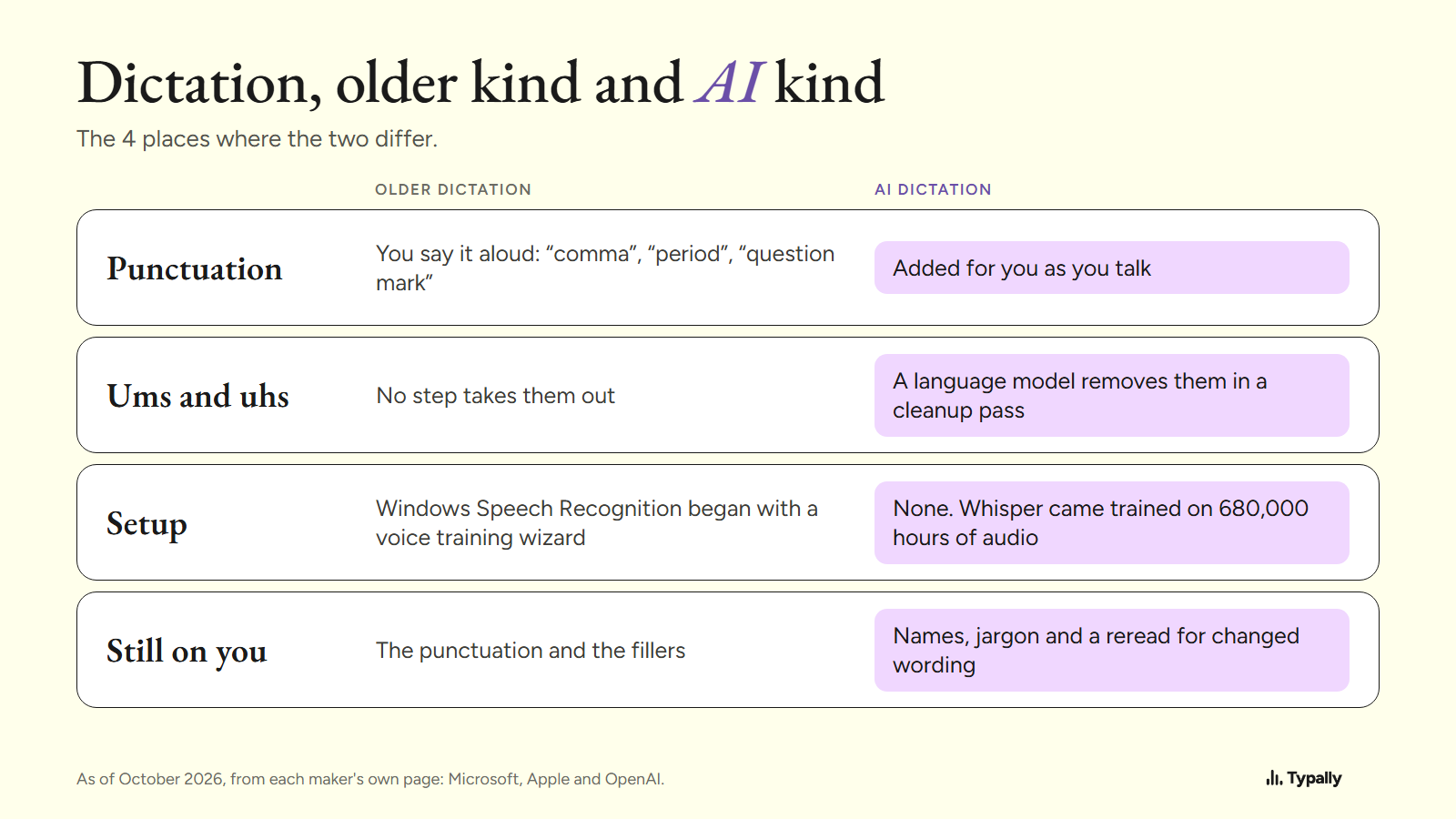
- Older dictation typed what it heard. You said "comma" and "period" aloud, and Windows Speech Recognition began with a voice training wizard.
- AI dictation listens with a large speech model. OpenAI's Whisper is one, and it learned from 680,000 hours of audio collected from the web.
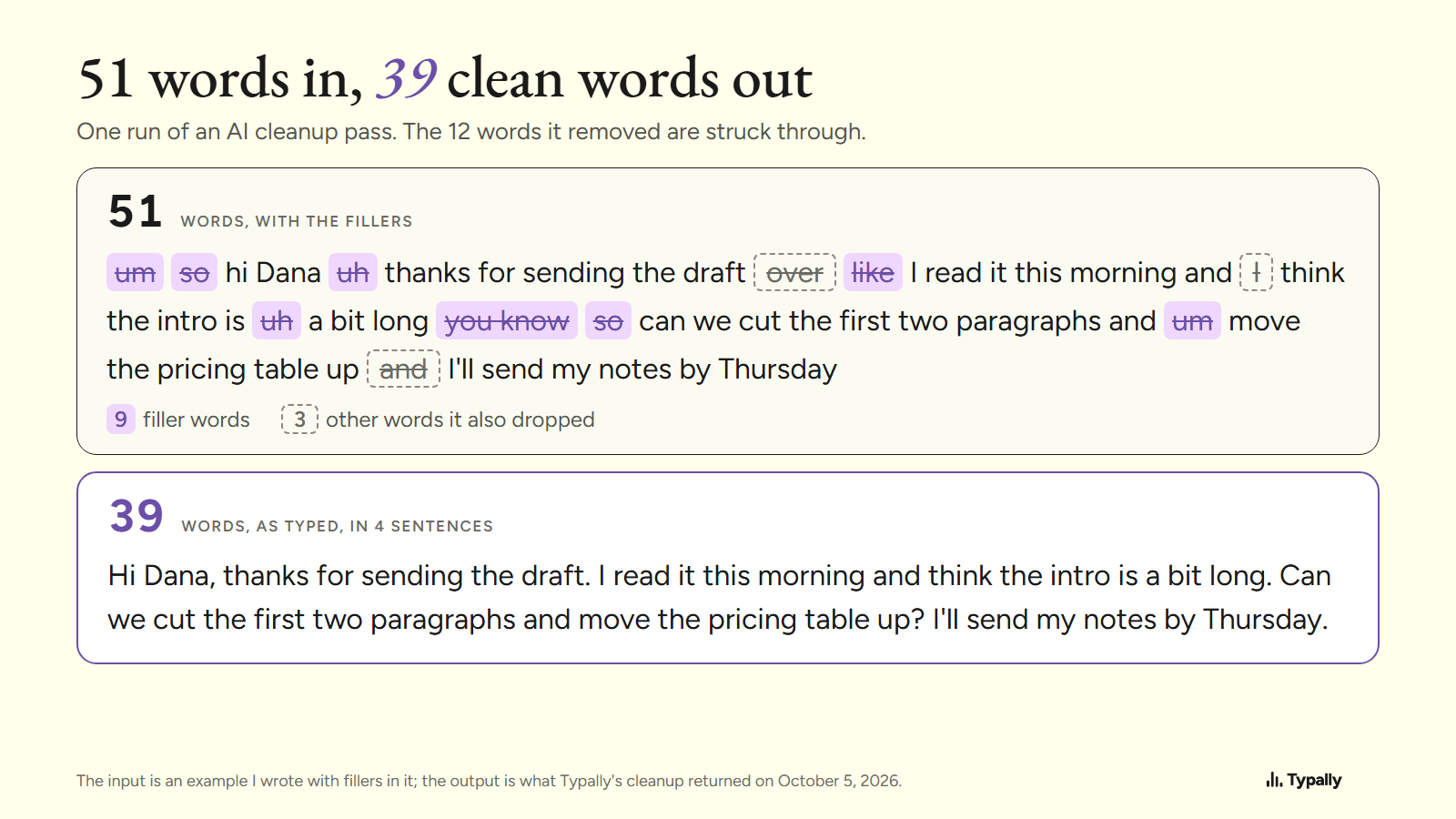
- In one run of Typally's cleanup on October 5, 2026, a 51-word message written the way people speak came back as 39 words in 4 sentences.
I build Typally, and it comes up near the end. By September 30, 2026, I had dictated 476,777 words with it, by the app's own count: my number, not a typical one.
How did dictation work before AI?
It typed what it heard, and you added the punctuation by voice. Microsoft's voice typing page still lists the commands: "comma", "question mark", and "period" or "full stop". Apple's command list for Mac Dictation has the same entry: "period/point/dot/full stop".
Some software wanted to learn your voice first. Microsoft's page for Windows Speech Recognition says "You can teach Windows 10 to recognize your voice". Its setup dialog box reads "Welcome to Speech Recognition Voice Training". On Windows 11 (22H2 and later), Microsoft replaced that tool with voice access in September 2024.
No step took the ums out. On Microsoft's page, correcting filler words appears only under Fluid dictation, covered below. Apple's Dictation page doesn't mention filler words.
What does the AI part change?
Two things: how the software listens, and what happens to the text afterward. The listening changed with models like Whisper. OpenAI's announcement of September 21, 2022 says it was "trained on 680,000 hours of multilingual and multitask supervised data collected from the web". It comes already trained, so there is no wizard for your voice.
OpenAI says the varied audio brought "improved robustness to accents, background noise and technical language". Across many datasets, in its own 2022 tests, Whisper made "50% fewer errors" than models tuned for one benchmark.
The second change is a cleanup pass. A language model reads the raw text, drops the fillers, and adds punctuation and capitals.
The built-in tools are moving the same way. Apple's Dictation page says that in supported languages it "automatically inserts commas, periods, and question marks for you as you dictate". Windows voice typing has an Automatic punctuation setting.
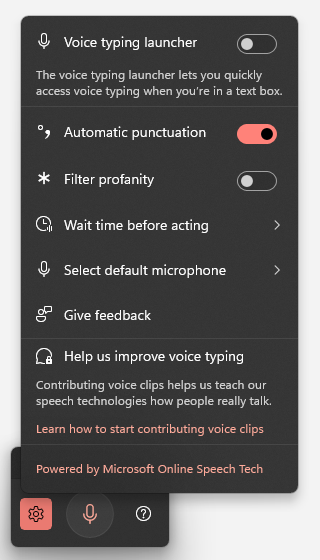
Microsoft goes further on Copilot+ PCs. Its page describes Fluid dictation, which "automatically corrects grammar, punctuation, and filler words as you speak". It is "powered by on-device small language models" and works in English, as of October 2026. The menu on the PC above doesn't list it.
The two kinds differ in 4 places.
What does the cleanup do to one real sentence?
It removes the fillers, splits the run-on into sentences, and can drop a word or two of yours. The input below is an example I wrote with fillers in it; the output is what Typally's cleanup returned on October 5, 2026.
Before (51 words)
um so hi Dana uh thanks for sending the draft over like I read it this morning and I think the intro is uh a bit long you know so can we cut the first two paragraphs and um move the pricing table up and I'll send my notes by Thursday
After (39 words)
Hi Dana, thanks for sending the draft. I read it this morning and think the intro is a bit long. Can we cut the first two paragraphs and move the pricing table up? I'll send my notes by Thursday.
Of the 12 words that went, 9 were fillers. The other 3 were real words: "over", one "I" and one "and". It added 3 periods, a comma and a question mark.
The input was typed, not recorded, so this shows the cleanup step alone. In Typally the full path is a Whisper model for the transcription, then this cleanup pass.
What does AI dictation still get wrong?
Four things: names and jargon, words you never said, changed wording, and the need for a connection.
- Names and jargon. OpenAI's speech-to-text guide tells developers to add a prompt "to improve recognition of names, acronyms, formatting, or recording-specific vocabulary". In a dictation app, that job falls to the custom word list.
- Words you never said. Whisper's model card warns that its output "may include texts that are not actually spoken in the audio input". It also says the models "perform unevenly across languages".
- Changed wording. The run above lost 3 real words. The meaning held, but read a message before you send it. Microsoft gives Fluid dictation an undo: say "Revert" or "Undo that".
- The connection. Microsoft says that to use voice typing "you'll need to be connected to the internet". Typally needs a connection too. Superwhisper, listed below, is one that doesn't.
What should you check before picking an AI dictation tool?
Check 4 things: where it types, whether it cleans up, where the audio goes, and the price.
- Where it types. A mic button inside one app types only in that app. Windows voice typing needs "your cursor in a text box", and Apple says Dictation enters text "anywhere you can type it".
- Whether it cleans up. Automatic punctuation is common now. Ask if the tool also removes filler words, and if you can switch that off.
- The audio. Look for 3 answers on the privacy page: device or server, kept or deleted, used for training or not.
- Price. The built-in tools are free, and the three apps below each have a free plan.
Which AI dictation tools are worth a look?
Start with the free one already on your computer. The facts below are from each maker's own page, as of October 2026. The full lists are in dictation software for Windows and dictation software for Mac.
- Windows voice typing (free). Press Windows key + H in a text box. On a Copilot+ PC in English, Fluid dictation makes it the first thing to try. The steps are in speech to text on Windows.
- Mac Dictation (free). Apple says you "can dictate text of any length without a timeout", and it stops after 30 seconds of silence.
- Wispr Flow. Its pricing page lists a free plan and Pro at $15 a user a month, or $12 a month billed yearly. It has phone apps, which Typally doesn't.
- Superwhisper. Its site says it can transcribe offline, and its free plan lists "Unlimited use of Whisper models". Pick it if you often have no connection.
Coming from Dragon? See Dragon NaturallySpeaking alternatives.
Where does Typally fit?
Typally, voice typing for Mac and Windows, is the two-step kind described above. Hold your shortcut key, talk, let go, and the text appears where your cursor is. That can be Gmail, Slack, ChatGPT or any other text box. The cleanup is on by default: it removes the ums and fixes the punctuation and capitals.
It listens only while you hold the key. The audio is discarded after transcription, and your history stays on your computer. It has a custom vocabulary for names and 100 dictation languages. It needs an internet connection.
Download Typally free at typally.com for Windows or Mac. The free plan gives you 100 minutes a month and doesn't ask for a card.
What else do people ask about AI dictation?
Is AI dictation the same as speech to text?
Speech to text is the first step: sound in, words out. AI dictation adds the cleanup step and types the result into the app you're in.
Is Windows voice typing AI dictation?
In part: Microsoft says it uses online speech recognition "powered by Azure Speech services", and it can punctuate for you. Filler-word cleanup comes with Fluid dictation, on Copilot+ PCs in English. Typally vs Windows voice typing compares the two.
Is Typally free?
There's a free plan with 100 minutes of dictation a month, forever, and it doesn't ask for a card. Pro is $11.99 a month with a 14-day free trial, and the trial needs a card. Or $96 a year.