The Dragon NaturallySpeaking alternatives for plain dictation are free tools built into Windows 11 and macOS, and newer apps that clean up your words. Dragon is still the right buy for shared voice macros, a legal vocabulary, or batches of recordings.
In short:
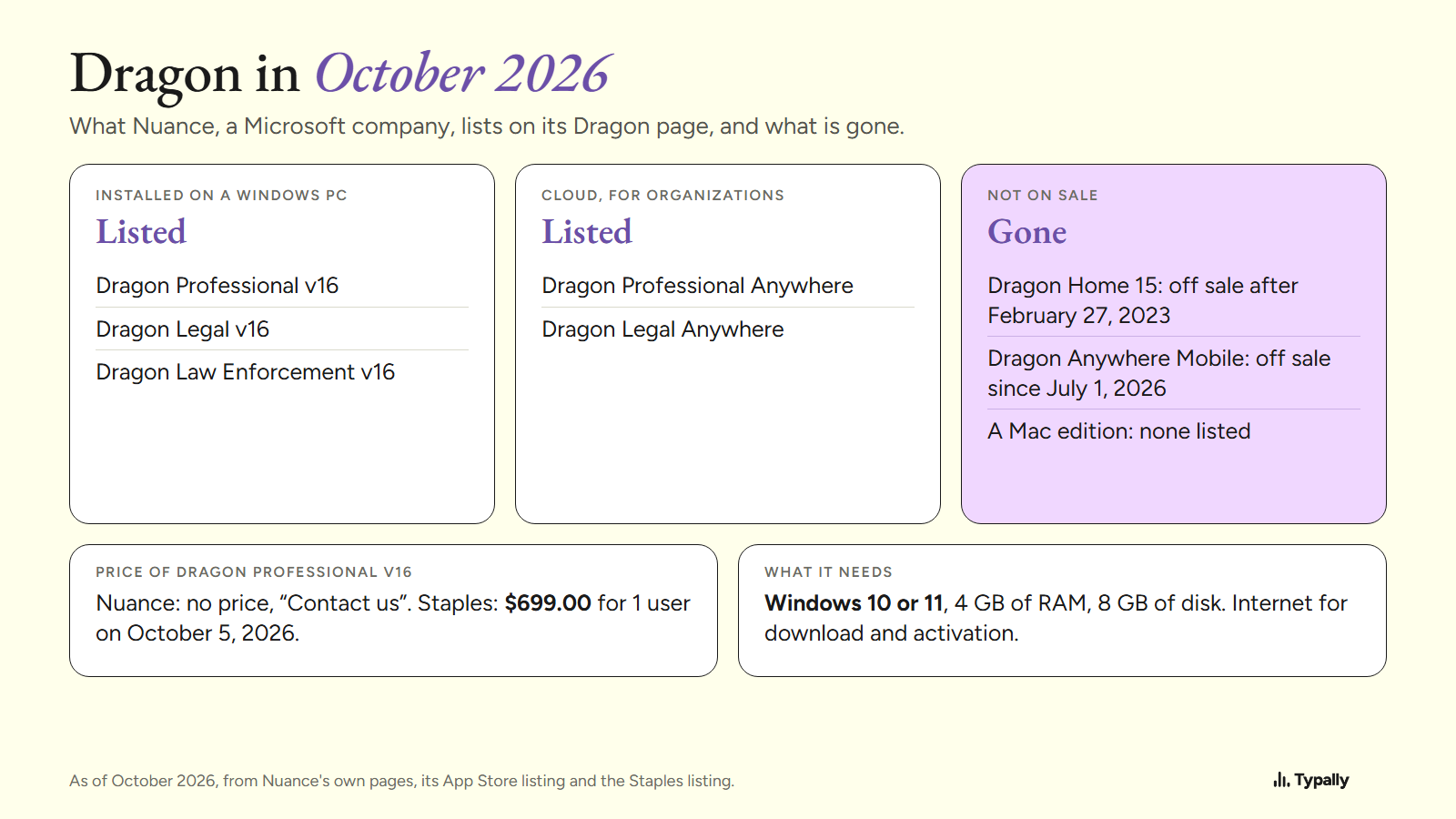
- Dragon today is Dragon Professional v16, a Windows-only program for business. Nuance, a Microsoft company, lists no Home edition and no Mac edition.
- To control a computer by voice, Windows 11 has Voice access and macOS has Voice Control. Both are free, and both accept your own commands.
- To write by voice, start with the free built-in dictation. Apps such as Wispr Flow, Superwhisper and Typally add a cleanup step in any app.
I build Typally, and it comes up near the end. I've dictated 476,777 words with it, by the app's own count on September 30, 2026. I did not speak into the other tools for this article. Each fact comes from its maker's page, read on October 5, 2026, and the Windows screens are from my PC.
What is Dragon NaturallySpeaking called now, and what does it cost?
It's called Dragon Professional v16, and it runs only on Windows. The name NaturallySpeaking (often typed "Naturally Speaking") no longer appears on Nuance's Dragon page.
As of October 2026, that page lists 3 installed products: Dragon Professional v16, Dragon Legal v16 and Dragon Law Enforcement v16. It also lists cloud versions. The v16 data sheet asks for Windows 10 or 11, 4 GB of RAM and 8 GB of disk space. It needs internet only for download and activation.
No Mac product is on the page. A Nuance advisory says Dragon Home 15 would not be sold after February 27, 2023. The phone app's App Store listing says that, as of July 1, 2026, it "is no longer available for sale."
Nuance shows no price for Dragon software, only a "Contact us" link. On October 5, 2026, Staples listed the 1-user download of Dragon Professional v16 at $699.00.
Who should still buy Dragon?
Buy Dragon if your work depends on one of these 4 things, all from Nuance's own pages.
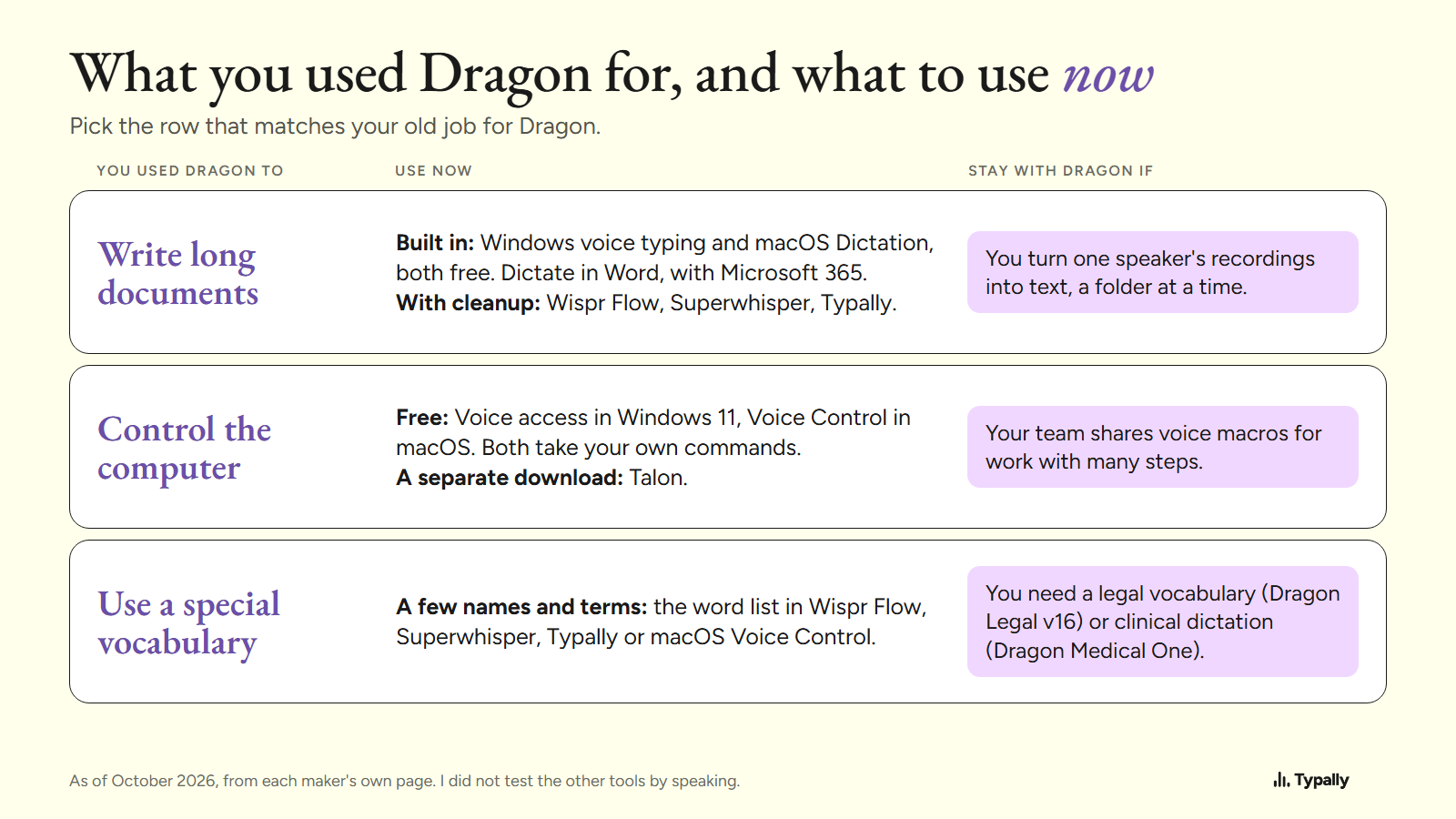
- Shared macros. Custom voice commands insert standard text or run a task with many steps. A team can share them.
- A legal vocabulary. Dragon Legal has one "trained on more than 400 million words from legal documents."
- Recordings. Dragon types out audio files of a single speaker, and can work through a folder of them.
- Hands-free extras. The data sheet lists a mouse grid across several monitors and playback of your dictated audio.
Clinical dictation is a separate line. Microsoft sells Dragon Medical One and Dragon Copilot to care teams.
What replaces Dragon for controlling a PC by voice?
On Windows 11, Voice access does, and it's free. Microsoft says you can "open and switch between apps, browse the web, and read and author emails using your voice." It runs on the device and "works even without the internet." It needs Windows 11, version 22H2 or later.
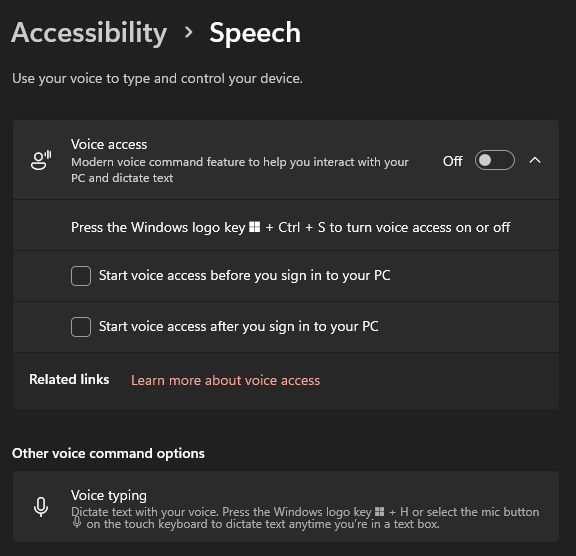
Custom commands exist too. Voice shortcuts can paste text, open files, apps or links, and press keys. One shortcut holds up to 8 actions. As of October 2026, they work in 6 kinds of English only.
On a Mac, Voice Control does this job. Apple's examples are "Open Mail," "Scroll Down," and "Click Done." You can create your own commands that paste text, press a keyboard shortcut or run a Shortcut. These steps are Apple's; I have no Mac screens here.
Talon is a separate download for Windows and macOS, with no price shown on its page. The page lists commands and dictation, custom commands, "Mouse by just looking" and "Pop to click, hiss to scroll."
What replaces Dragon dictation for writing long documents?
Start with the dictation already on your computer. As of October 2026 there are 3 options: 2 are free, and 1 comes with Microsoft 365.
- Windows voice typing. Press Windows key + H in a text box. Microsoft's page says it needs internet and a microphone. On Copilot+ PCs, "Fluid dictation" also corrects grammar, punctuation and filler words, in English.
- macOS Dictation. Apple says "You can dictate text of any length without a timeout." It stops after 30 seconds of silence, and adds commas, periods and question marks in supported languages.
- Dictate in Word. Go to Home, then Dictate. Microsoft says it is "only available to Microsoft 365 subscribers" and needs internet.
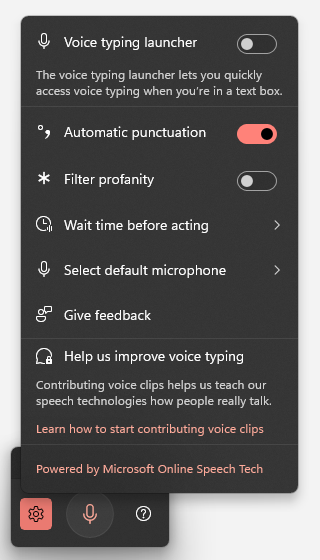
On a PC like mine, nothing in that menu removes filler words. Dictation apps add that step in any app.
- Wispr Flow "automatically removes filler words, adds punctuation, and formats your writing." Its free plan allows 2,000 words a week on desktop. Pro is $15 per user a month, or $12 a month billed yearly.
- Superwhisper promises to "Turn your voice into polished text," online or not: "No Wi-Fi, no problem." It has a free plan, and Pro is $8.49 a month.
Here is one cleanup, from Typally. The input is an example I wrote with fillers in it. The output is what Typally's cleanup returned on October 5, 2026.
um so hi Dana uh thanks for sending the draft over like I read it this morning and I think the intro is uh a bit long you know so can we cut the first two paragraphs and um move the pricing table up and I'll send my notes by Thursday
Hi Dana, thanks for sending the draft. I read it this morning and think the intro is a bit long. Can we cut the first two paragraphs and move the pricing table up? I'll send my notes by Thursday.
That is 51 words in and 39 out. For full comparisons, see dictation software for Windows and dictation software for Mac. AI dictation explains how these apps differ from older dictation.
What replaces Dragon for legal, medical or technical vocabulary?
For a full legal or clinical vocabulary, stay in the Dragon family: Dragon Legal v16, or Microsoft's Dragon Medical One and Dragon Copilot.
For a few dozen names and terms, a word list is enough. Wispr Flow has a dictionary. Superwhisper asks you to "Enter names, abbreviations, and specialized terms once." macOS Voice Control takes vocabulary terms, and Typally has a custom vocabulary.
Typally has no medical or legal edition. If your records fall under a privacy rule, ask any vendor for its terms in writing first.
Where does Typally fit?
Typally, voice typing for Mac and Windows, covers one of Dragon's jobs: writing. Hold your shortcut key, talk, let go, and the text appears where the cursor is. That can be Word, Google Docs, Outlook or ChatGPT. The cleanup is on by default: it removes the ums and fixes the punctuation and capitals.
There is a hands-free mode for long thoughts. Typally needs an internet connection, and it does not control the computer by voice. It listens only while you hold the key. Audio is discarded after transcription, and your history stays on your computer.
Pro is $11.99 a month with a 14-day free trial, and the trial needs a card. Or $96 a year. Download Typally free at typally.com. The free plan gives you 100 minutes a month and doesn't ask for a card.
What else do people ask about Dragon?
Is Dragon NaturallySpeaking still sold?
Yes, under another name. As of October 2026, Nuance lists Dragon Professional v16 for Windows 10 and 11, with no price on the page. Staples listed it at $699.00 on October 5, 2026.
Is there a Dragon for Mac?
Nuance's Dragon page lists none, and the v16 data sheet names only Windows. On a Mac, Apple's Dictation and Voice Control are free.
What is the closest free tool to Dragon on Windows?
Voice access in Windows 11. It combines dictation with voice commands, runs on the device, and takes custom voice shortcuts in English. Speech to text on Windows has the setup steps.
Is Typally free?
There's a free plan with 100 minutes of dictation a month, forever, and it doesn't ask for a card. Pro has a 14-day free trial, and the trial needs a card.