Dictation commands are words a dictation tool treats as instructions: say "comma" and it types a comma. Four are on every list for Windows voice typing, Mac Dictation, Word and Google Docs: "period", "comma", "question mark" and "new line".
In short:
- To dictate punctuation, say the mark's name. "Period", "comma", "question mark" and "new line" are on the English lists for all four tools, as of October 2026.
- Editing by voice differs most. Windows voice typing and Word list "delete that" and "scratch that", Google Docs lists "delete", and Apple's list for Mac Dictation has no editing command.
- Automatic punctuation is a setting in Windows voice typing, Mac Dictation and Word. Google's page for Docs voice typing describes none.
Every phrase here comes from the maker's own support page, opened on October 7, 2026. The pages are Microsoft's for Windows voice typing and Dictate in Word, Apple's commands for dictating text, and Google's Type & edit with your voice. These are the English lists. I did not try the commands by voice for this article. I build Typally, and it comes up near the end.
For the keys that start each tool, see voice typing shortcuts.
What do you say to dictate punctuation?
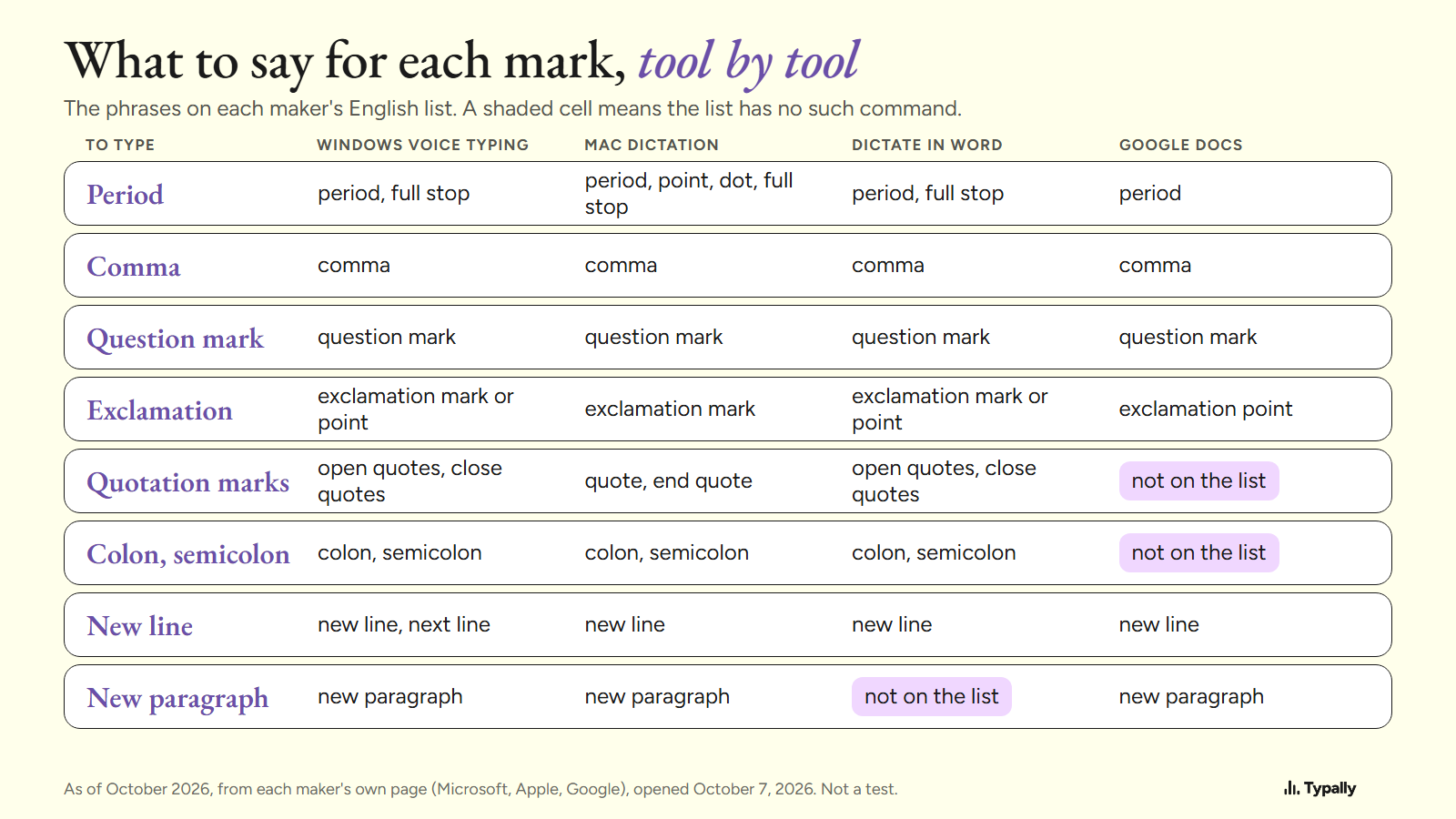
Say the name of the mark where you want it. The table has each maker's phrases; its last four rows are editing commands. I wrote them in lower case and split Microsoft's "new/next line" into two phrases.
| To get | Windows voice typing | Mac Dictation | Dictate in Word | Google Docs voice typing |
|---|---|---|---|---|
| Period | "period", "full stop" | "period", "point", "dot", "full stop" | "period", "full stop" | "period" |
| Comma, question mark | "comma", "question mark" | "comma", "question mark" | "comma", "question mark" | "comma", "question mark" |
| Exclamation mark | "exclamation mark", "exclamation point" | "exclamation mark" | "exclamation mark", "exclamation point" | "exclamation point" |
| Quotation marks | "open quotes", "close quotes" | "quote", "end quote" | "open quotes", "close quotes" | Not on the list |
| Colon, semicolon | "colon", "semicolon" | "colon", "semicolon" | "colon", "semicolon" | Not on the list |
| New line | "new line", "next line" | "new line" | "new line" | "new line" |
| New paragraph | "new paragraph" | "new paragraph" | Not on the list | "new paragraph" |
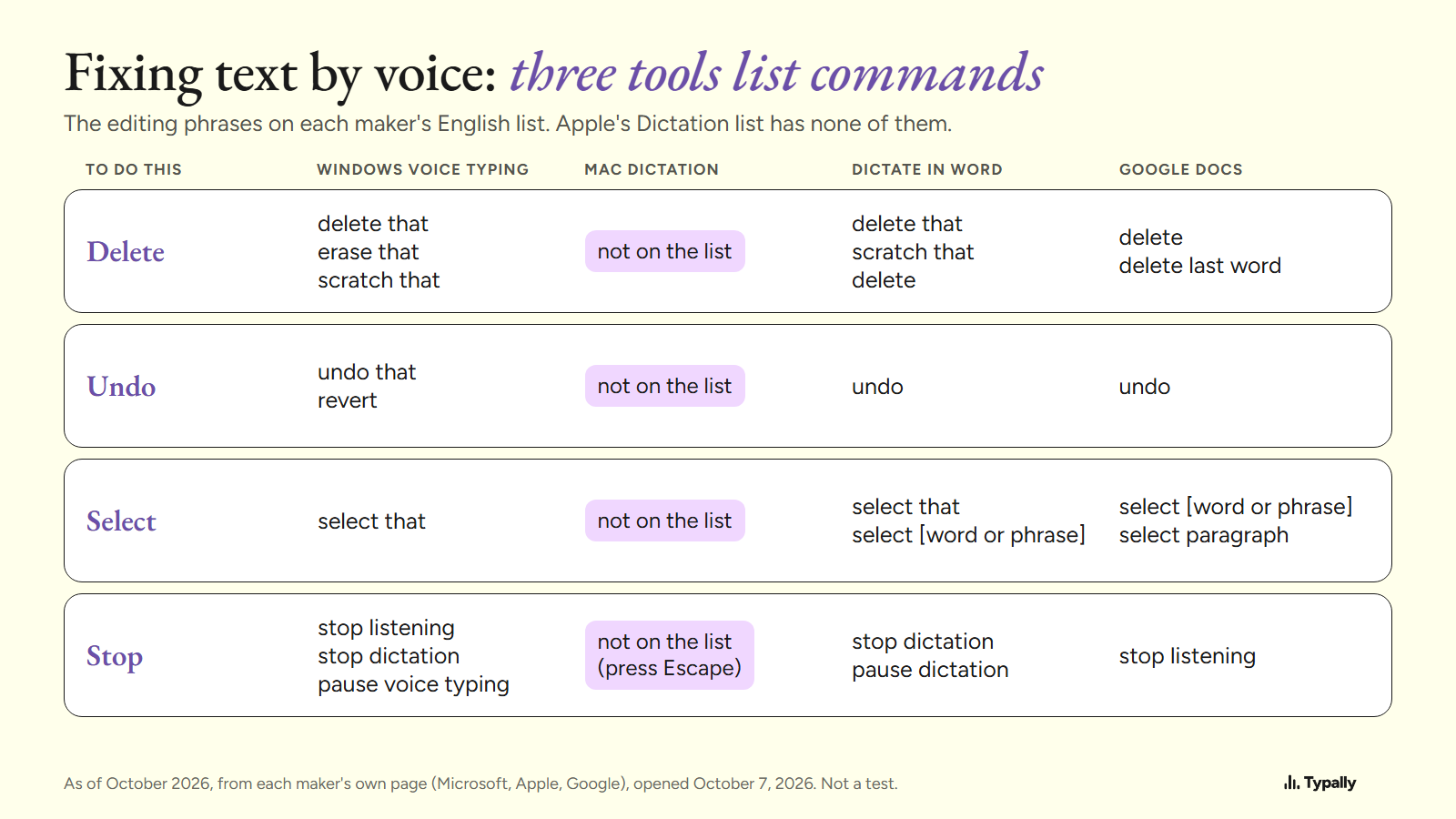
| Delete | "delete that", "erase that", "scratch that" | Not on the list | "delete that", "scratch that", "delete" | "delete", "delete last word" |
| Undo | "undo that", "revert" | Not on the list | "undo" | "undo" |
| Select | "select that" | Not on the list | "select that", "select [word or phrase]" | "select [word or phrase]", "select paragraph" |
| Stop | "stop listening", "stop dictation", "pause voice typing" | Not on the list (press Escape) | "stop dictation", "pause dictation" | "stop listening" |
No single phrase for "!" is on all four lists. Apple lists only "exclamation mark", and Google only "exclamation point".
Google's punctuation list is the shortest, with 6 commands. Apple's page is the longest: by my count, 65 commands. Five of them set capitals, such as "caps on" and "all caps".
How do you start a new line or a new paragraph?
Say "new line" in any of the four tools. "New paragraph" is on three of the lists: Windows voice typing, Mac Dictation and Google Docs.
Microsoft's English list for Dictate in Word has "new line" and, under Creating lists, "next line". It has no "new paragraph", so I can't say that phrase works there.
On a Mac, the break may not show at once. Apple's Dictation page says: "The new line or new paragraph appear when you’re done dictating."
Which commands delete, undo and select text?
Windows voice typing, Word and Google Docs each list editing commands. Apple's list for Mac Dictation has none.
- Windows voice typing. Microsoft's English (United States) list has 8 actions: stop or pause, delete, select, undo, and the Enter, Backspace, Tab and Space keys. "Delete that" deletes the "last spoken word or phrase".
- Dictate in Word. Microsoft's tips: "Saying “delete” by itself removes the last word or punctuation before the cursor." "Delete that" removes "the last spoken utterance". The list also formats: "bold", "create bullet list".
- Google Docs. Google's tip: "If you say “Delete” by itself, you delete the word before the cursor." Its lists also format: "Bold", "Insert table". "Undo" is in its troubleshooting tips, not in those lists.
- Mac Dictation. None of Apple's 65 commands deletes, undoes or selects. Apple puts text editing in Voice Control, a separate feature: its page gives "Replace cat with dog" as an example. How to dictate on a Mac covers both.
Why does a tool type the command as a word?
The makers' pages give two conditions beyond the right phrase: the right language and a pause.
- Language. Google says: "Voice commands are available only in English. The account language and document language must both be English." Windows voice typing has a separate command list for each of its 46 languages, by my count.
- The pause. Google's advice: "Pause before and after each command." On Windows, the Wait time before acting setting sets "how long Voice typing waits before carrying out a voice command".
If the tool doesn't start or hear you at all, see the fixes for Windows voice typing, Mac Dictation and Google Docs voice typing.
Can the tool add the punctuation for you?
Three of the four can, by their makers' pages, which leaves fewer commands to say.
Windows voice typing. Select the gear on the voice typing launcher. One setting there is Automatic punctuation, "to let voice typing automatically insert punctuation based on what you’re saying".
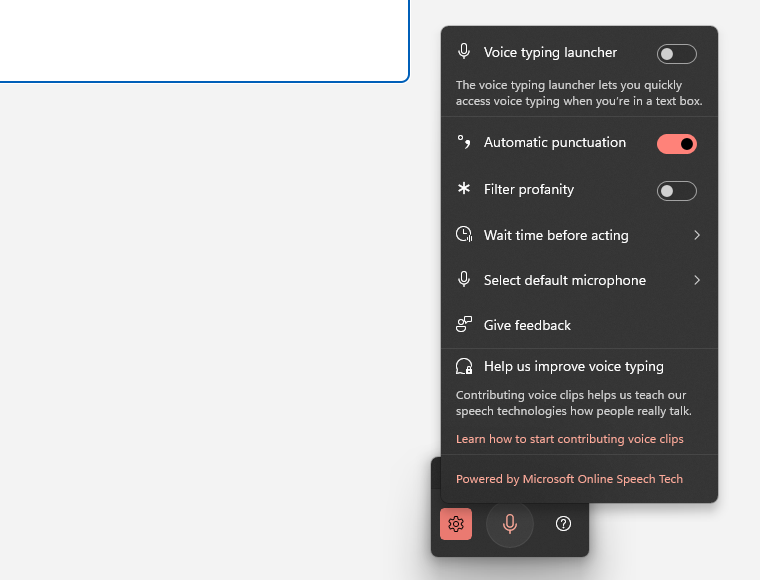
Microsoft's page doesn't say whether that switch starts on or off, so check yours. On Copilot+ PCs, in English, Microsoft's Fluid dictation "automatically corrects grammar, punctuation, and filler words as you speak".
Mac Dictation. Apple says: "In supported languages, Dictation automatically inserts commas, periods, and question marks for you as you dictate." The switch is Auto-punctuation, under Dictation in Keyboard settings.
Dictate in Word. Its gear menu has Auto Punctuation: "Toggle the checkmark on or off, if it's available for the language chosen". Dictate itself "is only available to Microsoft 365 subscribers".
Google Docs. Google's page describes no automatic punctuation, only the 6 spoken commands.
For short notes, a built-in tool with its switch on may be all you need. To place every mark yourself, the command lists give you that control.
Where does Typally fit?
Typally, voice typing for Mac and Windows, takes the other approach: you talk in plain sentences and its cleanup adds the marks. Hold your shortcut key, talk, let go, and the text appears where your cursor is. That can be Google Docs, Word, Gmail or any other app.
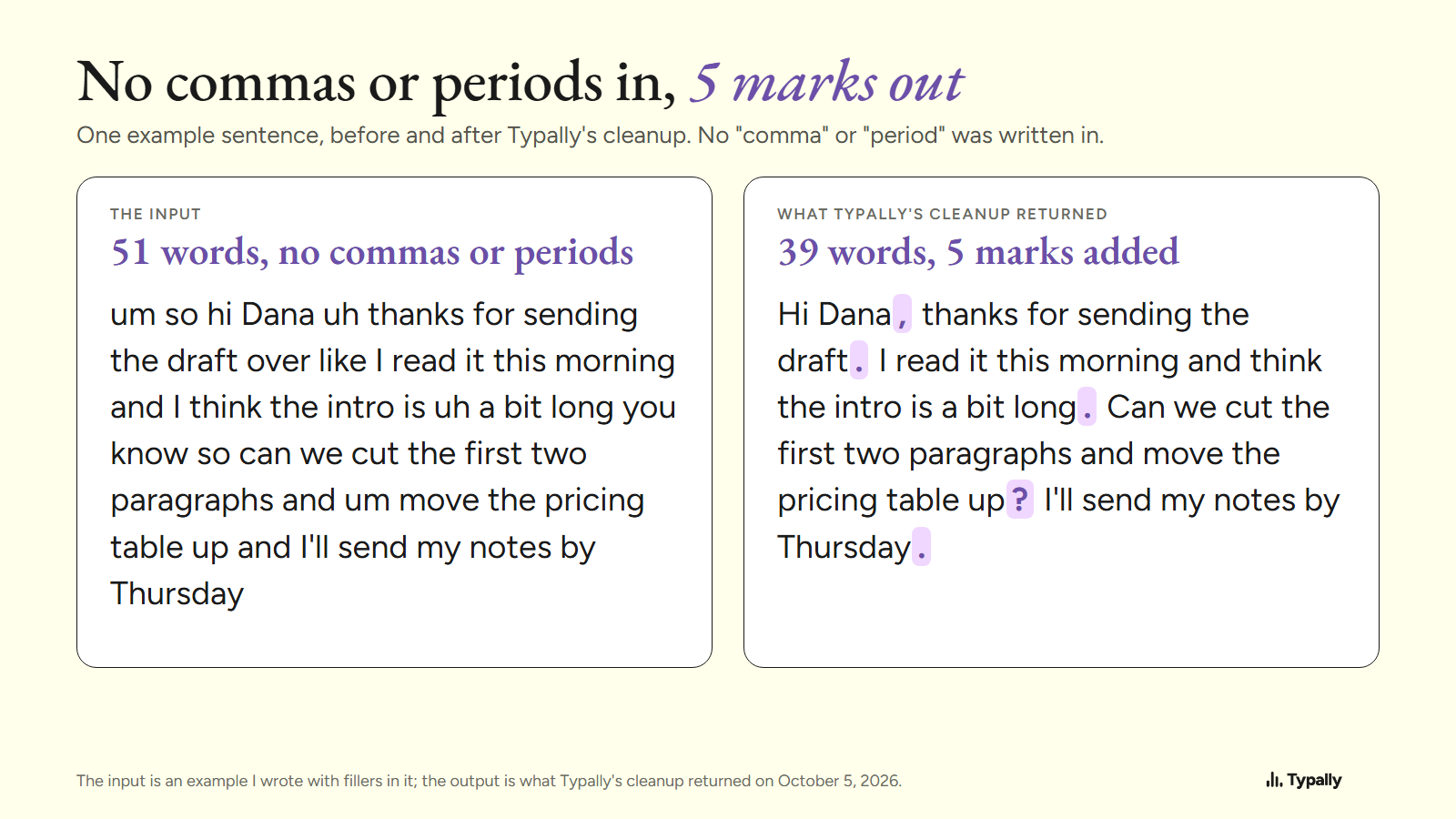
The cleanup is on by default. It removes the ums and fixes the punctuation and capitals. One run from October 5, 2026: the input is a 51-word example I wrote, with fillers and no comma or period. "um so hi Dana uh thanks for sending the draft over" came back as "Hi Dana, thanks for sending the draft."
Typally needs an internet connection, and it's one more app to install. It listens only while you hold the key. The audio is discarded after transcription, and your history stays on your computer.
To format by voice, Word's Dictate and Docs voice typing are the better pick: their lists have commands for bold, lists and tables. Download Typally free at typally.com for Windows or Mac. The free plan gives you 100 minutes a month and doesn't ask for a card.
What else do people ask about dictation commands?
What are the dictation commands in Word?
Microsoft's English list for Dictate has punctuation ("period", "comma", "new line"), editing ("delete that", "undo") and formatting ("bold", "create bullet list").
How do you dictate punctuation in Google Docs?
Say one of Google's 6 commands: "Period", "Comma", "Exclamation point", "Question mark", "New line" or "New paragraph". Google says voice commands need the account language and the document language both set to English.
Are Windows 10 dictation commands the same as Windows 11?
No. Microsoft's Windows 10 list is separate, with "Delete that; strike that" and "Select that". Microsoft says those commands "are available in US English only".
Is Typally free?
There's a free plan with 100 minutes of dictation a month, forever, and it doesn't ask for a card. Pro is $11.99 a month with a 14-day free trial, and the trial needs a card.