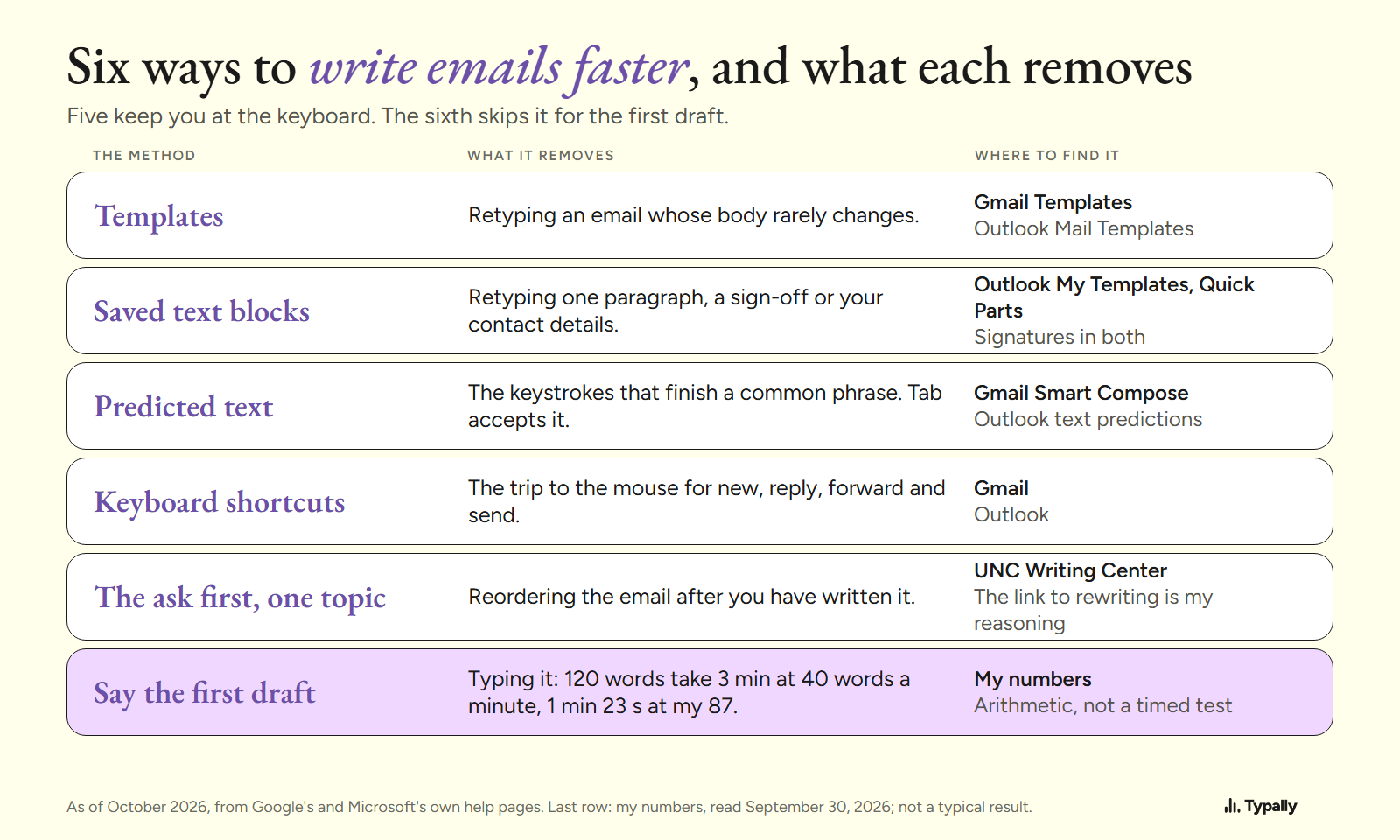
To write emails faster, stop retyping what you have typed before: save templates, accept predicted text and learn 5 keyboard shortcuts. Then put the ask in the first line, and say the long emails instead of typing them.
In short:
- Gmail and Outlook already have 4 of the 6 methods: templates, saved text blocks, predicted text and keyboard shortcuts.
- Neither company's help pages put a number on the time saved. So I say what each of those methods removes, and give no minutes.
- The one time figure is arithmetic. A 120-word email takes 3 minutes to type at 40 words a minute, and 1 minute 23 seconds to say at my 87.
I build Typally, a voice typing app, and it comes up near the end. I opened every page linked below on October 7, 2026. For typing speed itself, see How to Type Faster.
How do you write emails fast when most of them repeat?
Save the repeat as a template. Google's template page has the case in mind: "a message that includes information that doesn't change frequently".
In Gmail, turn templates on first: Settings, See all settings, Advanced, then Enable next to "Templates". After that, More options in the compose window has Templates. By Google's note, this works only in Gmail on a computer.
Outlook has two kinds, by Microsoft's template page. Mail Templates save "full emails, including recipients, subject, body, formatting, and attachments". The My Templates add-in "only stores short text snippets for quick insertion into an email". In new Outlook and Outlook on the web, the page says both need "a qualifying Microsoft 365 subscription".
A template removes the typing of everything that stays the same.
What about one paragraph you keep retyping?
Save it as a text block. In Outlook, that is the My Templates add-in above, which Microsoft suggests for "reusable phrases like standard replies".
Microsoft lists Quick Parts for Outlook for Microsoft 365, Outlook 2024 and Outlook 2021. Select the text, open the Insert tab, click Quick Parts, then "Save Selection to Quick Part Gallery".
The closing lines belong in a signature. Google describes a Gmail signature as text "automatically added at the end of Gmail messages as a footer". Outlook can add one to new emails, replies or forwards.
Does predicted text make an email faster to write?
It removes the keystrokes that finish a common phrase, and Google claims a speed gain without giving a number. Its Smart Compose page opens: "With Smart Compose, powered by machine learning, you can write emails faster." It suggests text as you type, and Tab accepts it.
Smart Compose works in 5 languages: English, Spanish, French, Italian and Portuguese. Google also warns that it "may not always predict factually correct information".
Outlook calls the same thing text predictions. You accept one with Tab or the Right arrow key.
Which keyboard shortcuts matter most for email?
The 5 that carry one message from start to send, with no trip to the mouse: new message, reply, reply all, forward and send. Google's shortcut page opens with "Save time navigating in Gmail by using keyboard shortcuts." Microsoft's list for Outlook says shortcuts help many users "work more efficiently". Neither gives a number.
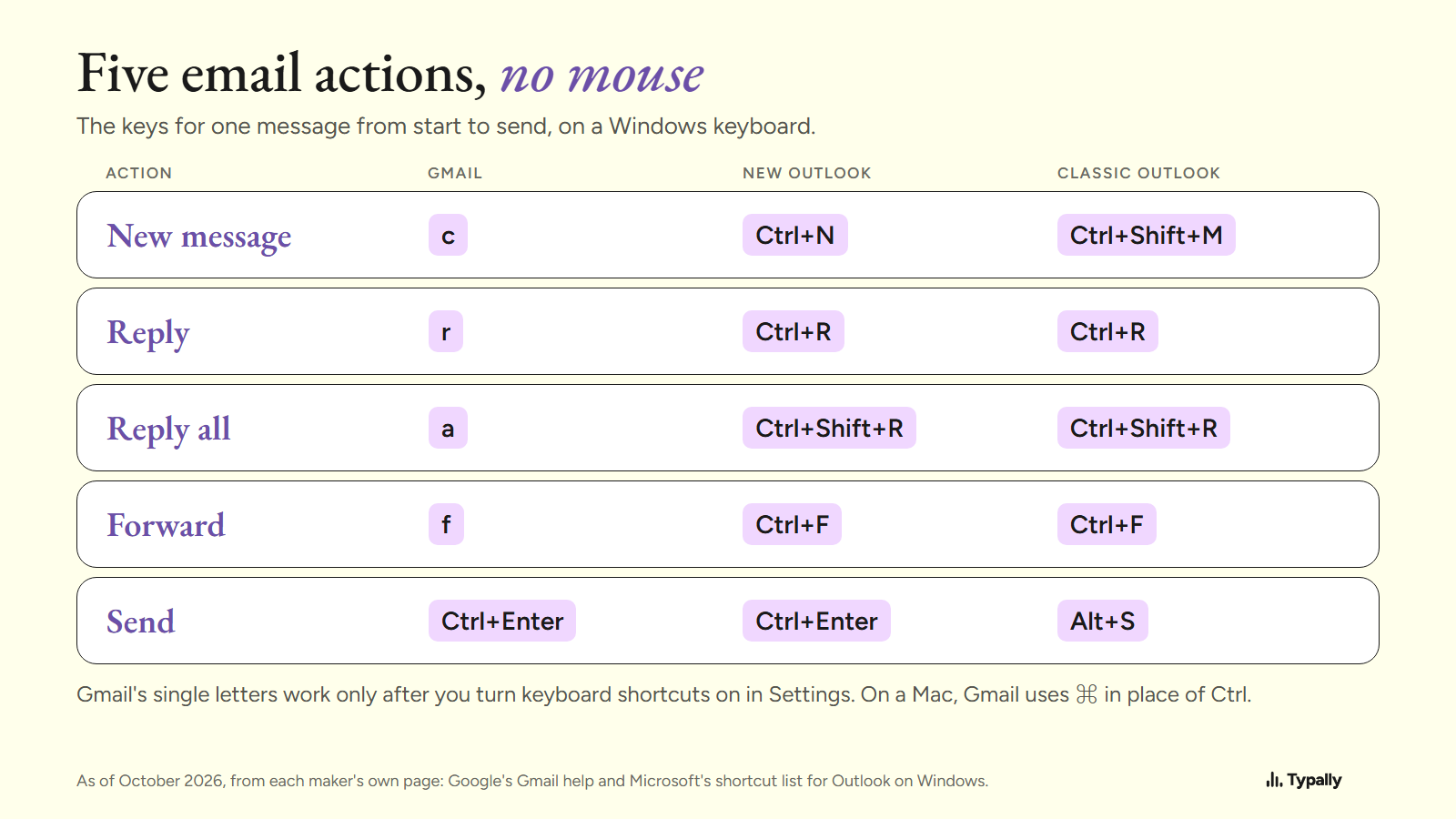
Google marks Gmail's single letters as shortcuts that "won't work unless keyboard shortcuts are turned on". Turn them on under Settings, See all settings, in the "Keyboard shortcuts" section. On a Mac, Gmail uses the Command key where Windows uses Ctrl.
How does putting the ask first cut the rewriting?
You decide what the email is for before you type it, so there is less to reorder afterward. That link is my reasoning, not a measured result.
The University of North Carolina's Writing Center tells email writers: "Briefly state your purpose for writing in the very beginning of your message." For more than one subject, it says to "consider writing separate emails if you have many unrelated points or questions".
So: the ask in the first line, the facts the reader needs to answer it, then stop. For the wording of the message itself, see Business English for Emails and Chat.
Is saying an email faster than typing it?
For the first draft of a long email, the arithmetic says yes. Take a 120-word email, an example length. At a commonly cited 40 words a minute, typing it takes 3 minutes. That 40 is an average with no single study behind it, not my measurement. Average typing speed has the sourced figures.
On September 30, 2026, my Typally Insights screen showed 476,777 words dictated in 91 hours 31 minutes. That is about 87 words a minute with every pause counted. At that pace, 120 words take 1 minute 23 seconds.
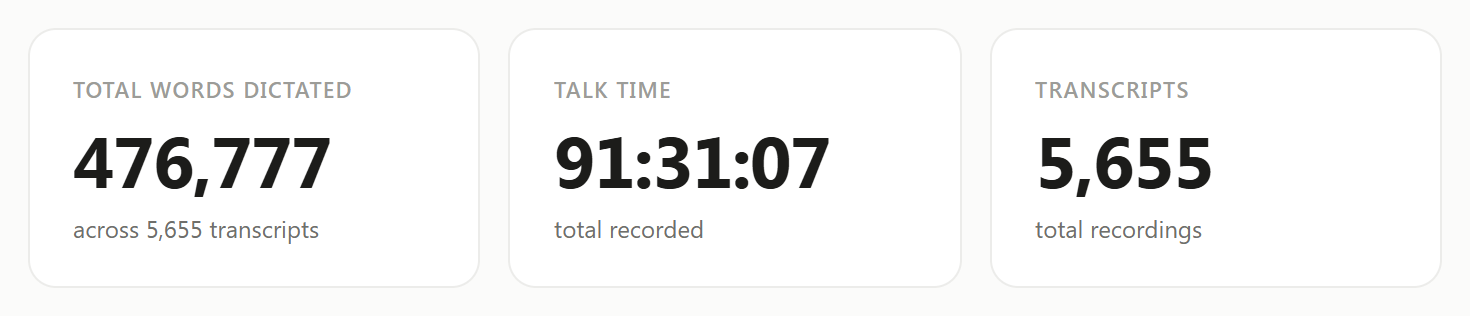
Two limits. I use Typally for prompting AI, so my 87 is not an email measurement. And the arithmetic covers only getting the words down, not deciding what to say or reading it over.
The gap is 1 minute 37 seconds on one email. I found no source that measures a bigger saving, so I don't claim one.
Talking brings filler words. I wrote an example email, 51 words with 9 fillers in it. Typally's cleanup returned this on October 5, 2026, in 39 words:
Hi Dana, thanks for sending the draft. I read it this morning and think the intro is a bit long. Can we cut the first two paragraphs and move the pricing table up? I'll send my notes by Thursday.
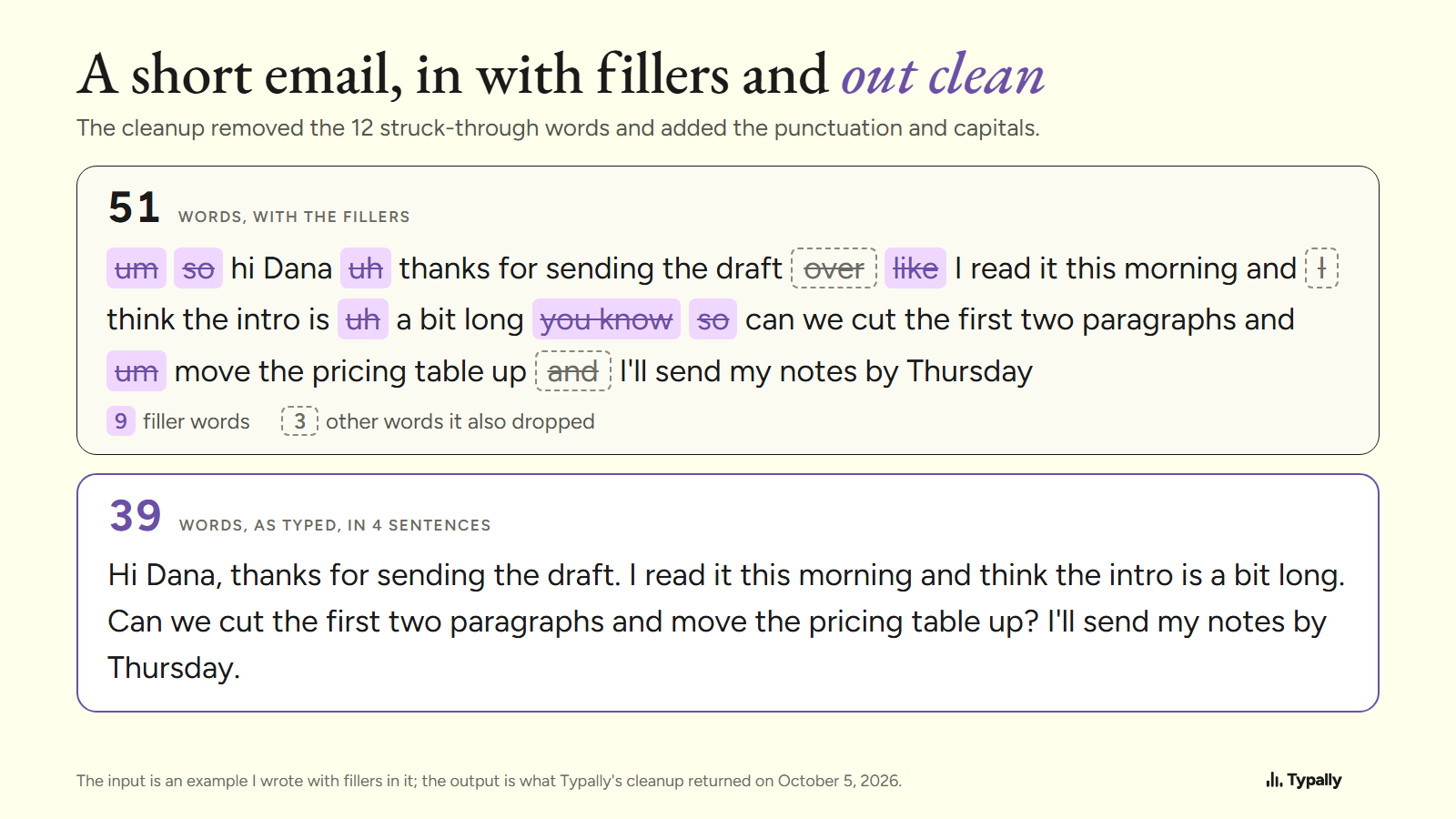
The ask is still the third sentence. The cleanup kept the order, so moving the ask up stays your job. And for a two-line reply, the keyboard is already under your hands.
Which built-in tools let you say an email?
Windows and macOS both include free dictation, and Outlook has its own button. Facts from each maker's page, as of October 2026.
On Windows 11, click in the message and press Windows key + H. Microsoft's page says you need to "be connected to the internet, have a working microphone, and have your cursor in a text box". For Copilot+ PCs, in English, it describes Fluid dictation, which "automatically corrects grammar, punctuation, and filler words as you speak".
On a Mac, Apple's page says Dictation lets you "speak to enter text anywhere you can type it".
Outlook has a Dictate button on the Message tab. Microsoft's steps for classic Outlook and Outlook for Mac say to use it "while signed in to Microsoft 365". If you write only in Outlook and have that subscription, it may be all you need.
The keys that start them are in voice typing shortcut, and the words for commas and new lines in dictation commands.
Where does Typally fit?
Typally, voice typing for Mac and Windows, is the app I build. Hold your shortcut key, say the email, let go, and the text appears where your cursor is. That can be a Gmail draft, Outlook or any other app. The cleanup is on by default: it removes the ums and fixes the punctuation and capitals.
It needs an internet connection. It listens only while you hold the key, the audio is discarded after transcription, and your history stays on your computer.
Download Typally free at typally.com for Windows or Mac. The free plan gives you 100 minutes a month and doesn't ask for a card.
What else do people ask about writing emails faster?
Can AI write the email for me?
In Gmail, "Help me write" drafts an email from a prompt. As of October 2026, Google's page says it needs an eligible Google Workspace or Google AI plan, or a personal Google Account in the US. Its tip: "make your prompt as specific and detailed as you can."
Is Smart Compose on by default?
Yes. Google's page says: "By default, Gmail automatically offers suggestions." To switch it off, go to Settings, See all settings, General, "Smart Compose".
Is Typally free?
There's a free plan with 100 minutes of dictation a month, forever, and it doesn't ask for a card. Pro is $11.99 a month with a 14-day free trial, and the trial needs a card. Or $96 a year.