Business English for everyday work messages is plain English in a set order: the ask first, one topic, short common verbs. Phrases like "at your earliest convenience" belong to formal letters, by the dictionary's own label.
In short:
- Put the ask in the first line. GOV.UK's writing guidance says "Put the most important information first", and Microsoft's style guide says "Get to the point fast."
- Pick the short word. The Longman dictionary marks "utilize", "as per" and "at your earliest convenience" as formal.
- Below are 5 situations, each with a before and an after: asking, following up, saying no, giving an update and disagreeing.
I'm Lithuanian, and I work in English. By September 30, 2026, I had dictated 476,777 words, by my app's own count. I build Typally, and it comes up near the end.
How is a clear work message built?
In three moves: the ask first, one topic per message, and plain verbs. None of them needs a bigger vocabulary.
The ask first. The University of North Carolina's Writing Center tells email writers: "Briefly state your purpose for writing in the very beginning of your message." GOV.UK gives the reason: "The quicker you get to the point, the greater the chance your users will see the information you want them to."
One topic. The same handout says to "consider writing separate emails if you have many unrelated points or questions". My reason: one topic can be answered in one reply.
Plain verbs. GOV.UK's rule: "Use 'buy' instead of 'purchase', 'help' instead of 'assist', and 'about' instead of 'approximately'."
GOV.UK and Microsoft wrote these rules for web pages and product text, not for email. Using them for messages is my choice. One GOV.UK line answers the fear that plain words look basic: "people with higher levels of literacy prefer plain English because it allows them to understand the information as quickly as possible."
Which business English phrases sound stiff, and what do you write instead?
The ones a dictionary marks as formal. I read these 4 entries in the Longman Dictionary of Contemporary English on October 6, 2026.
- "At your earliest convenience" is labeled formal and "used in letters". Write the day: "by Wednesday".
- "As per" is labeled formal and means "according to something". Write "as we agreed".
- "Utilize" is labeled formal. Longman adds: "In everyday English, people usually say use rather than utilize".
- "Kindly" in a request is "a word meaning 'please', which is often used when you are annoyed". Write "please" or "could you".
GOV.UK's words to avoid list covers office words too. For "liaise" it says "work with", and for "going forward" it says "from now on".
Formal isn't wrong. It fits a contract or a first letter to a stranger. In a chat with a colleague, I think it reads stiff.
What do you write when asking, following up, saying no, updating or disagreeing?
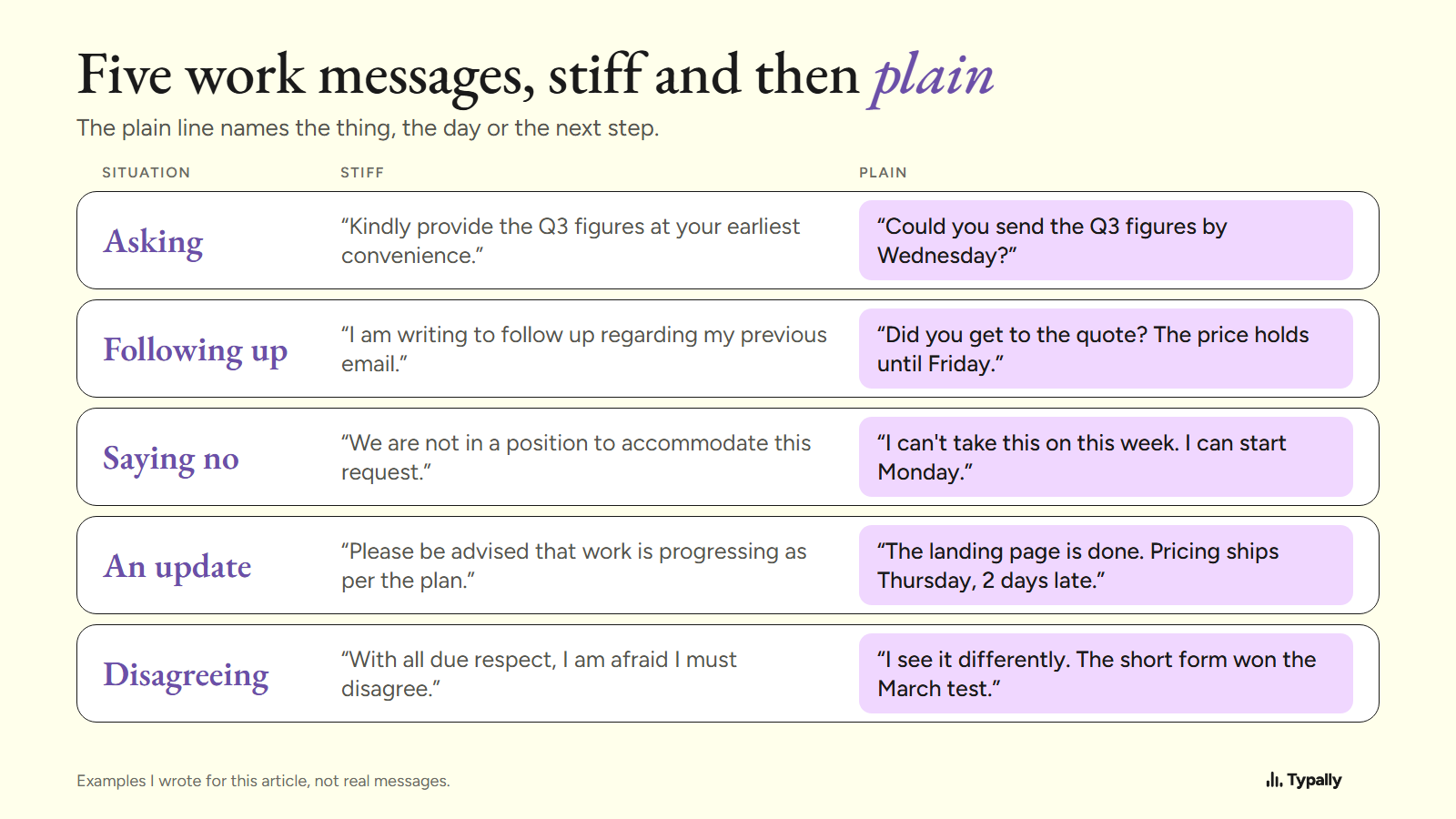
Name the thing, the day and the next step. The 5 pairs below are examples I wrote for this article, not real messages.
- Asking. Stiff: "Kindly provide the Q3 figures at your earliest convenience." Plain: "Could you send the Q3 figures by Wednesday?"
- Following up. Stiff: "I am writing to follow up regarding my previous email." Plain: "Did you get to the quote? The price holds until Friday."
- Saying no. Stiff: "We are not in a position to accommodate this request." Plain: "I can't take this on this week. I can start Monday."
- Giving an update. Stiff: "Please be advised that work is progressing as per the plan." Plain: "The landing page is done. Pricing ships Thursday, 2 days late."
- Disagreeing. Stiff: "With all due respect, I am afraid I must disagree." Plain: "I see it differently. The short form won the March test."
Each plain line carries a fact the stiff line leaves out: a day, a price deadline, a new date, a test result.
Is a chat message different from an email?
It's shorter, and the build is the same: the greeting and the ask go in one message. Slack's own etiquette guide says: "Never send a direct message that just says 'hey' or 'hello.'" Its reason: every direct message sends its own notification.
A short update fits in 3 lines: what's done, what's late with its new date, and what you need. That's my suggestion, not a standard.
What does a work message look like when you say it instead of typing it?
It comes out in the order you think, fillers included, and a cleanup pass takes the fillers out. Microsoft's style tips ask for that voice: "Write like you speak. Read your text aloud."
I ran one example through Typally's cleanup on October 5, 2026. I wrote the input with the fillers in it; nothing was recorded. It went in as 51 words:
um so hi Dana uh thanks for sending the draft over like I read it this morning and I think the intro is uh a bit long you know so can we cut the first two paragraphs and um move the pricing table up and I'll send my notes by Thursday
It came back as 39 words:
Hi Dana, thanks for sending the draft. I read it this morning and think the intro is a bit long. Can we cut the first two paragraphs and move the pricing table up? I'll send my notes by Thursday.
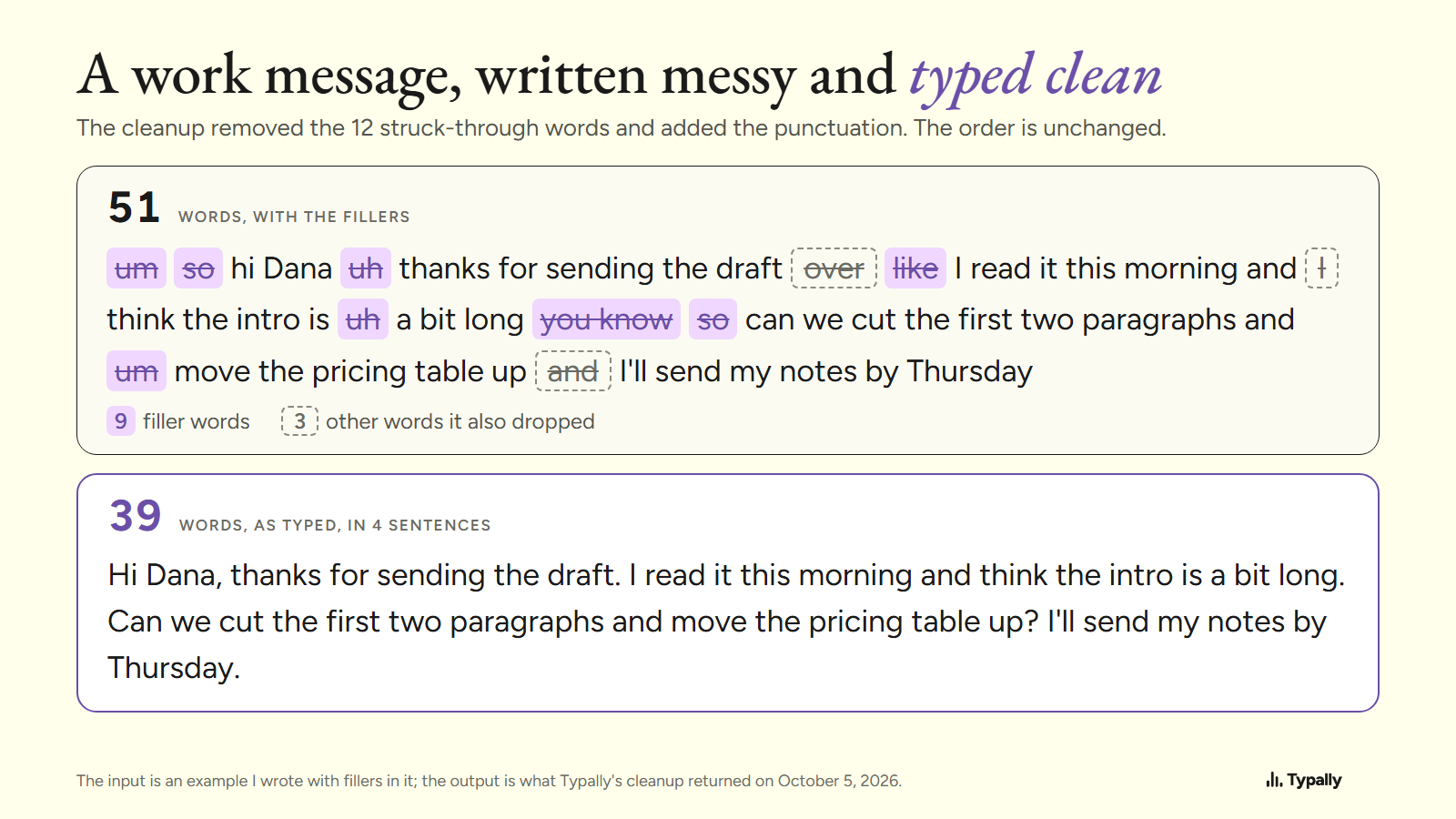
The cleanup kept my order, and the ask is still the third sentence. Moving it up is the writer's job: "Hi Dana, can we cut the first two paragraphs and move the pricing table up?" Fillers at work have their own guide: English filler words.
What can the free tools do?
The three moves cost nothing, and Windows and Mac can both type what you say for free. These facts are from each maker's page, as of October 2026.
On Windows 11, voice typing starts with the Windows key + H and needs an internet connection. On Copilot+ PCs, in English, Fluid dictation "automatically corrects grammar, punctuation, and filler words as you speak". Microsoft describes that cleanup for those PCs only.
On a Mac, Apple's Dictation "automatically inserts commas, periods, and question marks" in supported languages. Apple's page doesn't mention filler words. How to Voice Type on a Computer has the steps.
If you want lessons on email phrases, a course is the better pick. The British Council's English for emails series has 9 units for levels A2 and B1. To practice out loud, see English speaking practice.
Where does Typally fit?
Typally, voice typing for Mac and Windows, types what you say where your cursor is. Hold your shortcut key, say the message, let go. That works in Gmail, Outlook, Slack, Microsoft Teams and any other text box. The cleanup is on by default: it removes the ums and fixes the punctuation and capitals.
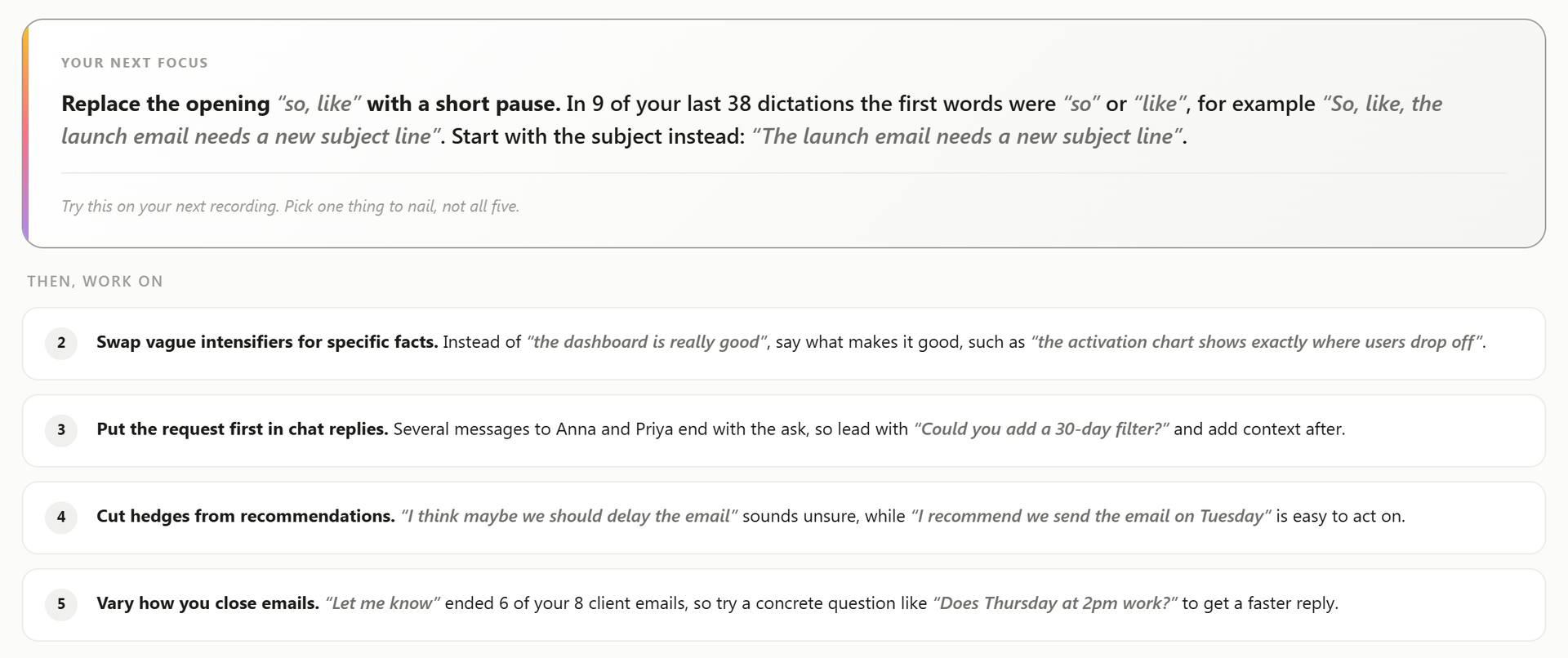
Its speech coach reads what you dictate and picks one "next focus". On the example screen below, item 3 is this article's first move: "Put the request first in chat replies."
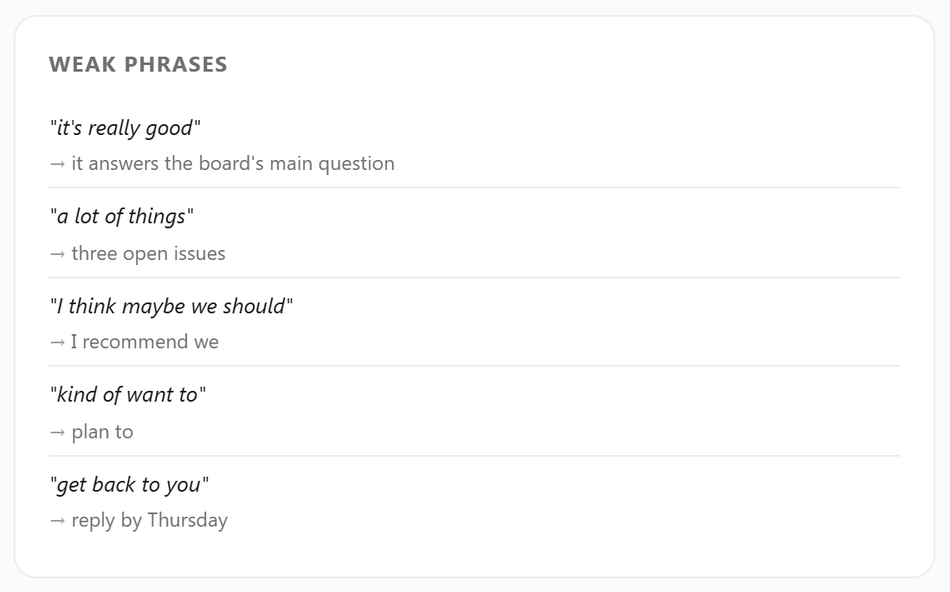
The coach also lists weak phrases with a more exact one beside each. On the example screen, "get back to you" sits next to "reply by Thursday".
Typally listens only while you hold the key. The audio is discarded after transcription, and your history stays on your computer. It needs an internet connection.
Download Typally free at typally.com for Windows or Mac. The free plan gives you 100 minutes a month and doesn't ask for a card.
What else do people ask about business English?
Is business English more formal than everyday English?
It doesn't have to be. Microsoft describes its own voice as "Less formal, more grounded in real, everyday conversations". GOV.UK asks its writers to be "serious but not pompous".
How long should a sentence in a work email be?
GOV.UK's guidance says: "Try to split up sentences that are over 25 words long."
Is Typally free?
There's a free plan with 100 minutes of dictation a month, forever, and it doesn't ask for a card. Pro is $11.99 a month with a 14-day free trial, and the trial needs a card. Or $96 a year.