To type faster, cut your mistakes first, press each key with the same finger every time, and practice a few minutes a day. Then stop typing your longest texts and say them.
In short:
- Fewer mistakes go with more speed. In Aalto University's 2018 test of 168,000 typists, the faster ones made and fixed fewer errors.
- You don't need all 10 fingers. In a 2016 Aalto study of 30 people, self-taught typists averaged 59 words a minute and trained touch typists 58.
- For long text, I speak. I dictated 476,777 words in 91 hours 31 minutes. Typed at a commonly cited 40 words a minute, that is about 199 hours.
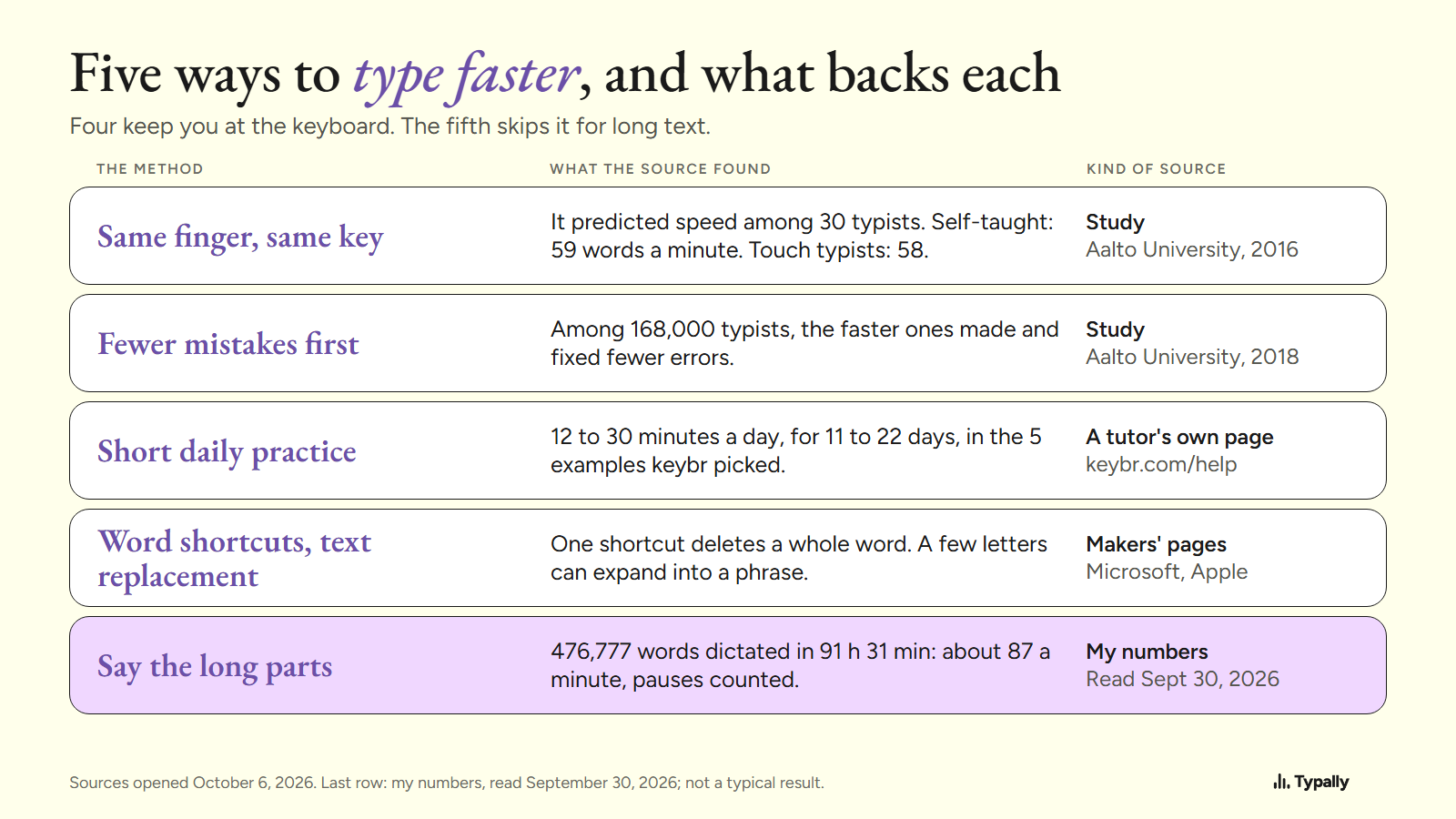
I build Typally, a voice typing app, and it comes up near the end. I opened every source below on October 6, 2026, and say whether it is a study or a typing tutor's own page. For what counts as fast, see average typing speed.
Do you have to learn touch typing to type faster?
No. You need one of its habits: the same finger on the same key, every time. In 2016, researchers at Aalto University tracked the hands and eyes of 30 typists. The trained touch typists averaged 57.8 words a minute. The self-taught ones averaged 58.9, with 6.2 fingers against 8.5.
Their paper says "entering text at high speed does not require mastery of the touch typing system." What predicted speed: each key always pressed by the same finger, hands that stay still, and fingers that move toward the next key early.
The self-taught group paid one price: they looked at the keyboard 40% of the time, against 20%. It is a small lab study, so read it as a pointer.
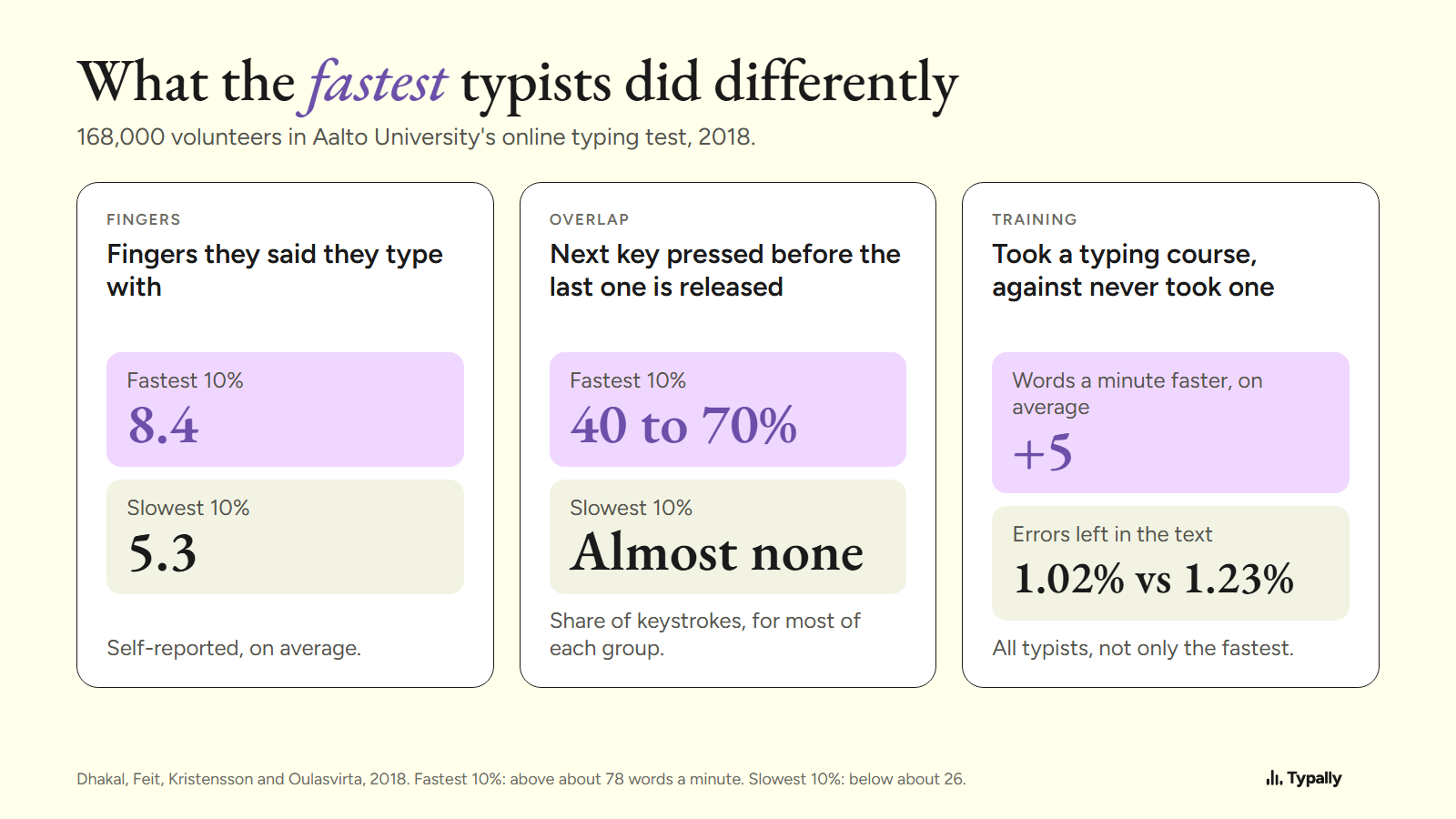
In Aalto's 2018 online test of 168,000 volunteers, people who had taken a typing course were 5 words a minute faster on average. The authors call that "a relatively small difference". Yet the fastest 10% said they type with 8.4 fingers, and the slowest 10% with 5.3.
So if you look at the keys a lot, learn the home row. keybr is a free typing tutor. Its help page says: "There are small bumps on the keys ‘F’ and ‘J’, put your index fingers on the bumps." If you already type without looking, I'd keep your system and make it consistent. That is my reading of the 2016 paper, not a tested rule.
Should you work on accuracy or speed first?
Accuracy. In the 2018 data, the faster the typist, the fewer mistakes they made and corrected. Each fix costs extra keystrokes, and you have to find the error first. The authors: "reducing errors by a small margin can contribute to a large gain in speed."
Typing tutors teach the same order. Ratatype's guide: "Do not rush when you just started learning. Speed up only when your fingers hit the right keys out of habit."
Most of the fastest 10% also pressed the next key before letting go of the last one, on 40 to 70% of keystrokes. The slowest 10% almost never did. The study did not test whether you can train it.
How long should you practice to improve your typing speed?
About 12 to 30 minutes a day (hours divided by days), going by one tutor's own examples. keybr's help page lists 5 "real, anonymized user profiles" that keybr picked. One went from 30 to 70 words a minute after 4 hours 20 minutes of practice over 15 days. Another needed about 10 hours over 22 days to go from 20 to 45. These are chosen examples, not typical results.
Drills aren't the only place to learn how to type faster. A 2007 study of 60 university students by Keith and Ericsson looked at who typed fastest. The fastest had attended a typing class and aimed to type quickly in everyday typing. So push your pace a little in real emails too.
Which shortcuts and tools save the most keystrokes?
The ones that work on whole words and whole phrases. They cut the keys a text needs.
- Delete a word at once. On Windows, Microsoft's shortcut list gives Ctrl+Backspace: "Delete words to the left of the cursor." On a Mac, Apple's list gives Option-Delete.
- Replace text on a Mac. Apple's page has the steps: System Settings, Keyboard, Text Replacements. Its example turns "fwiw" into "for what it's worth". Do the same for your address or a reply you send every week.
- Expand text in any app. Espanso, an open-source text expander for Windows and Mac, says it "detects when you type a keyword and replaces it while you're typing".
When is speaking faster than typing?
When the text is long and you make it up as you go: emails, documents, prompts for ChatGPT or Claude. On September 30, 2026, my Typally Insights screen showed 476,777 words dictated in 91 hours 31 minutes. That is about 87 words a minute with every pause counted.
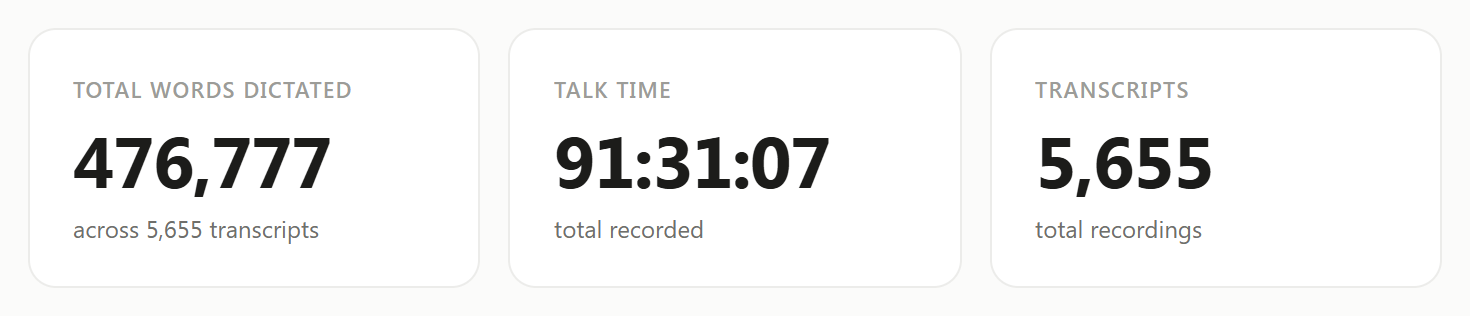
At a commonly cited 40 words a minute, typing those words would take about 199 hours. The 40 is an average, not my measurement. Is Speaking Faster Than Typing? goes through the studies.
Talking brings filler words. In two weeks of my own dictation (July 30 to August 12, 2026), "um" and "uh" were about 1 word in 24. Here is an example I wrote with fillers in it, 51 words:
um so hi Dana uh thanks for sending the draft over like I read it this morning and I think the intro is uh a bit long you know so can we cut the first two paragraphs and um move the pricing table up and I'll send my notes by Thursday
Typally's cleanup returned this on October 5, 2026, in 39 words:
Hi Dana, thanks for sending the draft. I read it this morning and think the intro is a bit long. Can we cut the first two paragraphs and move the pricing table up? I'll send my notes by Thursday.
Typing is still the better tool for some jobs. Code is full of symbols. For a two-word reply, the keyboard is already under your hands. And in a quiet office you may not want to talk at all.
Which free tools let you try dictation first?
Windows and macOS both come with dictation. On Windows 11, click in a text box and press Windows key + H. Microsoft's page says you need an internet connection and a working microphone.
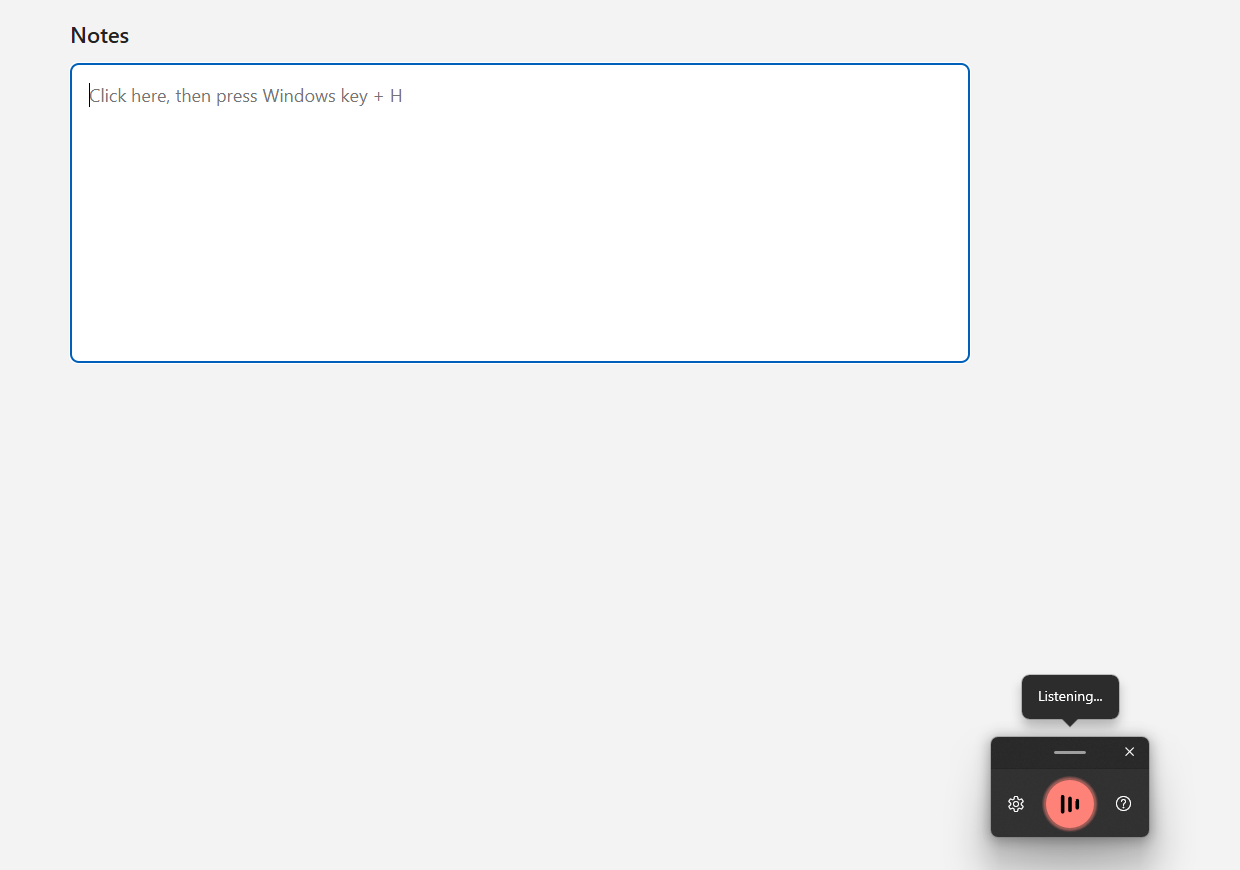
For Copilot+ PCs, in English, the same page describes Fluid dictation, which "automatically corrects grammar, punctuation, and filler words as you speak".
On a Mac, turn on Dictation under System Settings, Keyboard. Apple's page says you can "enter text anywhere you can type it", and that it stops after 30 seconds without speech. Those are Apple's steps.
Both are enough to find out whether talking suits you. How to voice type has the steps, and speech to text lists every option on a computer.
Where does Typally fit?
Typally, voice typing for Mac and Windows, is the app I build, and it counted my words above. Hold your shortcut key, talk, let go, and the text appears where your cursor is: Gmail, Slack, ChatGPT or any other app. The cleanup is on by default: it removes the ums and fixes the punctuation and capitals.
It needs an internet connection. It listens only while you hold the key, the audio is discarded after transcription, and your history stays on your computer.
Keep typing the short things and say the long ones. Download Typally free at typally.com for Windows or Mac. The free plan gives you 100 minutes a month and doesn't ask for a card.
What else do people ask about typing faster?
How long does it take to learn to type faster?
In keybr's 5 example profiles, 4 gained speed after about 2 to 10 hours of practice, spread over 11 to 22 days. keybr chose them, so treat them as possible, not typical.
Can you type fast with only a few fingers?
Some people do: in the 2016 Aalto study, some typists using 1 or 2 fingers per hand passed 70 words a minute.
Is Typally free?
There's a free plan with 100 minutes of dictation a month, forever, and it doesn't ask for a card. Pro has a 14-day free trial, and the trial needs a card.