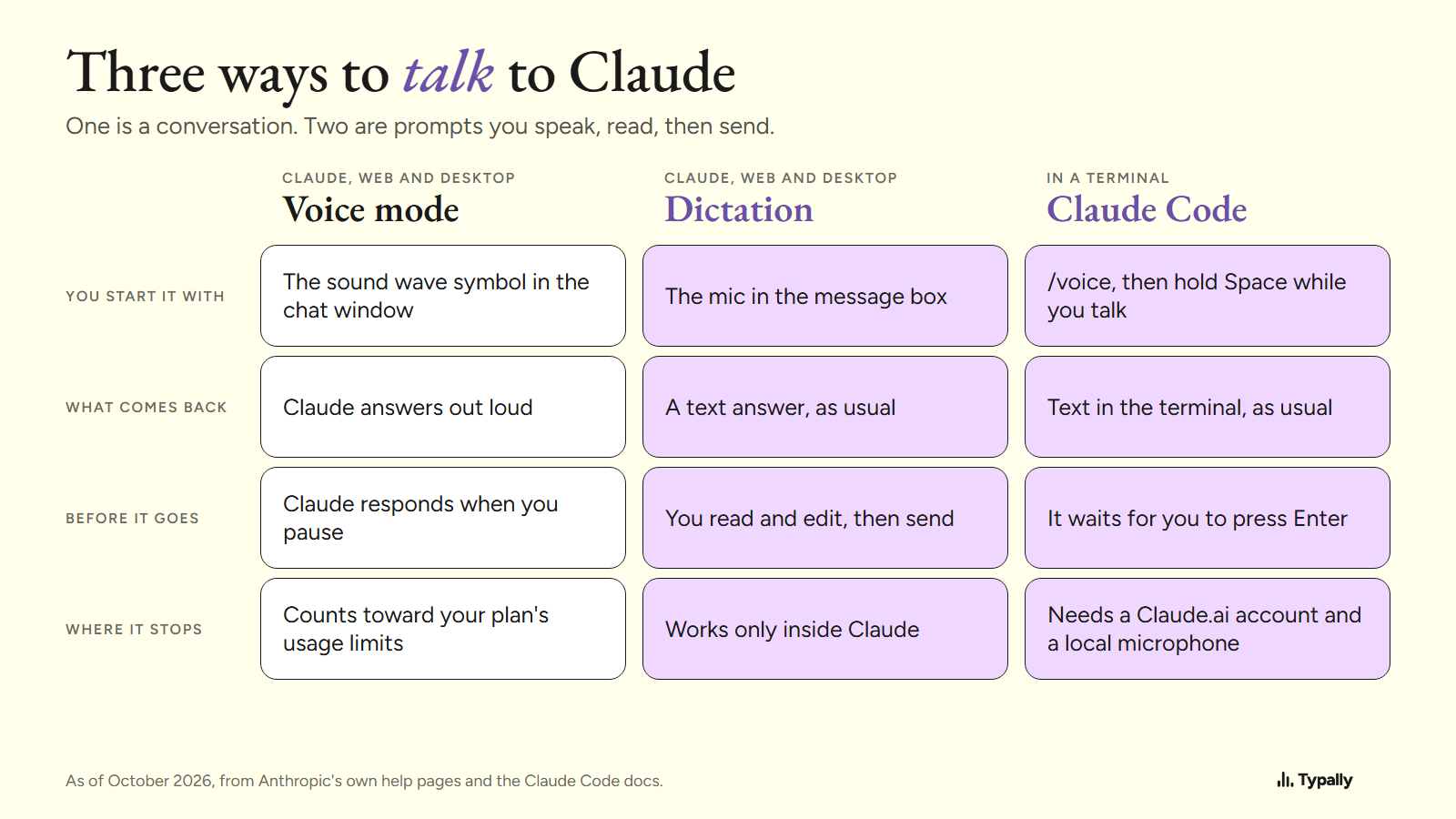
To talk to Claude on a computer, click the sound wave symbol in a new chat and start speaking. That is voice mode, and Claude answers out loud. To read your prompt before it goes, use dictation instead.
In short:
- Voice mode is a spoken conversation. As of October 2026, Anthropic lists it as a beta on every plan, Free included, on the web and in Claude Desktop.
- Dictation puts your words in Claude's message box as text, and nothing goes until you send. Claude has a mic for it; Windows voice typing and Mac Dictation type there too.
- Claude Code has dictation and no voice mode: run /voice, hold Space, talk, then press Enter.
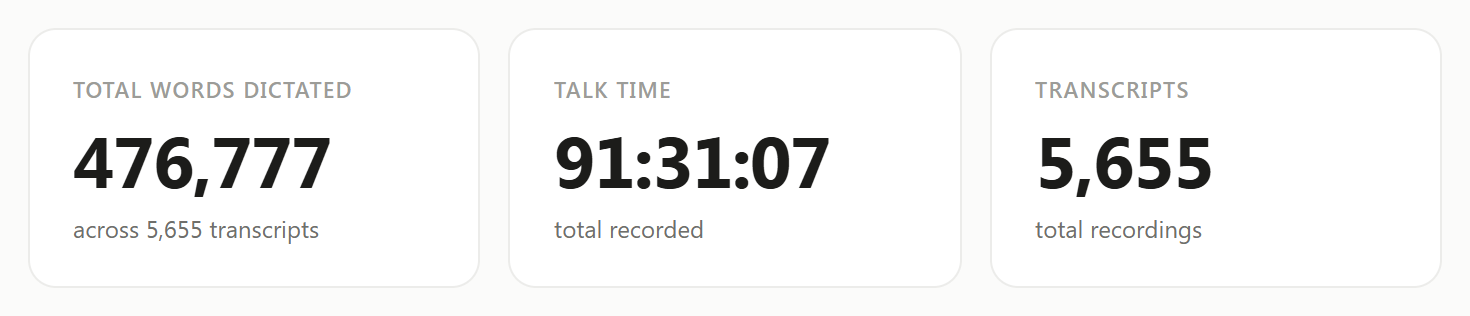
I build Typally, and it comes up near the end. I use it purely for prompting Claude, ChatGPT and other AI. On September 30, 2026, my Typally Insights screen showed 476,777 words dictated.
How do you start a voice conversation with Claude on a computer?
It takes 5 steps on the web and in Claude Desktop, by Anthropic's voice mode help page as of October 2026:
- Log in to Claude and start a new chat.
- Select the sound wave symbol in the lower right corner.
- Start talking. Your prompt appears in the chat input.
- Finish your prompt, and Claude responds.
- Click "Stop" to leave voice mode.
Hands-free is the default: Claude "listens continuously and responds to natural pauses in your speech".
What does Claude's voice mode cost, and where does it stop?
It has no price of its own. Anthropic calls it "a beta feature available to all plans (Free, Pro, Max, Team, and Enterprise)". The page lists no hours: "Voice conversations count toward your regular usage limits based on your subscription plan."
Anthropic's guide to voice mode and dictation says paid plans add "more capable Claude models, Opus and Sonnet". The help page says the Free plan can connect one tool, such as Gmail, and paid plans more.
Anthropic says voice mode "is built to work best from your phone". Its tip for long requests: "For multi-part questions, it can help to ask them one at a time rather than all at once."
How do you speak a prompt you can read before sending?
Use dictation: your words land in the message box as text, and you send when they look right. Claude replies in text. As of October 2026, there are 4 ways.
- Claude's own mic. Anthropic's guide: "In the desktop app, you press the mic, speak, and send when you're ready." Dictation is on the web too. On a Mac, Claude Desktop's quick entry adds a Caps Lock shortcut, off by default.
- Windows voice typing. Click in Claude's message box and press the Windows key + H. Microsoft's page says it needs an internet connection. On Copilot+ PCs, in English, Fluid dictation corrects "grammar, punctuation, and filler words".
- Mac Dictation. These steps are Apple's: turn Dictation on in System Settings under Keyboard, then press the Microphone key or your shortcut. Apple's page says it stops after 30 seconds with no speech.
- A hold-to-talk app. Hold a key, talk, let go, and the text appears at your cursor in any app.
The first three cost nothing extra, so start there. Here is the Windows one:
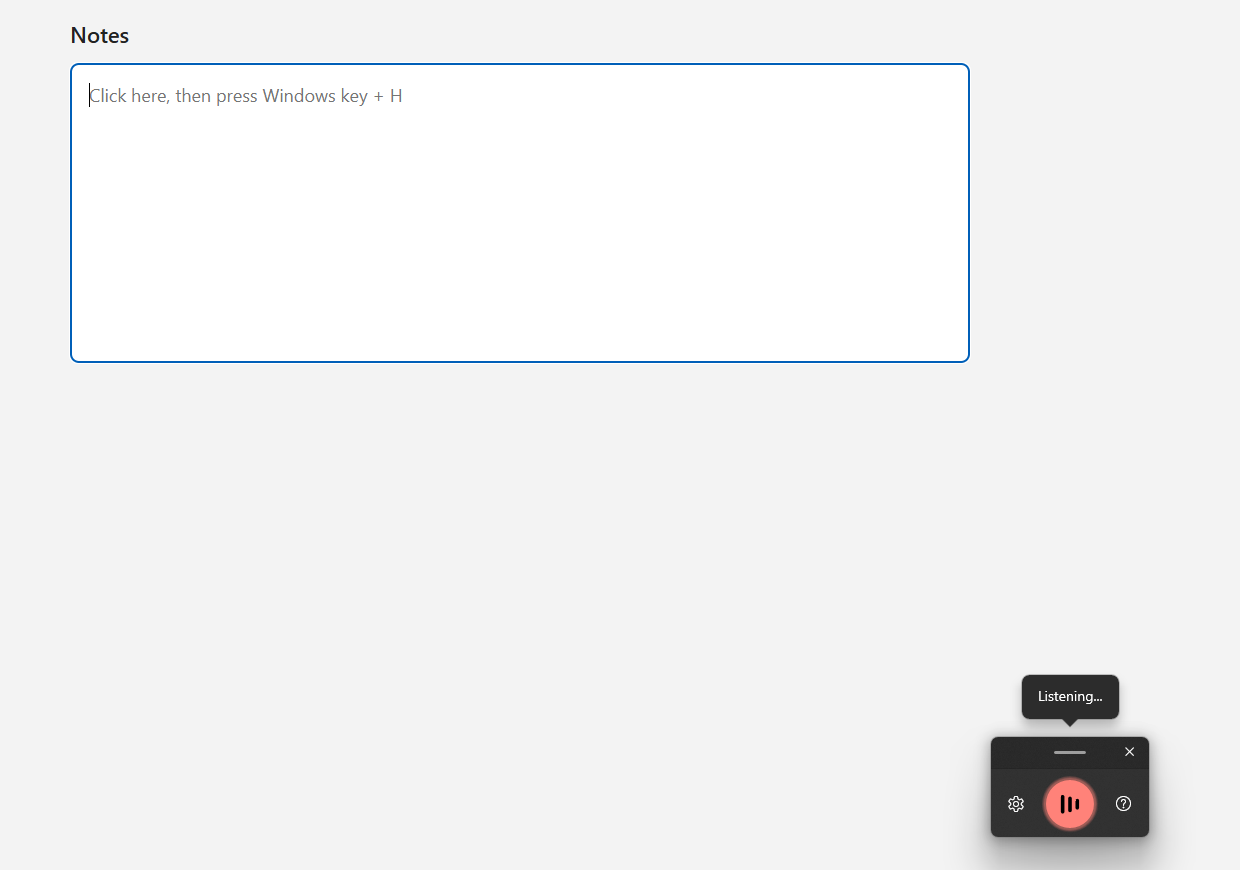
Our guide to voice typing in Claude has the steps. See also the keys that start voice typing and what to do when Windows voice typing won't start.
How do you talk to Claude Code with your voice?
Run /voice, hold Space, talk, and let go. By the Claude Code docs, as of October 2026, recording runs while you hold the key. Then Claude Code "inserts the transcript and waits for you to press Enter", so you read the prompt first.
It needs a Claude.ai account and a local microphone. The docs say it is not available with an Anthropic API key. Transcription "does not consume Claude messages or tokens". In tap mode, which sends for you, recording stops "after 15 seconds of silence or two minutes total".
Voice mode is not offered there. Anthropic's help page: "In Claude Cowork and Claude Code, dictation is available but voice mode isn't." Our Claude Code dictation page covers the terminal.
What does a spoken prompt look like before you send it?
It reads as plain sentences you can check. Typally began as a tool for our own Claude Code prompts. The ones that worked were long: the bug, the files, what we'd tried, what not to touch.
The input below is an example I wrote with those four parts and with fillers. The output is what Typally's cleanup returned on October 7, 2026.
With the fillers (73 words)
okay so um the login page is broken uh when you type a wrong password it shows a blank screen instead of the error message and like I think the problem is in the login form file or maybe in the auth helper so um I already tried clearing the cache and restarting the server you know and nothing changed and uh please don't touch the database code just fix the error message
After cleanup (62 words)
Okay, the login page is broken. When you type a wrong password, it shows a blank screen instead of the error message. I think the problem is in the login form file or maybe in the auth helper. I already tried clearing the cache and restarting the server, but nothing changed. Please don't touch the database code; just fix the error message.
The um, uh, like and you know are gone, and the punctuation and capitals are in. One "and" became "but". All four parts are still there.
Which way of talking to Claude fits which job?
Voice mode fits working something out, and dictation fits a request you already know. Anthropic draws the line: "if you already know what you want to say or do, use dictation. If you're trying to figure something out or practice, that's voice mode."
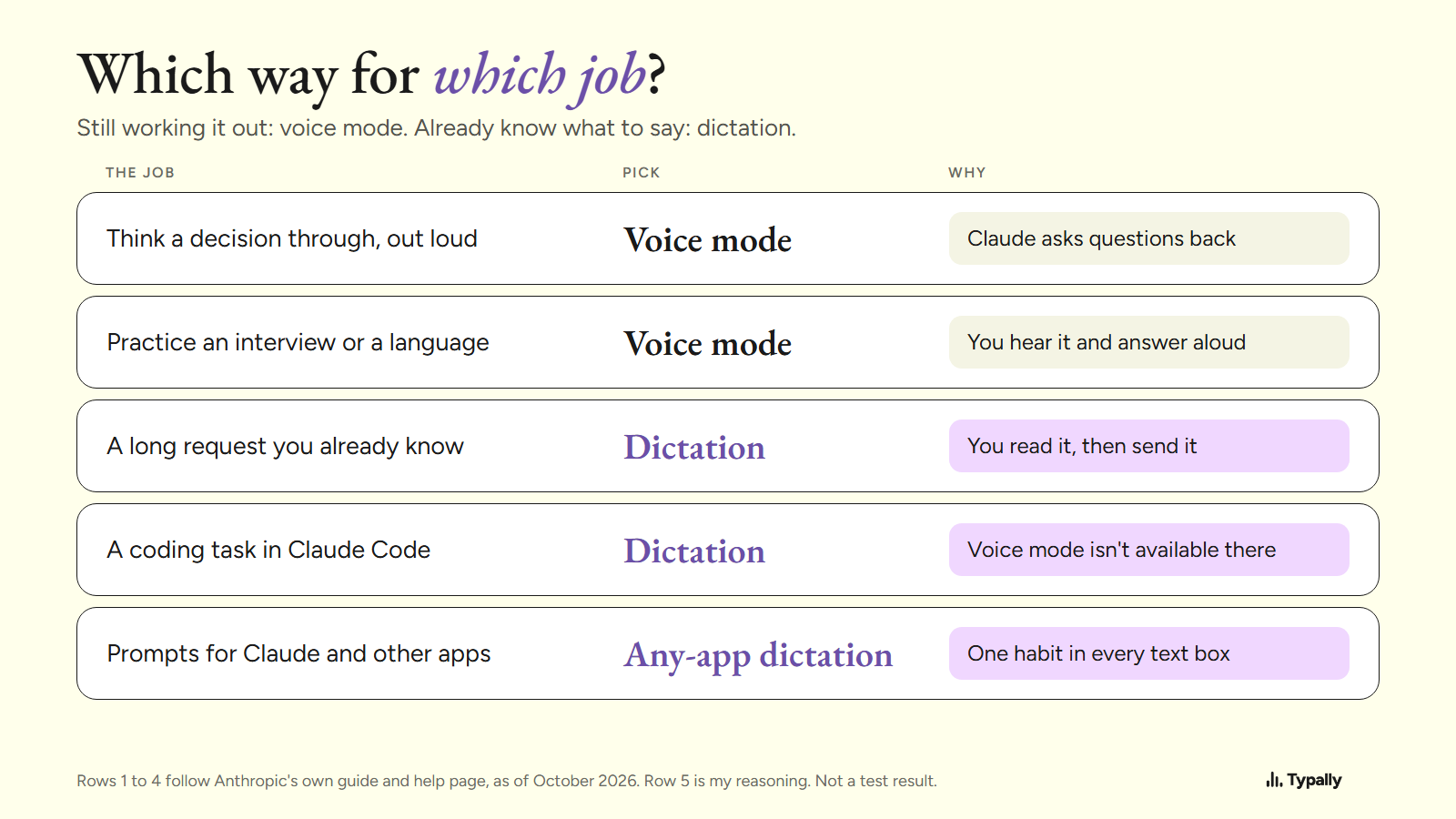
Anthropic's examples for voice mode include weighing a job offer and practicing a language. Its first case for dictation: "You have a long, messy request in your head."
That was our case. Browser dictation meant transcribing in one tab and pasting into another, so we built a key that types into any window. By September 30, 2026, I had dictated on 97 of the last 98 days. The total was 476,777 words in 5,655 dictations, about 84 words each.
I haven't measured whether Claude's answers got better. Talk to ChatGPT covers the same choice there.
Where does Typally fit?
Typally, voice typing for Mac and Windows, is the hold-to-talk app I build. Hold your shortcut key, talk, let go, and the text appears where your cursor is. The same key works in Claude, a terminal running Claude Code, ChatGPT and Cursor. The cleanup is on by default: it removes the ums and fixes the punctuation and capitals.
It listens only while you hold the key. The audio is discarded after transcription, and your transcripts and history stay on your computer. It needs an internet connection.
Typally does not talk back. For a spoken answer, Claude's voice mode is the better pick. If you only prompt inside Claude's app, its mic may be all you need. So may /voice, if you work in Claude Code with a Claude.ai account.
Download Typally free at typally.com for Windows or Mac. The free plan gives you 100 minutes a month and doesn't ask for a card.
What else do people ask about talking to Claude?
Can you talk to Claude for free?
Yes. As of October 2026, Anthropic lists voice mode as a beta on all plans, Free included. It counts toward your plan's usage limits.
Does Claude save your voice conversations?
Yes, as text. Anthropic's help page: "Textual transcripts of your audio conversations are saved in your chat history just like text conversations."
Is Typally free?
There's a free plan: 100 minutes of dictation a month, forever, and it doesn't ask for a card. Pro is $11.99 a month with a 14-day free trial, and the trial needs a card. Or $96 a year.