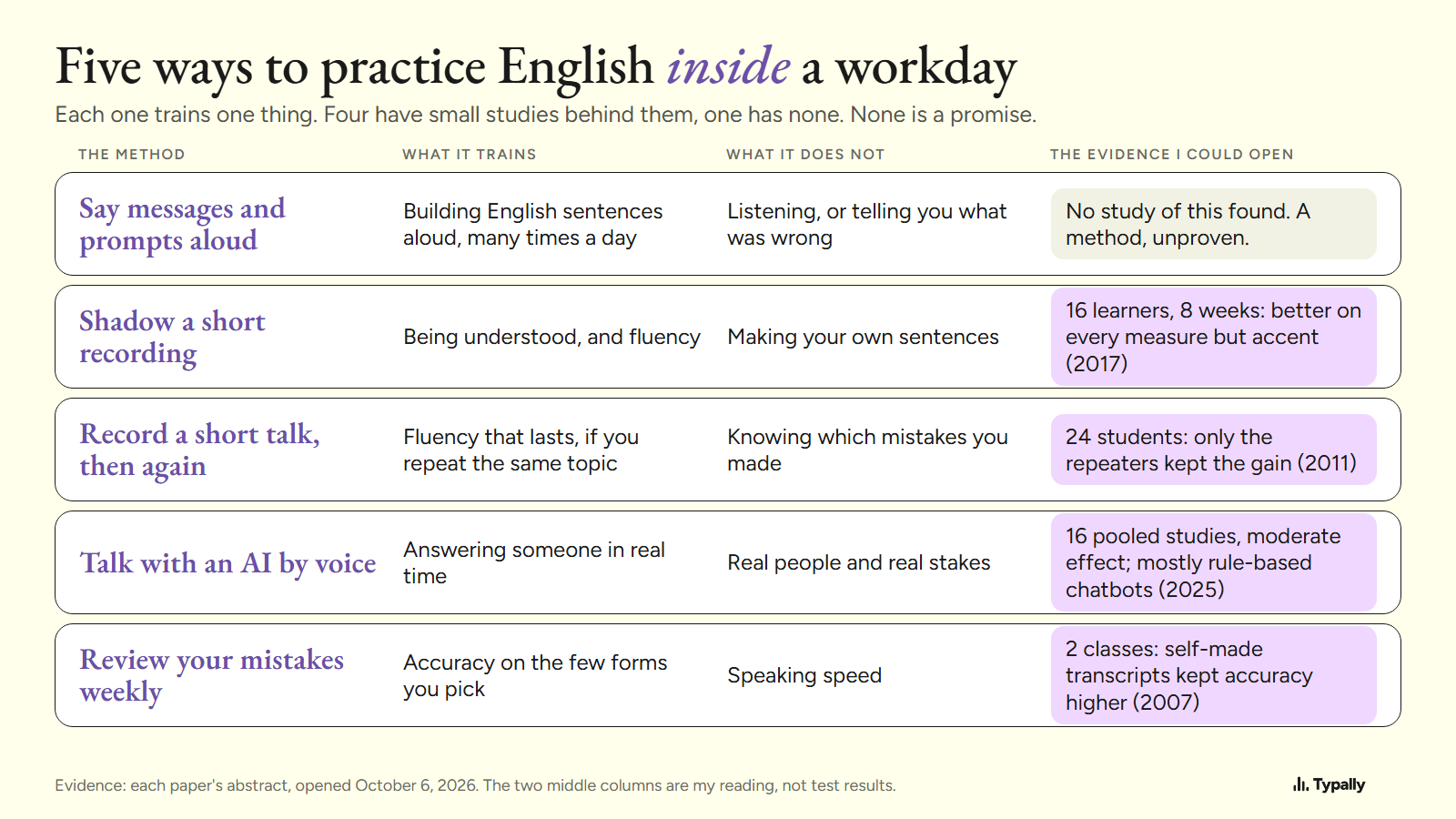
For English speaking practice with no spare hour, practice inside the work you already do. Say your messages and prompts aloud, record one short talk, and review your mistakes once a week.
In short:
- Five methods fit inside a working day. Say messages and prompts aloud, shadow a recording, record yourself, talk with an AI by voice, and review your mistakes weekly.
- Four have research I could open behind them, and all of it is small: 16 learners, 24 students, 2 classes, and 16 pooled studies.
- Saying work messages aloud has no study I could find. It costs no extra time, and it leaves text you can review later.
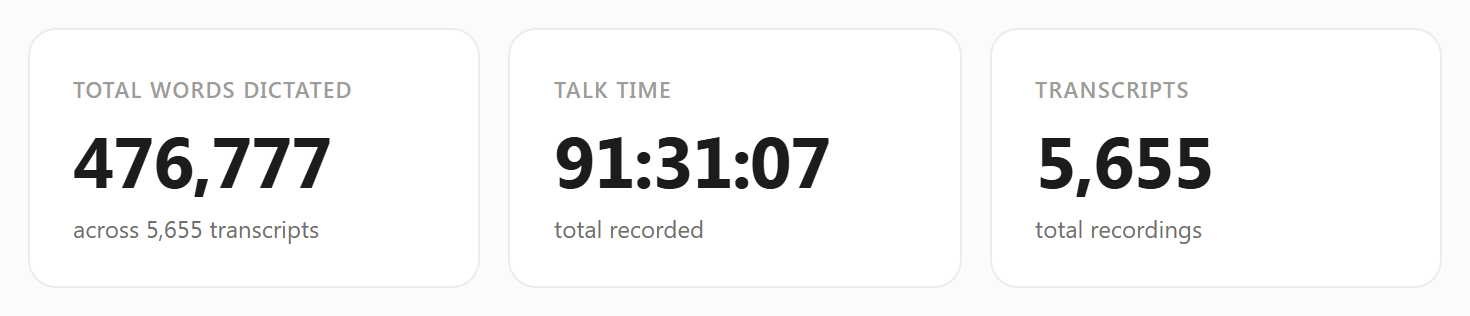
I'm Lithuanian, and I work in English. I dictate in English almost every day. On September 30, 2026, my Typally Insights screen showed 476,777 words dictated. I had used it on 97 of the last 98 days.
I build Typally, and it comes up near the end.
How do you practice speaking English without adding time to your day?
Say aloud what you were going to type. A dictation tool turns it into text, so the message or the AI prompt still gets written. You have also spoken English for a minute.
What it trains, by my reasoning: building English sentences aloud, many times a day, about your real work. I found no study that tested dictating work messages as practice, so treat it as a method, unproven.
The nearest I could open is a 2019 study in the Journal of Second Language Pronunciation. One group in a pronunciation workshop did half its work with a dictation program, Windows Speech Recognition. Both groups improved, with "no statistically significant differences between the two groups". That was a taught workshop, so it is a pointer at most.
What it does not train: listening, or a live talk where someone interrupts you. By itself it gives no feedback. Some dictation tools also tidy the words before they type them. Typally's cleanup turned a 51-word example message into 39 words.
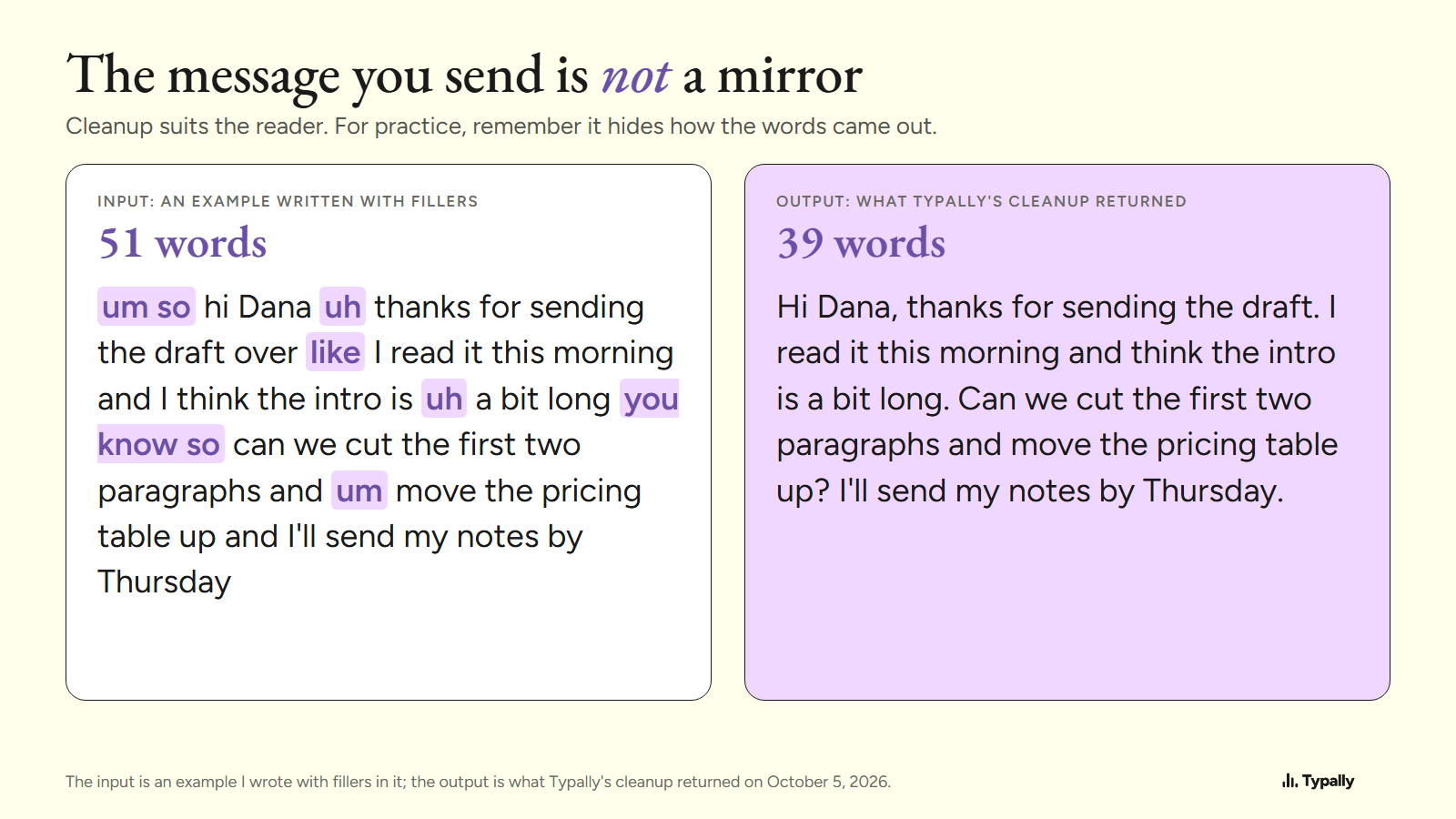
That suits the reader. But the sent text is not a mirror of how you speak. What to put in those messages is another subject, and Business English for work messages covers it.
Does shadowing work, and where does it fit at work?
In one small study, learners were understood better after 8 weeks of it. It takes 10 minutes. Shadowing means you play a recording and say the words along with the speaker, a beat behind.
In a 2017 study by Foote and McDonough, 16 learners shadowed short dialogues for 8 weeks. They practiced at least 4 times a week, 10 minutes or more each time. Raters then found they "improved significantly on all speaking measures apart from accentedness". Those measures included how well they were understood and how fluent they sounded.
At work, shadow something you need anyway, such as a recorded talk from your field. What it does not train is your own sentences.
What do you get from recording yourself?
You hear what your listeners hear, and repeating the same talk is the part with evidence. The speaking tips from Victoria University of Wellington give the steps. "Record yourself to develop your fluency", then "replay it and analyse the recording for mistakes". Then: "Make another recording of the same topic, but try to speak with more confidence and less hesitation."
In a 2011 study by de Jong and Perfetti, 24 students recorded speeches of 4, 3 and 2 minutes. Some repeated one topic and some changed topics. Fluency improved for both groups in training. It "was maintained on posttests only by the students who repeated their speeches".
At work, that is the 2-minute summary before a call. Record it, listen, record it again. What you don't get is a second opinion: you are the only judge.
Is a voice conversation with an AI real speaking practice?
It is the only one of the five that answers back, and most of the research is older than today's AI. A 2025 analysis in the journal ReCALL pooled 16 studies of dialogue systems. It found "a moderate overall effect size" on speaking.
Two cautions come from the paper. 15 of the 16 studies had fewer than 60 learners. And the systems were "mostly rule-based systems that are not powered and trained by GenAI".
At work, take 5 minutes before a call and rehearse it by voice. Talk to ChatGPT has the steps, and AI English Tutor covers what these tools can and can't do. What it does not train: a real person, with something real at stake.
How do you review your own English mistakes each week?
Take 10 minutes on Friday with the text of what you said, and pick one pattern to change. In Tony Lynch's 2007 study, two classes reworked transcripts of their own speaking task. One class transcribed itself, and the teacher transcribed for the other. The results suggested that self-transcribing kept "higher rates of accuracy in the forms highlighted".
A dictation app does the transcribing for you, so I can't say that result carries over. A review also does not train speed. What an app can do is read the English you already speak at work. Typally's coach gives a score out of 100 with five parts: vocabulary, grammar, fluency, fillers and variety.
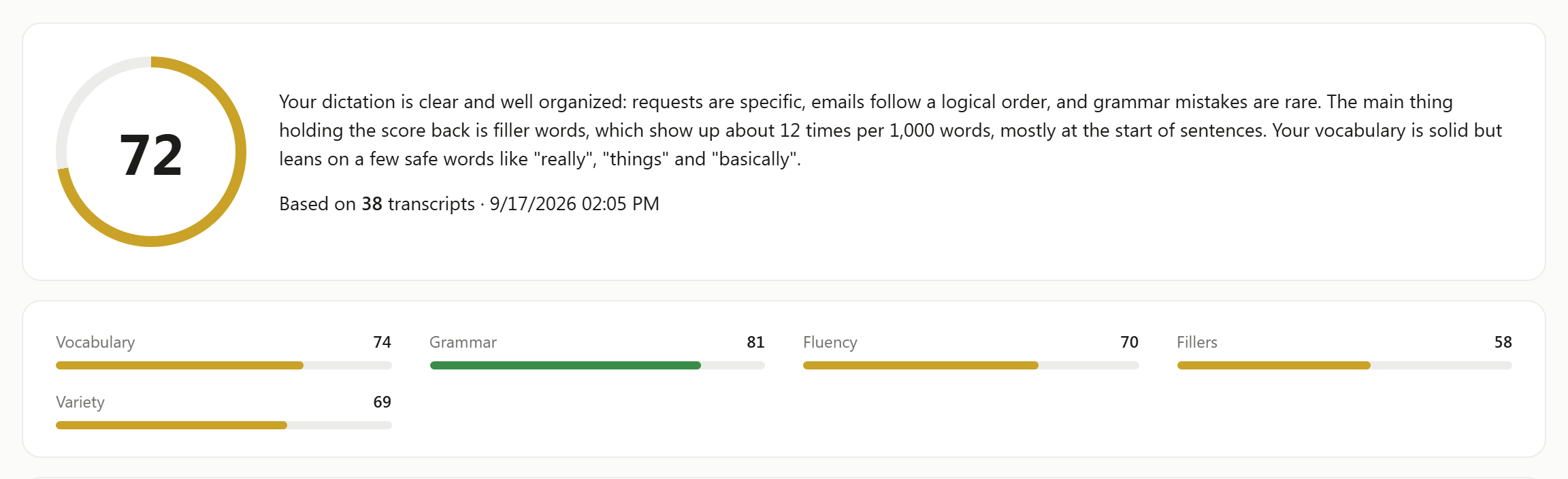
Then it names one habit to work on, called "your next focus".
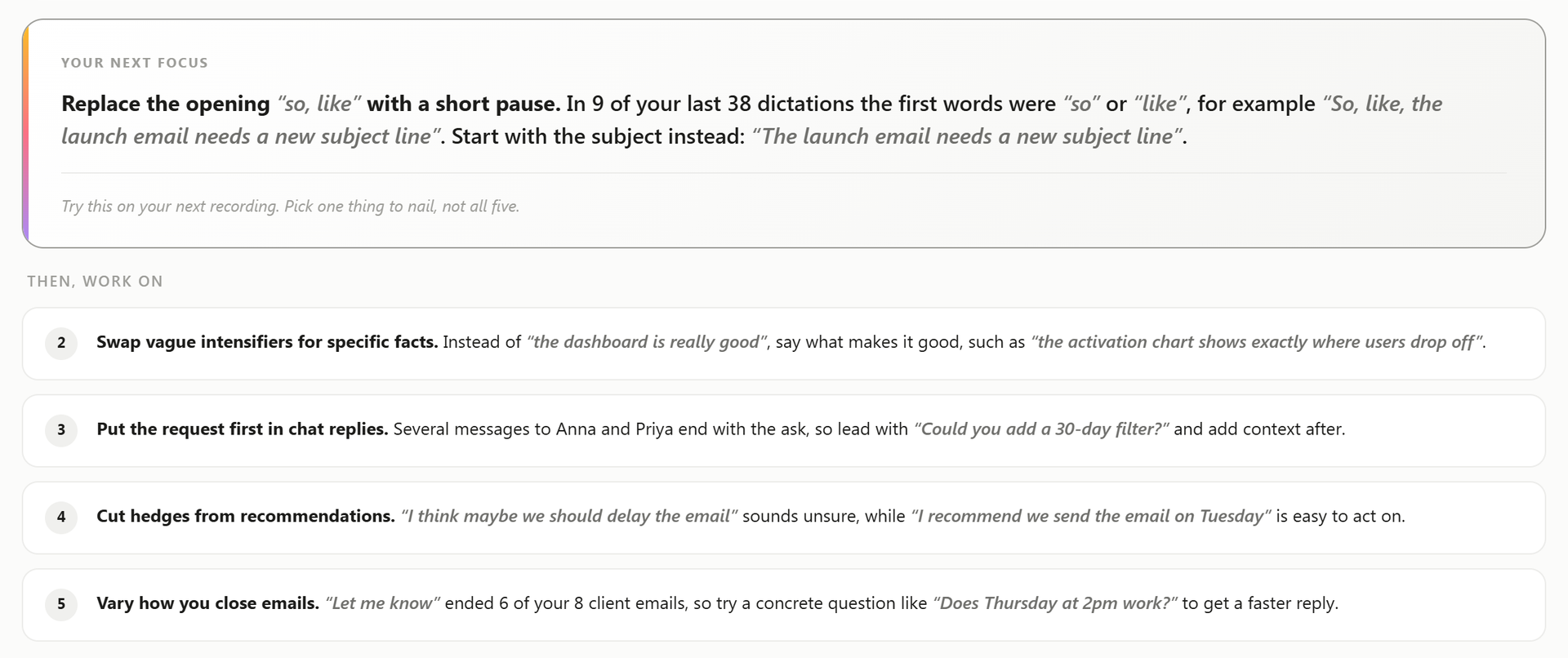
My own score went from 67 on May 21, 2026, to 73 on August 13, 2026. That is one person, and I can't say what caused it.
The same coach counted about 100 fillers per 1,000 words in two weeks of my dictation, July 30 to August 12, 2026. That count includes every "like" and "so". On my computer the cleanup is switched off, which is why the coach could count them. The rate did not fall in those two weeks. English Filler Words covers which ones are fine to keep.
Which free tools are enough for this?
For speaking more, the tools already on your computer are enough. The facts here are from each maker's page, as of October 2026. On Windows, Microsoft's page says to press the Windows key + H, and that voice typing needs an internet connection. On Copilot+ PCs, in English, its Fluid dictation "automatically corrects grammar, punctuation, and filler words as you speak".
On a Mac, Apple's page puts Dictation under System Settings, Keyboard. It "stops automatically when no speech is detected for 30 seconds".
Where they stop: none of them scores your English or names a next focus. If you only want to speak more and judge yourself, they are the better pick.
Where does Typally fit?
Typally, voice typing for Mac and Windows, is how I do the first method and the last. Hold your shortcut key, talk, let go, and the text appears where your cursor is. That can be Slack, Microsoft Teams, Gmail, ChatGPT or any other text box. The cleanup is on by default: it removes the ums and fixes the punctuation and capitals.
It listens only while you hold the key. The audio is discarded after transcription, and your history stays on your computer.
Download Typally free at typally.com for Windows or Mac. The free plan gives you 100 minutes a month and doesn't ask for a card.
What else do people ask about English speaking practice?
How can I practice speaking English alone?
Record a short talk, replay it, and record it again. The Wellington page adds: "Talk to yourself a little every day in your target language, aloud (or in your head)."
Does English speaking practice online work?
It depends on what "online" means: a tutor, a partner or an AI. For dialogue systems, the 2025 analysis above found a moderate effect across 16 small studies. This article did not look at tutors or language partners.
Is Typally's speech coach free?
Yes. The free plan includes the coach and 100 minutes of dictation a month, forever, and it doesn't ask for a card. Pro is $11.99 a month with a 14-day free trial, and the trial needs a card.