You can type with one hand by changing the layout, the shortcuts or the input method. A one-handed layout, Sticky Keys and dictation each remove a different kind of reach.
In short:
- Layouts: Windows 11 and macOS both list a right-handed Dvorak layout, and Matias sells a Half-QWERTY keyboard. In one study, speeds reached 41% to 73% of two-handed speed after 10 sessions.
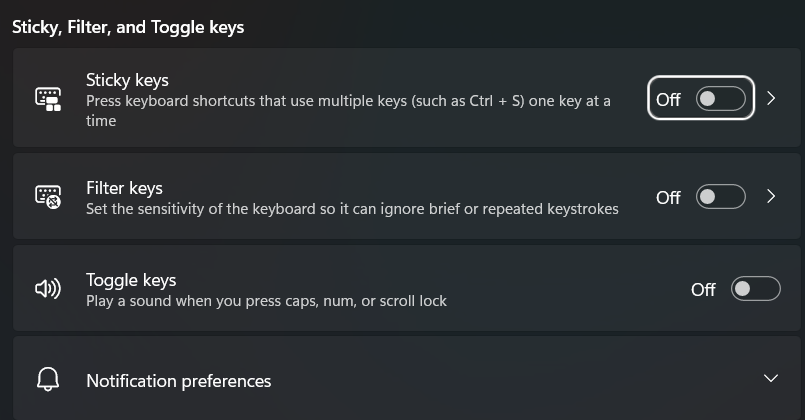
- Shortcuts: Sticky Keys, built into Windows and macOS, lets you press Ctrl + S as two separate presses. It is one switch in Settings.
- Talking: Windows voice typing and Mac Dictation type what you say. They are one option among the others, and each still needs one key press to start.
I build Typally, and it comes up near the end as one option. I did not time any layout myself. Every speed figure below comes from a named study, and each step comes from Microsoft's or Apple's own page, read on October 16, 2026.
Which one-handed keyboard layouts exist, and how fast are they?
Three are worth knowing: Half-QWERTY, one-handed Dvorak and the plain QWERTY layout used with one hand. Only the first two change where the letters sit.
| Option | How it works | Speed evidence |
|---|---|---|
| Half-QWERTY | Hold the space bar and the keys flip, so one hand reaches the other hand's letters. A tap still types a space. | Matias, MacKenzie and Buxton, 1996: 10 typists, 10 sessions of about 50 minutes, 41% to 73% of two-handed speed. |
| One-handed Dvorak | The most used keys sit under one hand. Listed in Windows 11 and macOS. | RESNA 2017 paper: 54.2% of two-handed speed in the final trial, against 39.1% for a control layout. |
| QWERTY with one hand | No new layout. Rest on a home-row anchor, reach, and return. | No speed figures in the guide I read. |
The Half-QWERTY study is the larger one. Typists averaged 13.2 words a minute in session 1 and 34.7 in session 10. Their two-handed average was 65.0. With extended practice, speeds reached as high as 60 words a minute, or 83% of two-handed speed. All of them were QWERTY touch typists.
The Dvorak study was small. It had 21 adults, nine trials of 20 minutes each, and about three hours of practice in all. Its control was ReverseQWERTY, not ordinary QWERTY. Read it as a hint, not a ranking.
Matias also sells the layout as hardware. Its page lists the Half Keyboard and the Half-QWERTY Pro Keyboard at $595 USD, with no drivers needed. The page is undated, so check the price. It also links demo software for Windows and Mac, which I did not run.
How do you switch to a one-handed Dvorak layout in Windows 11 and on a Mac?
Add it in settings. You do not install anything.
Windows 11. Open Settings > Time & language > Language & region. Choose the three dots next to your display language, then Language options. Under Keyboards, select Add a keyboard. Microsoft's keyboard list includes "United States-Dvorak for right hand". Press the Windows logo key and Space to cycle between installed layouts, or use the language icon in the taskbar.
Mac. Open System Settings > Keyboard, then Edit under Text Input. Click Add and search for Dvorak. Apple lists "Dvorak - Left-Handed" and "Dvorak - Right-Handed", described as having the most used keys under that hand.
I did not add either layout on my PC. The steps are Microsoft's and Apple's. Your keycaps will not change, so expect to look at the screen while you learn it.
Which shortcuts can you press with one hand?
Any shortcut that needs two keys at once becomes a sequence once Sticky Keys is on. You press and release Ctrl, Alt, Shift or the Windows key, then press the letter.
- Windows 11: Settings > Accessibility > Keyboard > Sticky keys. Microsoft's shortcut page says pressing Shift five times turns Sticky Keys on or off. Windows logo key + U opens Accessibility settings.
- macOS: System Settings > Accessibility > Keyboard > Sticky Keys. Apple says it lets you "press a set of modifier keys one at a time in sequence, instead of all at once". Option-Command-F5 opens the on or off panel. On a Mac with Touch ID, press Touch ID three times.
Two nearby settings are worth a look. On Windows, Filter keys sets the keyboard to ignore brief or repeated keystrokes. On a Mac, Slow Keys adjusts the delay between pressing a key and its activation. Microsoft also lists the On-Screen Keyboard, opened with Windows logo key + Ctrl + O.
Where does talking instead of typing fit?
Talking replaces keystrokes, not decisions. Starting it, placing the cursor and fixing a word still take a key or a click.
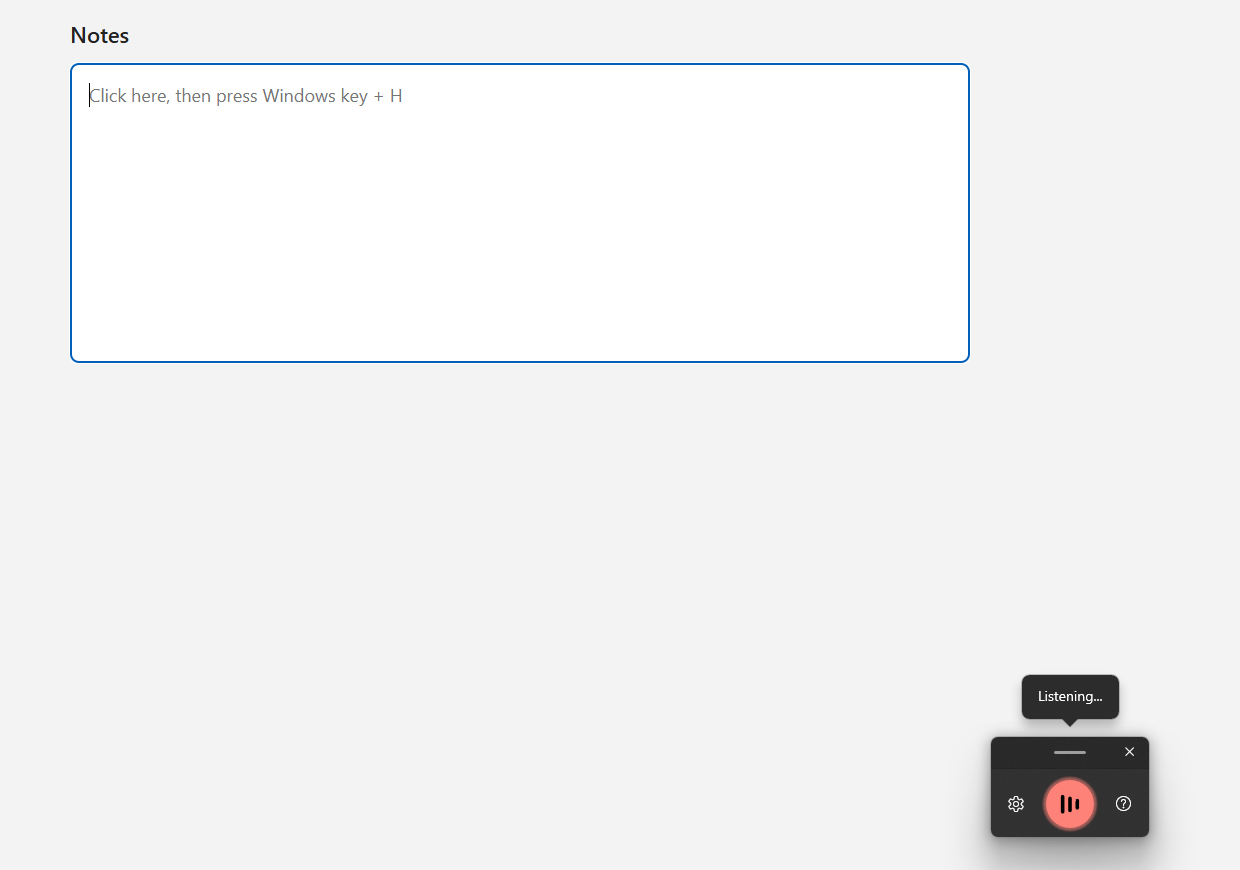
Windows voice typing. Click into a text box, then press the Windows logo key + H. Wait for "Listening..." before you speak. Microsoft says it needs an internet connection and a microphone. To stop, say "Stop listening" or press the microphone button again.
Mac Dictation. Turn it on in System Settings > Keyboard > Dictation. Press and release the Microphone key to start. Press Escape, the Microphone key or the Dictation shortcut to stop. It also stops after 30 seconds without speech, by Apple's page.
Typally, voice typing for Mac and Windows. You hold your shortcut key, talk, and let go. The text appears at your cursor in any app, and filler words and repeats are removed. Typally also has a hands-free mode that you start and stop with the shortcut, described in hands-free typing. It removes keystrokes. Typally needs an internet connection while you dictate.
Shortcut details for each voice tool are in voice typing shortcut keys. To dictate into a specific app, see the guides for Gmail and Google Docs.
What else do people ask about one-handed typing?
Can you touch type with one hand?
Yes. Wikipedia describes one-hand typing as touch typing with one hand, or mainly one hand. The Half-QWERTY study tested exactly that, with typists who already touch typed.
Is there a one-handed keyboard that works on both Windows and Mac?
Matias says its Half Keyboard works with any device that supports standard wired keyboards. Its page does not name operating systems, so confirm with the maker before you buy.
Are there methods that are not QWERTY at all?
Yes. Koester Performance Research lists chorded entry (the Twiddler 3 and the BAT keyboard), swipe typing, on-screen keyboards, the Tap Strap 2 and speech dictation. It says trying a device is often the only way to know how it works for you.
Who can help choose a setup?
An occupational therapist or an assistive technology service can help match a method to your needs. Koester's list of 12 considerations is a good place to start.
Try talking instead of typing
Download Typally free at typally.com (Windows and Mac). The free plan has 100 minutes of dictation a month, no card needed.